Merchant Center Promotion Titles: No Dates, Deal Ends Update
Merchant Center promotion titles can no longer include dates, and the Deal Ends annotation is out of its experimental phase. What to fix before holiday sales.


In this article
Google has tightened the rules for Merchant Center promotion titles, right in the middle of the holiday sales season. The updated promotion editorial requirements now say: “Don’t include dates in any format. Redemption dates should only be included in their designated fields.”
At the same time, the Deal Ends annotation for Shopping ads has lost its “experimental” label, and India has been added to the list of places where it does not run. Both changes were spotted on November 13, 2026, as reported by Search Engine Roundtable.
If you sell through Shopping ads or free listings and run promotions, this affects you this week. A promotion title like “20% off, ends 11/30” now breaks the rules and risks disapproval.
What changed in Merchant Center promotion titles
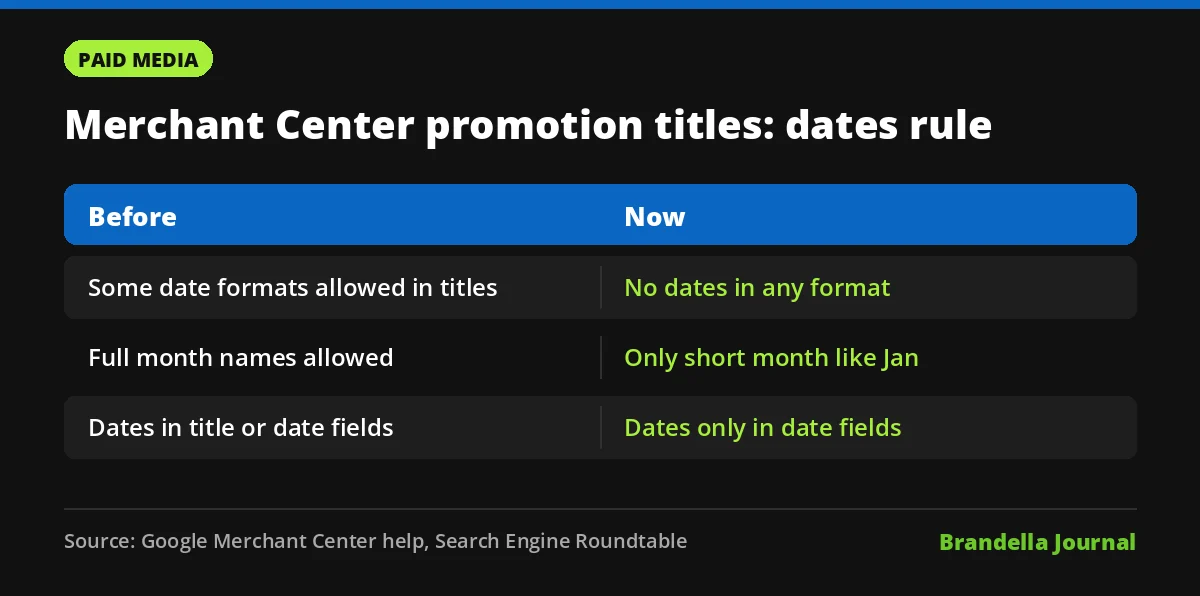
The earlier version of the help page allowed certain date formats in titles. Search Engine Roundtable lists examples such as “M/D/YYYY”, “Ends in YYYY”, “MM/DD” and “January D, YYYY”, based on an archived copy of the page. The change was first noticed by Hana Kobzová of PPC News Feed.
Now the only exception is a short month abbreviation, such as “Jan”. Full dates, day and month numbers and “ends on” phrases belong in the promotion’s date fields, which Google already uses to show timing to shoppers.
| Before | Now | |
|---|---|---|
| Dates in title | Some formats allowed | Not allowed in any format |
| Month name | Allowed | Only short abbreviation such as “Jan” |
| Where dates go | Title or date fields | Designated date fields only |
Other promotion title rules to double check
While you are editing, check the rest of the title rules on the same page. They have not changed, but they often cause disapprovals:
- The title attribute has a 60 character limit, and longer titles are not allowed.
- Titles with only numbers or symbols, such as “20%” or “$10+”, are not allowed.
- Redemption codes belong in their own fields, not in the title.
- The currency in the title must match the country the promotion targets.
- If a promotion is mapped to products, the title should not just show the highest possible discount.
The title must also be in the target country’s language. For more on organising product data, our post on Google’s Holiday 100 trends shows which gift categories are worth extra care this year.
Deal Ends annotation is now a standard feature
The Deal Ends annotation help page describes badges such as “3 days left” or “5 hours left” that appear below the price in Shopping ads on desktop and mobile. It launched in August 2026 and is now simply called the Deal Ends annotation.
It is available globally except in the EEA+, India, Switzerland and the United Kingdom. There is no opt in. Google builds the badge from your promotions and sale price data when they meet its rules.
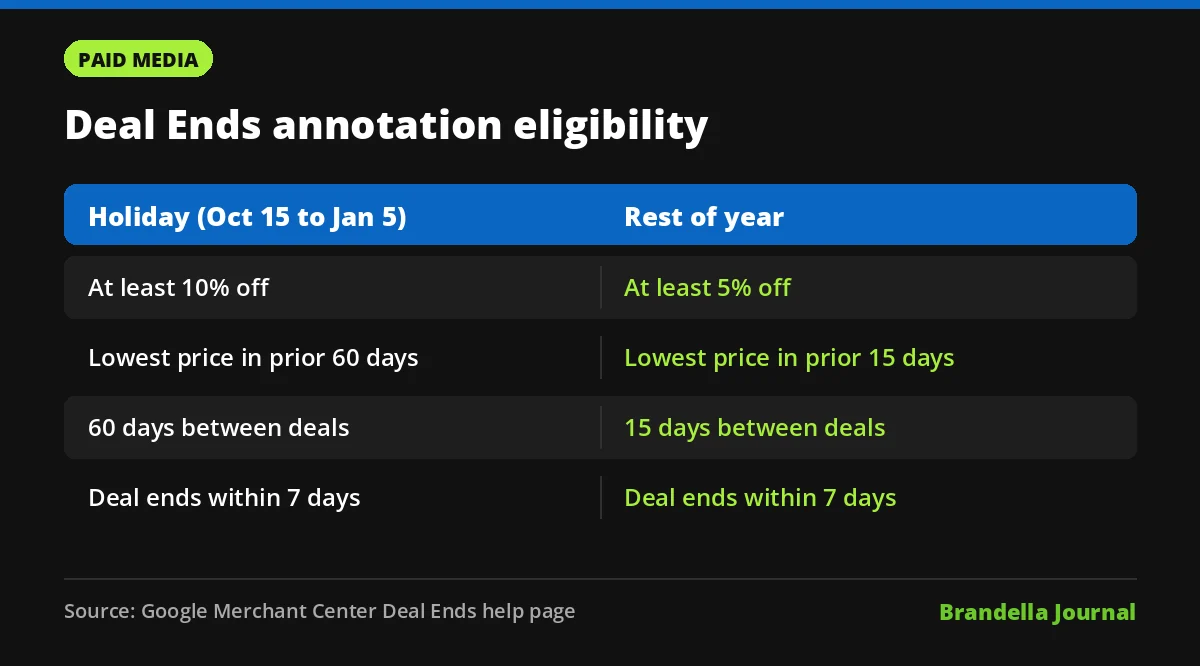
The rules differ between the holiday period, October 15 to January 5, and the rest of the year:
| Requirement | Holiday period | Rest of year |
|---|---|---|
| Minimum discount | 10% off the post deal price | 5% off |
| Lowest price check | Lowest effective price in prior 60 days | Prior 15 days |
| Gap between deals for same offer | At least 60 days | At least 15 days |
| Deal must expire within | 7 days | 7 days |
A sale price only counts if both sale_price and sale_price_effective_date are present. That links the two changes neatly. Google wants dates in structured fields, where it can turn them into a countdown badge, not inside free text titles.
What merchants should do now
These steps are Brandella recommendations based on the help pages above:
- Export all active promotions. Search the titles for numbers with slashes, years and words like “ends” or “until”.
- Move dates into fields. Remove dates from titles and confirm the promotion start and end dates are set correctly.
- Rewrite titles under 60 characters. Lead with the offer, for example “20% off all winter jackets”, and keep codes out.
- Add sale price effective dates. For products on sale, make sure
sale_price_effective_dateis filled so they can qualify for Deal Ends. - Check discount depth. During the holiday period, short deals need at least 10% off and must be the lowest price in 60 days to get the badge.
- Watch diagnostics daily. Look for promotion disapprovals in Merchant Center through the end of the sale period.
If your feed is managed through a third party tool, ask the provider to confirm that templated titles do not insert dates automatically.
Why this matters for holiday performance
A disapproved promotion during Black Friday week means lost visibility at the moment shoppers compare offers most. The fix takes minutes per promotion, but only if you find the problem first.
Shopping performance also depends on clean measurement. If you rely on lead or sale data to judge promotions, our guides on enhanced conversions and the recent Merchant Center outage show where reporting gaps can appear.