Google Ads Invalid Traffic Card: See Savings and Credits
The new Google Ads invalid traffic card shows estimated savings and credited cost on the Overview page. What each metric means and what to check now.

In this article
Google Ads is rolling out a new card that shows how much Google ads invalid traffic protection saved you and how much it credited back. Google announced it on November 12, 2026 in a post on its Ads and Commerce blog, and the Google Ads help page on invalid traffic now explains the card in detail.
This affects every advertiser who pays per click or per lead. Until now, invalid activity mostly showed up as small adjustments on invoices or in a separate report. The card puts both numbers on the Overview page for the date range you pick.
Google’s message, as quoted by Search Engine Roundtable, is that the card gives advertisers “front end transparency into how we protect their campaigns.” It is a reporting change, not a change to how Google filters or bills.
Where to find the Google Ads invalid traffic card
According to the help page, the “Invalid traffic” card sits on the Overview page in the Campaigns menu. It summarises your account’s invalid traffic protection metrics for the selected date range.
Google says the card is “rolling out gradually,” so it may not be in your account yet. Search Engine Roundtable reports that Google’s Ads Liaison described the rollout as global, starting this week.
Estimated savings vs credited cost
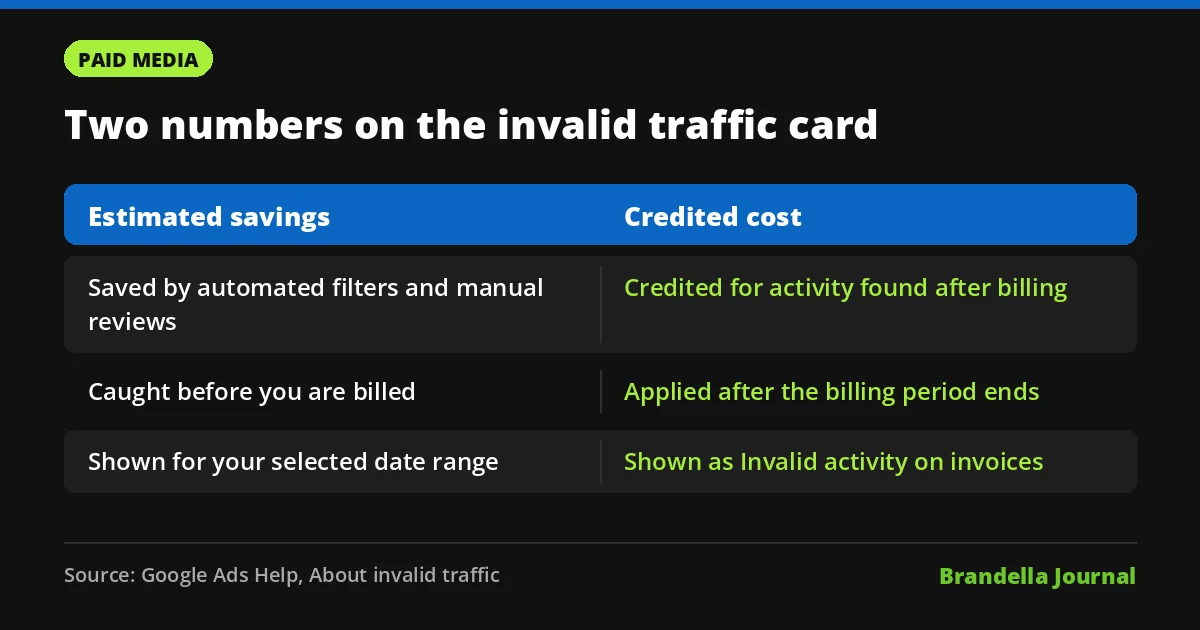
The card shows two numbers, and they mean different things:
| Metric | What it covers | When it happens |
|---|---|---|
| Estimated savings | The estimated cost Google’s automated protections saved you, including automated filters and proactive manual reviews | Before you are billed |
| Credited cost | The amount credited back for past invalid activity Google detected after the billing period ended | After the billing cycle closes |
Search Engine Roundtable’s report says the savings figure covers activity such as bots, click farms and accidental clicks. So a high savings number does not always mean fraud. Some of it is simply people tapping an ad by mistake.
Selecting View details opens a breakdown with daily graphs, an all campaign view and direct links to invoices for past invalid activity credits.
How invalid activity credits work
The help page explains that invalid traffic found after billing generates a credit in the next billing cycle “when appropriate and possible.” Credits appear as “Invalid activity” adjustments on invoices and under the Adjustments dropdown in the Month card on the Billing Summary page.
One detail catches many advertisers out. Campaign metrics do not change retroactively. If you want adjusted figures, Google points to the Invalid Activity Credit Report in the Report Editor.
Google’s Keerat Sharma also said, as reported by Search Engine Roundtable, that Google has cut advertiser exposure to invalid leads by an average of 30% so far in 2026. Google has not published how that figure was measured, so treat it as a company claim.
Why this matters for advertisers
Invalid clicks distort more than spend. They inflate click counts, lower conversion rates and feed bad signals into Smart Bidding. If you run value based bidding, junk traffic that slips through can push the system toward the wrong audiences.
The card does not replace your own checks. It shows what Google caught. It cannot show what Google missed, such as fake form fills from real looking users. That is why lead quality checks still matter, especially for pay per lead campaigns.
What advertisers should do now

These steps are Brandella’s recommendations:
- Open the Overview page. Check whether the card is live in your account and set the date range to the last 90 days to get a baseline.
- Use View details. Look at the campaign breakdown. A campaign with far more filtered traffic than the rest deserves a closer look at placements, locations and keywords.
- Match credits to invoices. Use the invoice links to confirm credits were applied, and share them with finance so nobody wonders about the adjustments.
- Pull the credit report. Because campaign metrics are not restated, use the Invalid Activity Credit Report when you calculate true cost per lead or ROAS.
- Keep your own lead checks. Validate leads in your CRM, add form protections and track lead to sale rates. Our lead generation playbook covers the basics.
- Feed clean conversions back. Upload qualified leads or sales as offline conversions so bidding learns from real customers, not from raw form fills. See our guide on enhanced conversions.
Questions Google has not answered yet
As PPC Land points out, Google has not said how estimated savings are valued, whether the data will reach the Google Ads API, or whether every campaign type is covered. It also has not said if the card will show flagged activity that was not credited.
For now, treat the card as a useful health check. If the numbers look unusual, raise a ticket with Google Ads support and keep your own records alongside it.