

Now Reading: Google Ads Budget Pacing Update 2026
-
01
Google Ads Budget Pacing Update 2026

Google Ads has updated how budgets are spent with ad scheduling. This article explains the change in simple language with practical USD examples and actions
Google Ads Budget Pacing Update 2026 – What Actually Changed?
If you are running campaigns on Google Ads, this update can directly change how your money is spent every month.
At first, it sounds technical. But the idea is actually very simple.
Earlier, your spending depended on how many days your ads were running. Now, Google tries to spend your full monthly budget regardless of how many days your ads are active.
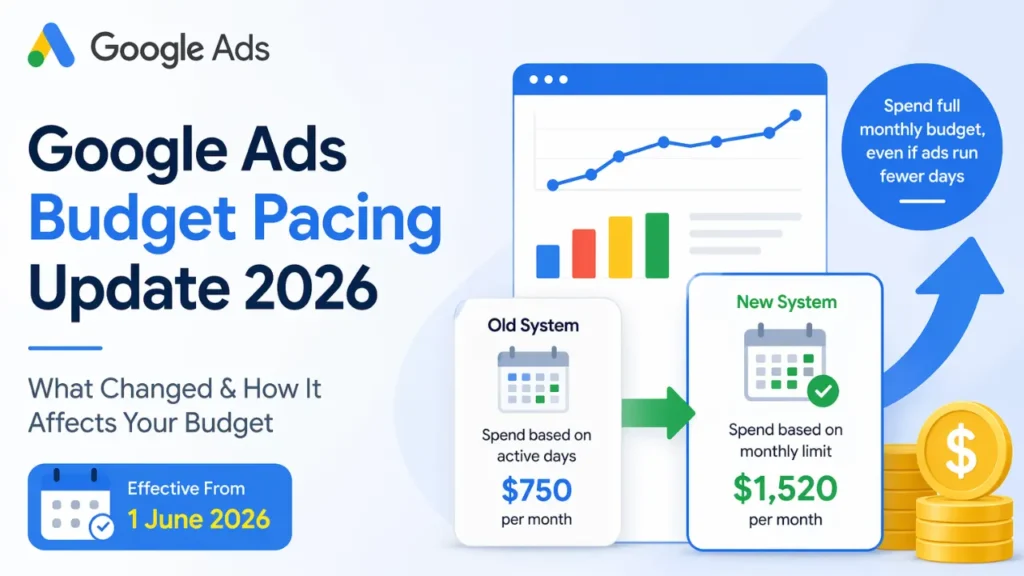
Google Ads Budget Pacing Update 2026
What Is Budget Pacing in Simple Words
Budget pacing means how Google spreads your daily budget over time.
Before this update, Google was conservative.
Now, Google is more aggressive in spending your budget.
How the Old System Worked
In the old system, your total spend was directly linked to your ad schedule.
Example in USD:
- Daily budget = $50
- Ads run only 15 days in a month
- Total spend = $50 × 15
Final monthly spend = $750
This means:
- If you run ads fewer days, you automatically spend less
- Budget is evenly distributed
- No sudden spikes in daily spend
How the New System Works
After the update, Google calculates your spending based on full monthly capacity.
It uses this formula:
Monthly limit = Daily budget × 30.4
Example in USD:
- Daily budget = $50
- Monthly limit = $50 × 30.4
New total spend ≈ $1,520
Even if your ads run only 15 days, Google will try to reach this amount.
What Changes in Reality
Your ads will still run only on the days you selected.
But here is the key difference:
Spending per day increases
Same example:
- Monthly target = $1,520
- Active days = 15
Daily spend becomes ≈ $101 per day
So instead of spending $50/day, you may now spend around $100/day.
Old vs New – Simple Comparison
Old System
- Spend depends on active days
- Lower monthly spend if schedule is limited
- Stable and predictable
Example: $750/month
New System
- Spend depends on full monthly limit
- Higher daily spend on active days
- Faster budget usage
Example: $1,520/month
Important Points You Should Know
Your ad schedule is still respected. Ads will not run on disabled days.
Billing limits are unchanged. You will still not be charged more than:
- 2× your daily budget in a day
- 30.4× your daily budget in a month
This update is mainly designed to help advertisers use their full budget and avoid underspending.
Let us take an example
Let us say you run ads only on weekdays.
Daily budget = $100
Earlier, your spending was limited to those weekdays.
Now, Google will try to spend the full monthly budget within those weekdays.
That means your daily cost may increase significantly.
What You Should Do Now
If you are comfortable with higher spending and want more leads, you can keep your budget as it is.
If you want to maintain the same monthly spending, you should reduce your daily budget.
Example:
Old monthly spend = $750
New system target = $1,520
To maintain $750, reduce daily budget to around $25
Who Should Pay Attention to This Update
This change mostly affects advertisers who:
- Use ad scheduling
- Run ads only on selected days or hours
- Have strict monthly budgets
Final Takeaway
Earlier, you could control spending by limiting the number of days your ads ran.
Now, Google tries to spend your full monthly budget, even if your ads run fewer days.
This means higher spend per day and faster budget usage.
What we learn today?
The Google Ads budget pacing update is important, especially if you rely on ad scheduling.
If you understand it properly, you can control your costs and improve performance.
If you ignore it, you may suddenly see higher daily spending without realizing why.
Thanks for reading. Plaese repost/share in your network.