Claude Sheets, Whiteboards and Data: What Marketers Can Do Now
Claude Sheets, Whiteboards and Claude Data launched on November 10 for paid plans. What each tool does, the limits, and practical uses for marketing teams.

In this article
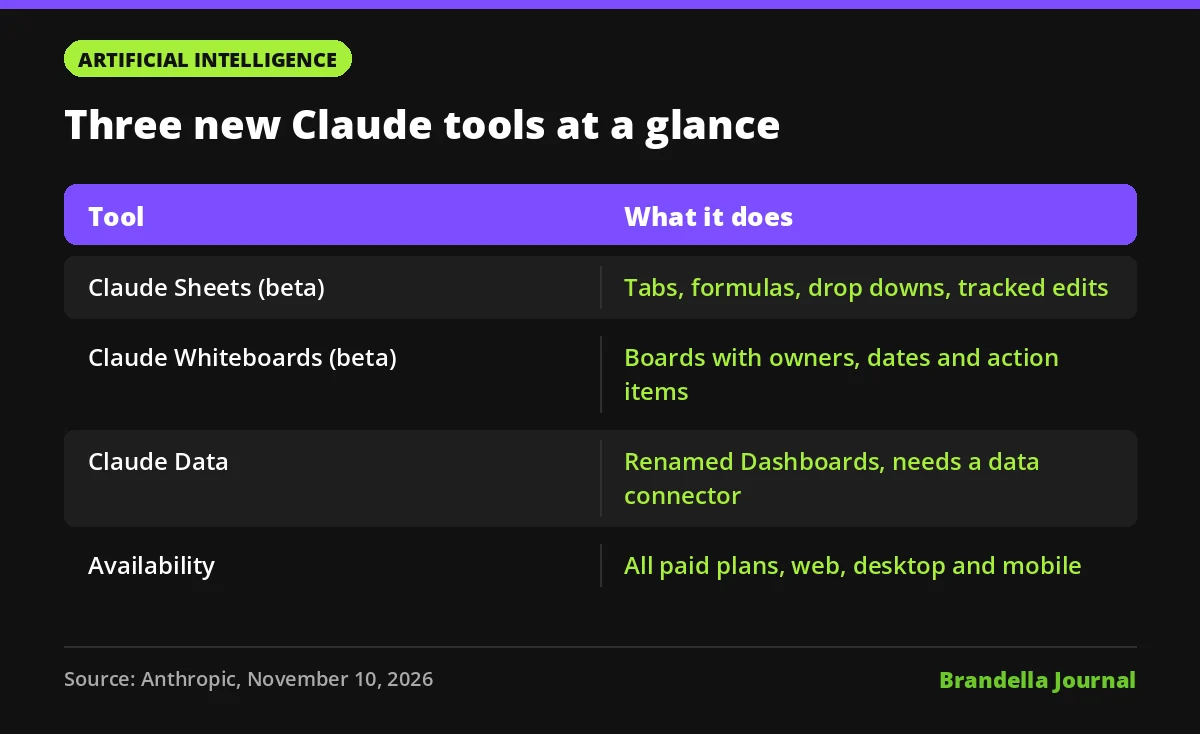
Claude Sheets, Claude Whiteboards and Claude Data are three new workspace tools Anthropic launched on November 10, 2026. Sheets and Whiteboards arrive in beta, while Claude Data is the new name for Claude Dashboards, which is now generally available.
Anthropic set out the details in Claude Whiteboards, Claude Sheets, and Claude Data, saying the tools are “available today on all paid plans” on web, desktop and mobile. The launch pushes Claude further toward being a place where marketing work gets built rather than just drafted.
For marketing teams, the interesting part is not that an AI can make a spreadsheet. It is that planning boards, tracker sheets and live metric dashboards can now sit in the same place as the chat that produced them, with tracked changes and sharing.
What Claude Sheets does
According to Anthropic, Claude builds and edits spreadsheets with tabs, formulas, formatting and drop downs, and records each edit so changes can be tracked. Sheets can be shared with teammates.
Anthropic is upfront that functionality is basic for now. For full Excel features, it points users to export as .xlsx or CSV, or to use Claude for Excel. Named partner tools include Airtable, Asana, monday.com and Smartsheet.
For marketers that suggests a clear split. Use Claude Sheets for quick trackers, keyword lists, content calendars and campaign checklists. Keep heavy models and finance grade sheets in Excel or Google Sheets.
What Claude Whiteboards does
Claude Whiteboards (beta) is a shared board for brainstorming. Anthropic says Claude can turn a spoken plan into a board with owners and dates, group teammates’ notes by theme and draft action items. A finished board can become a doc or a deck, or move to Lucid, Miro or Vani by Zoho.
This is the most natural fit for campaign kickoffs and retros, where the slow part is turning a messy session into clear next steps.
What Claude Data adds for reporting
Claude Data is the renamed Claude Dashboards, which entered beta in October. Anthropic lists these features:
- Certified metric definitions (beta), with a certified badge on charts
- Data stories and narrated videos drafted from metrics for review
- Live sharing (beta), where viewers see only approved queries
- Design system support, caching with per dashboard refresh cadence, and tracked changes with rollback
Claude Data needs a data connector, such as a warehouse or CRM. Named analytics partners include Amplitude, Mixpanel, Omni, PostHog and Sigma, and named data sources include Amazon Redshift, BigQuery and ClickHouse.
Anthropic also says interactive connectors can now open as full apps beside a conversation or full screen, with Adobe, Atlassian, Box and Notion among the examples.
Availability and admin settings
| Item | Detail from Anthropic |
|---|---|
| Plans | All paid plans, on web, desktop and mobile |
| Sheets and Whiteboards status | Beta |
| Claude Data status | Generally available, needs a data connector |
| Team plans | All three on by default |
| Enterprise plans | Whiteboards and Sheets off by default; Claude Data on by default from November 19, 2026 |
| Where admins change it | Organization settings, then Artifacts |
If you run an Enterprise workspace, note the November 19 date. Claude Data will switch on unless an admin changes the setting.
A companion post, More ways to work with Claude, adds that plugins from Salesforce (beta), NetSuite and Workday (beta) now come with built in skills, and that Claude Meetings, which would take notes during calls and update team documents, is coming soon. Anthropic has not given a date for Meetings.
What marketing teams can do with Claude Sheets and Data now
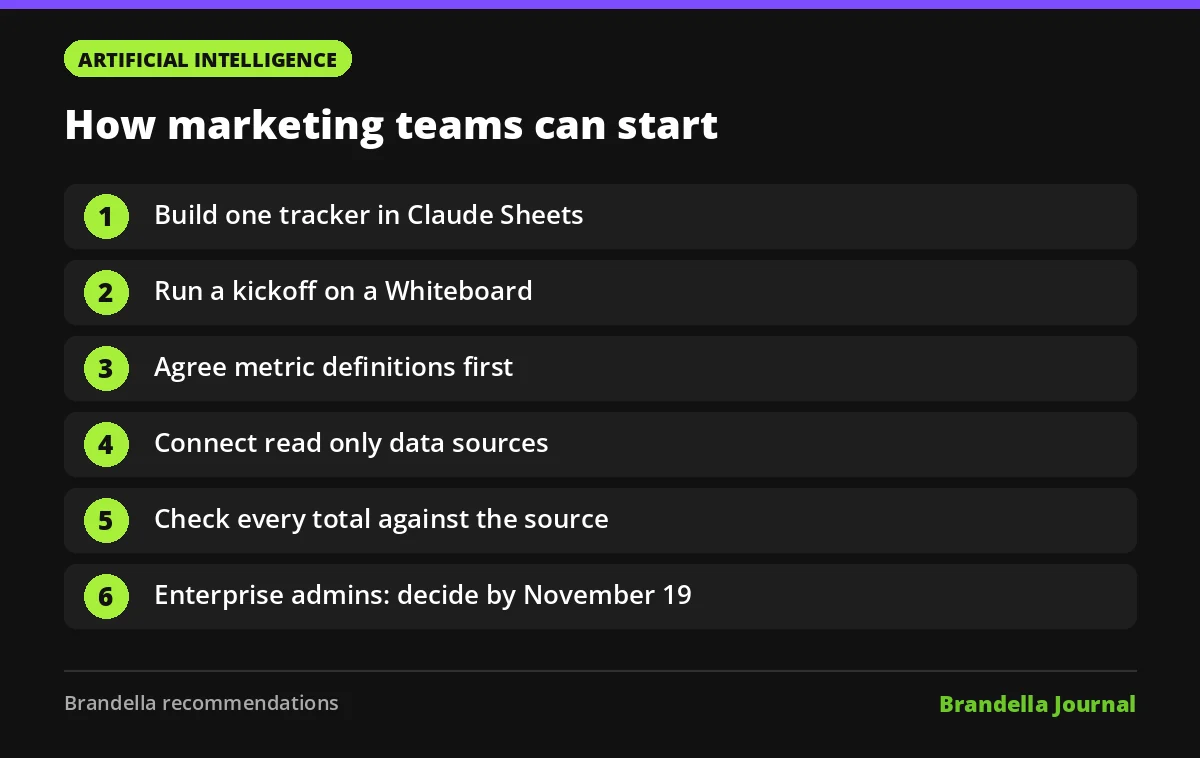
These are Brandella recommendations for trying the tools safely.
- Start with one tracker in Claude Sheets. A content calendar or a keyword shortlist is ideal. Ask Claude to add drop downs for status and owner, then check the formulas yourself.
- Run your next kickoff on a Whiteboard. Paste or dictate the plan, let Claude group ideas and draft action items, then export the result to a doc your team already uses.
- Define metrics before you build dashboards. Agree on what counts as a lead, a conversion and revenue first. Certified metric definitions only help if the definition is right. Our paid media reporting dashboard guide lists the metrics worth standardizing.
- Connect read only data. If you trial Claude Data, connect a warehouse or analytics source with read only access and limit live sharing to approved queries.
- Check every number once. Compare a dashboard total against your source tool before sharing it with leadership. AI built reports still need a human check.
- Plan the Enterprise switch. Admins should decide before November 19 whether Claude Data stays on and who gets access.
How this fits the AI tool stack
The launch adds to an already busy month for Anthropic, which we covered in Claude Fable 5.2 for marketers. Anthropic’s product updates page shows a steady run of workplace releases since October, including Claude Duet and a unified Cowork and chat experience for Enterprise. The trend across AI vendors is the same: assistants are moving from answering questions to producing the working files teams use every day.
That does not mean replacing your stack overnight. Treat these tools as fast first drafts that can stay live, and keep your source of truth where your data already lives. For a wider view of which assistants suit which jobs, see our list of AI tools for marketers.