

- Home
- SEODiscover the latest updates from across the United States, including politics, culture, economy, and trending stories. Stay informed on the key events shaping the nation and the topics everyone’s talking about.
- Technical SEOLearn technical SEO concepts including crawling, indexing, XML sitemaps, robots.txt, canonical tags, site architecture, and website performance.
- Local SEOOptimize your business for local seo with Google Business Profile, local citations, reviews, maps, and location-based SEO.
- Mobile SEOImprove your website’s mobile seo performance with responsive design, mobile-first indexing, usability, and page speed optimization.
- On-Page SEOExplore on-page seo optimization techniques such as title tags, meta descriptions, headings, URLs, internal linking, and content optimization.
- Off-Page SEODiscover off-page SEO strategies such as backlinks, digital PR, brand mentions, outreach, and authority building.
- SEO ToolsExplore the best SEO tools for keyword research, technical audits, backlink analysis, rank tracking, and website optimization.
- Core Web VitalsLearn how to improve Core Web Vitals including LCP, INP, CLS, page speed, and overall user experience for better rankings.
- Keyword ResearchLearn how to find profitable keywords, analyze search intent, evaluate competition, and build effective keyword strategies.
- Link BuildingMaster ethical link building techniques, backlink analysis, outreach methods, guest posting, and authority growth strategies.
- Google Search ConsoleLearn how to use Google Search Console to monitor indexing, fix errors, analyze search performance, and improve SEO.
- SEO BasicsLearn the fundamentals of search engine optimization (SEO Basics), including how search engines work, SEO terminology, and beginner-friendly best practices.
- Paid Media
- Display AdvertisingLearn display advertising strategies, banner ads, audience targeting, remarketing, Google Display campaigns, and optimization techniques.
- Google AdsLearn Google Ads strategies, campaign setup, bidding, keywords, Performance Max, Search Ads, and optimization techniques.
- LinkedIn AdsLearn LinkedIn Ads strategies for B2B marketing, lead generation, audience targeting, campaign optimization, and paid social advertising.
- Meta AdsLearn Meta Ads strategies for Facebook and Instagram, including campaign setup, targeting, retargeting, and performance optimization.
- Paid Media AnalyticsLearn paid media analytics, including CPC, CTR, CPA, ROAS, conversion tracking, attribution, reporting, and campaign performance analysis.
- PPC StrategyLearn effective PPC strategies, campaign planning, bidding, keyword targeting, landing pages, conversion optimization, and more.
- ContentTransform your living spaces with inspiration, tips, and trends in interior design. From minimalist decor to bold statements, find ideas for every style and budget.
- Social
- Digital MarketingExplore stories and advice on living your best life. From personal growth to entertainment, dive into the latest in lifestyle trends and inspiration.
- Artificial IntelligenceStay informed about health and wellness with expert advice, fitness tips, and the latest medical breakthroughs. Your guide to a healthier and happier life.
- DevelopmentYou will find development related educational articles
- GTMLearn Google Tag Manager (GTM) with practical guides for tags, triggers, variables, tracking, conversions, and website analytics implementation.
- HTMLLearn HTML with simple tutorials, examples, tags, elements, attributes, and best practices for building modern web pages.
- HTML CSSLearn HTML CSS together with practical tutorials, examples, layouts, styling techniques, responsive design, and modern web development practices.
- HTML JSLearn HTML JS – JavaScript with practical tutorials and examples for adding interactivity, dynamic content, events, and functionality to web pages.
- JavaScriptExplore JavaScript tutorials, examples, concepts, and practical techniques for creating interactive and dynamic websites and web applications.
- PHPLearn PHP programming with practical tutorials, examples, functions, syntax, and web development techniques for beginners and developers.
- PythonLearn Python programming with practical tutorials, examples, syntax, functions, automation techniques, and useful programming concepts.
- Home
- SEODiscover the latest updates from across the United States, including politics, culture, economy, and trending stories. Stay informed on the key events shaping the nation and the topics everyone’s talking about.
- Technical SEOLearn technical SEO concepts including crawling, indexing, XML sitemaps, robots.txt, canonical tags, site architecture, and website performance.
- Local SEOOptimize your business for local seo with Google Business Profile, local citations, reviews, maps, and location-based SEO.
- Mobile SEOImprove your website’s mobile seo performance with responsive design, mobile-first indexing, usability, and page speed optimization.
- On-Page SEOExplore on-page seo optimization techniques such as title tags, meta descriptions, headings, URLs, internal linking, and content optimization.
- Off-Page SEODiscover off-page SEO strategies such as backlinks, digital PR, brand mentions, outreach, and authority building.
- SEO ToolsExplore the best SEO tools for keyword research, technical audits, backlink analysis, rank tracking, and website optimization.
- Core Web VitalsLearn how to improve Core Web Vitals including LCP, INP, CLS, page speed, and overall user experience for better rankings.
- Keyword ResearchLearn how to find profitable keywords, analyze search intent, evaluate competition, and build effective keyword strategies.
- Link BuildingMaster ethical link building techniques, backlink analysis, outreach methods, guest posting, and authority growth strategies.
- Google Search ConsoleLearn how to use Google Search Console to monitor indexing, fix errors, analyze search performance, and improve SEO.
- SEO BasicsLearn the fundamentals of search engine optimization (SEO Basics), including how search engines work, SEO terminology, and beginner-friendly best practices.
- Paid Media
- Display AdvertisingLearn display advertising strategies, banner ads, audience targeting, remarketing, Google Display campaigns, and optimization techniques.
- Google AdsLearn Google Ads strategies, campaign setup, bidding, keywords, Performance Max, Search Ads, and optimization techniques.
- LinkedIn AdsLearn LinkedIn Ads strategies for B2B marketing, lead generation, audience targeting, campaign optimization, and paid social advertising.
- Meta AdsLearn Meta Ads strategies for Facebook and Instagram, including campaign setup, targeting, retargeting, and performance optimization.
- Paid Media AnalyticsLearn paid media analytics, including CPC, CTR, CPA, ROAS, conversion tracking, attribution, reporting, and campaign performance analysis.
- PPC StrategyLearn effective PPC strategies, campaign planning, bidding, keyword targeting, landing pages, conversion optimization, and more.
- ContentTransform your living spaces with inspiration, tips, and trends in interior design. From minimalist decor to bold statements, find ideas for every style and budget.
- Social
- Digital MarketingExplore stories and advice on living your best life. From personal growth to entertainment, dive into the latest in lifestyle trends and inspiration.
- Artificial IntelligenceStay informed about health and wellness with expert advice, fitness tips, and the latest medical breakthroughs. Your guide to a healthier and happier life.
- DevelopmentYou will find development related educational articles
- GTMLearn Google Tag Manager (GTM) with practical guides for tags, triggers, variables, tracking, conversions, and website analytics implementation.
- HTMLLearn HTML with simple tutorials, examples, tags, elements, attributes, and best practices for building modern web pages.
- HTML CSSLearn HTML CSS together with practical tutorials, examples, layouts, styling techniques, responsive design, and modern web development practices.
- HTML JSLearn HTML JS – JavaScript with practical tutorials and examples for adding interactivity, dynamic content, events, and functionality to web pages.
- JavaScriptExplore JavaScript tutorials, examples, concepts, and practical techniques for creating interactive and dynamic websites and web applications.
- PHPLearn PHP programming with practical tutorials, examples, functions, syntax, and web development techniques for beginners and developers.
- PythonLearn Python programming with practical tutorials, examples, syntax, functions, automation techniques, and useful programming concepts.
Now Reading: Enhanced Conversions Explained: Setup and Benefits
-
01
Enhanced Conversions Explained: Setup and Benefits
- Home//
- SEO//Discover the latest updates from across the United States, including politics, culture, economy, and trending stories. Stay informed on the key events shaping the nation and the topics everyone’s talking about.
- Technical SEO//Learn technical SEO concepts including crawling, indexing, XML sitemaps, robots.txt, canonical tags, site architecture, and website performance.
- Local SEO//Optimize your business for local seo with Google Business Profile, local citations, reviews, maps, and location-based SEO.
- Mobile SEO//Improve your website’s mobile seo performance with responsive design, mobile-first indexing, usability, and page speed optimization.
- On-Page SEO//Explore on-page seo optimization techniques such as title tags, meta descriptions, headings, URLs, internal linking, and content optimization.
- Off-Page SEO//Discover off-page SEO strategies such as backlinks, digital PR, brand mentions, outreach, and authority building.
- SEO Tools//Explore the best SEO tools for keyword research, technical audits, backlink analysis, rank tracking, and website optimization.
- Core Web Vitals//Learn how to improve Core Web Vitals including LCP, INP, CLS, page speed, and overall user experience for better rankings.
- Keyword Research//Learn how to find profitable keywords, analyze search intent, evaluate competition, and build effective keyword strategies.
- Link Building//Master ethical link building techniques, backlink analysis, outreach methods, guest posting, and authority growth strategies.
- Google Search Console//Learn how to use Google Search Console to monitor indexing, fix errors, analyze search performance, and improve SEO.
- SEO Basics//Learn the fundamentals of search engine optimization (SEO Basics), including how search engines work, SEO terminology, and beginner-friendly best practices.
- Paid Media//
- Display Advertising//Learn display advertising strategies, banner ads, audience targeting, remarketing, Google Display campaigns, and optimization techniques.
- Google Ads//Learn Google Ads strategies, campaign setup, bidding, keywords, Performance Max, Search Ads, and optimization techniques.
- LinkedIn Ads//Learn LinkedIn Ads strategies for B2B marketing, lead generation, audience targeting, campaign optimization, and paid social advertising.
- Meta Ads//Learn Meta Ads strategies for Facebook and Instagram, including campaign setup, targeting, retargeting, and performance optimization.
- Paid Media Analytics//Learn paid media analytics, including CPC, CTR, CPA, ROAS, conversion tracking, attribution, reporting, and campaign performance analysis.
- PPC Strategy//Learn effective PPC strategies, campaign planning, bidding, keyword targeting, landing pages, conversion optimization, and more.
- Content//Transform your living spaces with inspiration, tips, and trends in interior design. From minimalist decor to bold statements, find ideas for every style and budget.
- Social//
- Digital Marketing//Explore stories and advice on living your best life. From personal growth to entertainment, dive into the latest in lifestyle trends and inspiration.
- Artificial Intelligence//Stay informed about health and wellness with expert advice, fitness tips, and the latest medical breakthroughs. Your guide to a healthier and happier life.
- Development//You will find development related educational articles
- GTM//Learn Google Tag Manager (GTM) with practical guides for tags, triggers, variables, tracking, conversions, and website analytics implementation.
- HTML//Learn HTML with simple tutorials, examples, tags, elements, attributes, and best practices for building modern web pages.
- HTML CSS//Learn HTML CSS together with practical tutorials, examples, layouts, styling techniques, responsive design, and modern web development practices.
- HTML JS//Learn HTML JS – JavaScript with practical tutorials and examples for adding interactivity, dynamic content, events, and functionality to web pages.
- JavaScript//Explore JavaScript tutorials, examples, concepts, and practical techniques for creating interactive and dynamic websites and web applications.
- PHP//Learn PHP programming with practical tutorials, examples, functions, syntax, and web development techniques for beginners and developers.
- Python//Learn Python programming with practical tutorials, examples, syntax, functions, automation techniques, and useful programming concepts.
- Home
- Paid Media
- Google Ads
- Enhanced Conversions Explained: Setup and Benefits
Enhanced Conversions Explained: Setup and Benefits

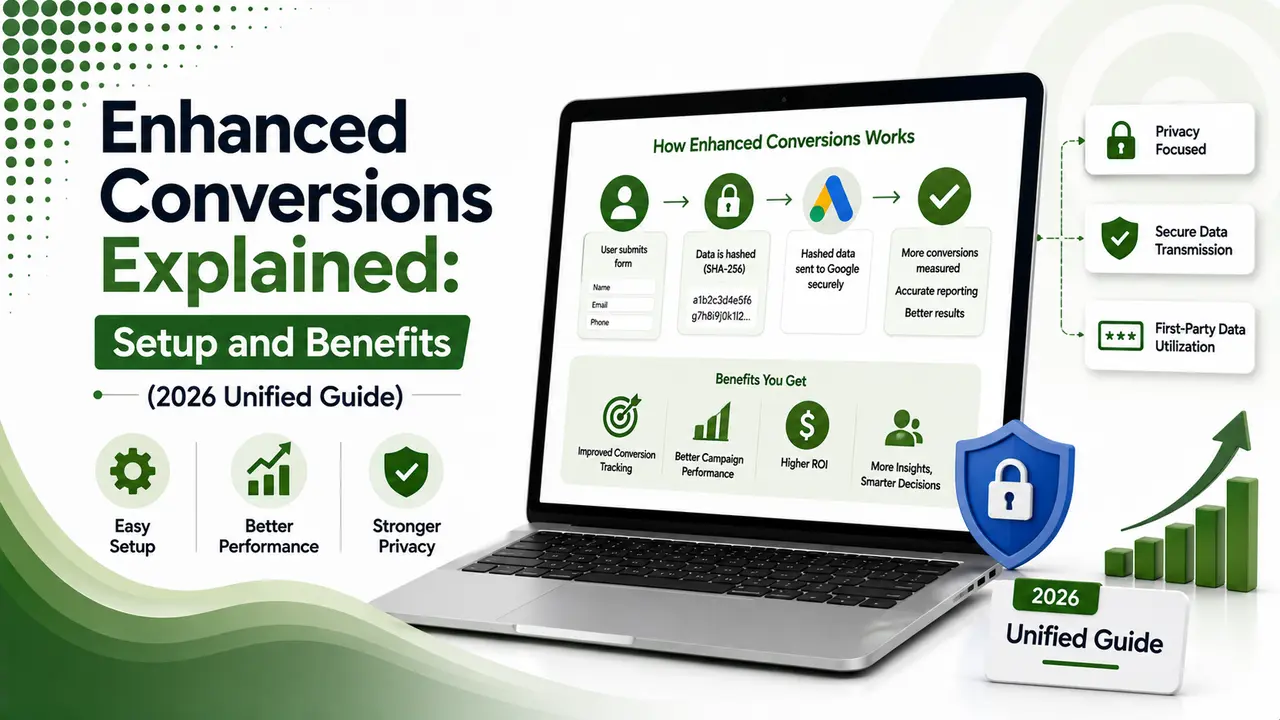
Enhanced conversions explained simply: hashed first-party data that closes Google Ads' tracking gaps, now unified into one toggle as of June 2026.
Table of Contents
ToggleEnhanced conversions explained simply: it's Google Ads' fix for the tracking gaps cookies, cross-device journeys, and privacy settings keep creating. You send hashed first-party data, like a customer's email, alongside your normal conversion tag, and Google matches it to close the gap between what actually happened and what your pixel could see.
Google Marketing Live 2026 changed how this works structurally. Enhanced conversions for web and enhanced conversions for leads used to be two separate setups. As of June 2026, they're unified into a single on/off toggle, and Google now accepts hashed data simultaneously from website tags, Data Manager, and API connections at once.
If you've had partial implementation, enhanced conversions for web running, leads tracking never configured, this update is worth revisiting. It closes exactly that kind of gap.
01What Enhanced Conversions Actually Does
Google's own documentation describes it precisely: enhanced conversions supplements your existing conversion tags by sending hashed first-party data, an email, name, address, or phone number, to Google using SHA-256, a secure one-way hashing algorithm, before it ever leaves your site.
OWOX's explainer frames the practical problem this solves: without enhanced conversions, a user who clicks an ad on their phone and completes a purchase later on desktop can look like two separate people to Google's system. Hashed first-party data lets Google recognize it's the same customer, closing that attribution gap.
02What Changed in June 2026
Bizi Digital's coverage of Google Marketing Live 2026 calls this the end of a real gap in many accounts: enhanced conversions for web and enhanced conversions for leads used to be entirely separate setups, and it wasn't uncommon for an account to have web tracking live for over a year while the leads version sat completely unconfigured.
RelevantAudience's 2026 guide confirms the mechanics: starting in April 2026, Google began accepting user-provided data simultaneously from website tags, Data Manager, and API connections. By June 2026, that consolidated into one unified on/off toggle, removing the old choice between implementation methods entirely.
Google's own documentation is clear on migration: if you'd already accepted the customer data terms, you were automatically migrated to the unified setting with no extra steps. New users can now enable it at either the account level or for individual conversion actions.
03The Real Benefits, Backed by Data
Growth Minded Marketing's guide is honest about the expectation to set: enhanced conversions doesn't instantly boost campaign performance, its real value is improving tracking accuracy and attribution over time, which then feeds better decisions into Smart Bidding.
Bizi Digital's coverage cites a specific study worth noting: an analysis across 99 accounts found an 8% incremental ROAS lift on Search for advertisers using enhanced conversions. DataCops' implementation guide adds a documented 17.8% lower CPA compared to pixel-only tracking, with typical conversion recovery in the 20% to 40% range once hidden, previously untracked conversions get captured.
04How to Set It Up
Growth Minded Marketing's step-by-step is straightforward: in Google Ads, go to your conversion action settings, expand the Enhanced Conversions section, check "Turn on enhanced conversions," then review and accept the customer data terms. Choose your implementation method, the Google tag, Google Tag Manager, or the API, and confirm the tag captures the right first-party fields.
Campaigns You Love's guide flags a detail that quietly breaks a lot of setups: enhanced conversions technically works without Consent Mode v2, but without the ad_user_data parameter set to "granted," Google silently drops the hashed data server-side with no warning. Your setup will look fine in Tag Assistant while functionally doing nothing.
gtag('set', 'user_data', {
  email: 'user@example.com',
  phone_number: '+1234567890',
  address: {
    first_name: 'John',
    last_name: 'Doe',
    street: '1 Main St',
    city: 'Anytown',
    region: 'CA',
    postal_code: '12345',
    country: 'US'
  }
});

// Google automatically hashes this data with SHA-256
// before it leaves the browser. Never send plain-text
// data manually, always let the tag handle hashing.
05Implementation Checklist
A short list to confirm before assuming your setup is actually working.
Turn on the unified toggle at either account or conversion-action level, no need to choose an implementation method anymore.
Configure Consent Mode v2 properly, without the ad_user_data parameter set to granted, your hashed data gets silently dropped.
Capture the right first-party fields, email and phone number matter most; address fields add further matching accuracy.
Wait the full 30-day training period before judging impact; don't make changes based on the first few days of data.
Set up enhanced conversions in GA4 separately too, Google Ads and GA4 configurations don't share automatically.
06Web vs Leads: What Changed
A quick before-and-after for anyone who set this up before the unification.
| Aspect | Before June 2026 | After June 2026 |
|---|---|---|
| Web vs Leads setup | Two separate feature toggles | One unified on/off setting |
| Data sources | Choose one: tag, Data Manager, or API | All three accepted simultaneously |
| Offline conversions import | Via Google Ads API | Migrated to Data Manager API (June 15, 2026) |
| Existing accounts | N/A | Auto-migrated if data terms already accepted |
07Is Your Setup Actually Working?
Answer a few questions to check whether your enhanced conversions implementation is likely functioning correctly.
Is Your Setup Actually Working?
Select the option that matches your current setup
08FAQs on Enhanced Conversions
Hashed first-party data like email, phone number, name, and address, encrypted with SHA-256 before it leaves your website. Google never receives plain-text customer data.
Enhanced conversions for web and leads merged into a single on/off toggle, and Google now accepts data simultaneously from website tags, Data Manager, and API connections.
The most common cause is Consent Mode v2 not properly set to grant ad_user_data. Without it, Google silently drops the hashed data with no error message.
Up to 30 days. Google needs that training period to calibrate matching before enhanced conversion data appears in your reporting.
Yes. Enabling enhanced conversions in Google Ads doesn't automatically enable it in GA4, they require separate configuration.
Related Articles
What We Learn Today
Enhanced conversions sends hashed first-party data to close tracking gaps
Web and leads versions unified into one toggle in June 2026
Studies show an 8% ROAS lift and 17.8% lower CPA
Consent Mode v2 is required or data gets silently dropped
Full impact takes up to 30 days of training to appear
GA4 and Google Ads need separate enhanced conversions setup
Build a Complete Measurement Foundation
Enhanced conversions works best alongside clean GA4 tracking and Meta's Conversions API. Explore both guides next.
Related Posts
Previous Post
Next Post
Previous Post
Next Post





- Artificial Intelligence
- Content
- Core Web Vitals
- Development
- Digital Marketing
- Display Advertising
- Google Ads
- Google Search Console
- GTM
- HTML
- HTML CSS
- JavaScript
- Keyword Research
- Link Building
- LinkedIn Ads
- Local SEO
- Meta Ads
- Mobile SEO
- Off-Page SEO
- On-Page SEO
- Paid Media
- Paid Media Analytics
- PHP
- PPC Strategy
- Python
- SEO
- SEO Basics
- SEO Tools
- Social
- Technical SEO




