Rank Math Vulnerabilities in 2026: 16 Flaws, What to Update
Rank Math vulnerabilities in 2026 reached 16, including code execution flaws. Which versions are affected, what was fixed and what site owners should do.

In this article
Rank Math vulnerabilities have piled up in 2026. Patchstack’s vulnerability database lists 16 security flaws in the Rank Math SEO plugin disclosed between May 28 and October 27, 2026, including two that can lead to remote code execution by logged in users with low level accounts.
That matters because Rank Math is one of the most used SEO plugins on WordPress. Its WordPress.org plugin page shows more than 4 million active installations, and the current version is 1.0.282, released on November 10, 2026. Any site that has not updated since early autumn may still be running affected code.
Search Engine Journal reported on November 18 that this is more than any other SEO plugin this year, citing Wordfence data that shows four flaws in Yoast SEO’s free version and two in its paid version over the same period. The fix for site owners is simple, but only if you act on it.

Which Rank Math vulnerabilities are the most serious
Not every flaw carries the same risk. The ones below either allow code to run on your server or can be triggered by people with very little access. Scores differ between databases, so the table names the source for each.
| Flaw | Who can exploit it | Affected | Fixed in | Score (source) |
|---|---|---|---|---|
| PHP object injection that can lead to code execution (CVE-2026-1928) | Contributor and above | Up to 1.0.276 | Update to latest | 8.8 (Wordfence) |
| Remote code execution (CVE-2026-81757) | Author and above | Up to 1.0.276 | 1.0.277 | 7.2 (CVE record) |
| Arbitrary file upload to code execution (CVE-2026-104752) | Administrator | Before 1.0.280 | 1.0.280 | 9.1 (Patchstack) |
| SEO Analyzer results deletion (CVE-2026-104751) | No login needed | Before 1.0.280 | 1.0.280 | 5.3 (Patchstack) |
| Password protected post content disclosure | No login needed | Before 1.0.277.1 | 1.0.277.1 | Not listed |
The CVE-2026-1928 record, summarised on OpenCVE, explains that the flaw sits in the plugin’s updateMeta REST API endpoint. A user with a Contributor account can inject a PHP object, and if a suitable code chain is present, write a webshell to the uploads folder. That is a full site takeover path that starts from one of WordPress’s lowest roles.
What the full list of 16 flaws shows
Patchstack’s list includes several groups of issues:
- Missing permission checks: Author or Editor accounts could change robots meta, pillar content flags, post and user metadata, or core settings on content they do not own.
- Content leaks: unauthenticated users could read non public post schema and content, or the text of password protected posts.
- Admin level flaws: SQL injection, stored cross site scripting and file upload, all fixed in 1.0.280.
Search Engine Journal counted missing authorization as the most frequent weakness, with seven entries, and noted that 11 of the 16 were disclosed between August 27 and October 14. A cluster like that usually means researchers were actively reviewing the plugin, which is good for users in the long run, but it also means many sites ran exposed versions for weeks.
Why this is an SEO problem, not only a security one
A hacked WordPress site rarely stays a private problem. Attackers use stolen access to inject spam links, create doorway pages or redirect visitors, and Google can flag the site or drop pages from results. We covered how criminals use search for this in our post on Gootloader SEO poisoning, and the recent Optimizely malware case showed how a trusted script can become the attack path.
SEO plugins are a sensitive target because they can write robots rules, redirects, schema and, in older versions, even .htaccess. A flaw in that layer can change how search engines see every page on the site.
How to check and fix your site now
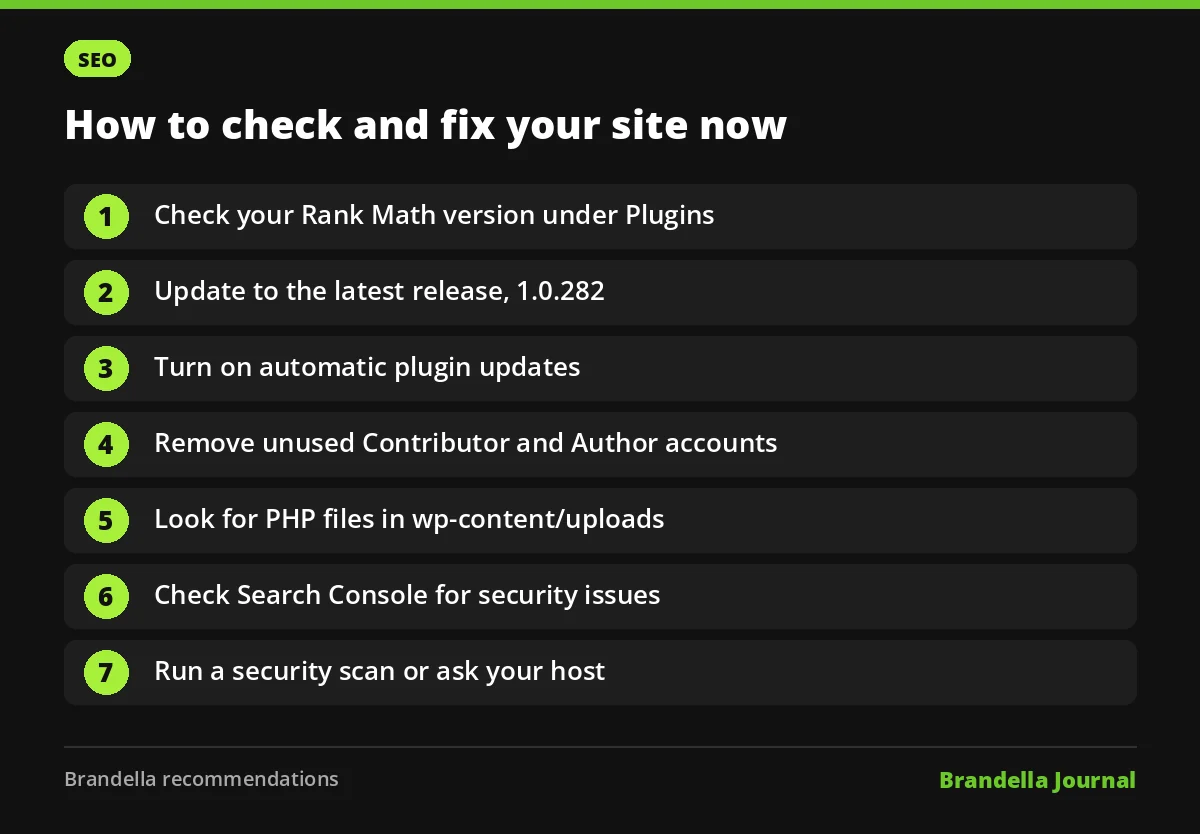
These steps are Brandella’s recommendations, based on the vulnerability records linked above.
- Check your version. In WordPress, go to Plugins and look at the Rank Math SEO version number. Anything below 1.0.280 is affected by at least one flaw in the table.
- Update to the latest release. At the time of writing that is 1.0.282 on WordPress.org. If you use Rank Math PRO, update it too.
- Turn on automatic updates for the plugin if your site does not need manual testing for every release.
- Review user accounts. Remove old Contributor and Author accounts you no longer need, since several flaws start from those roles.
- Look for strange files in
wp-content/uploads, especially PHP files, which should not normally be there. Our PHP file upload security guide explains why. - Check Search Console for security issues, manual actions and sudden new pages you did not publish.
- Run a security scanner such as Wordfence or Patchstack, or ask your host to scan the server.
If you find signs of a hack, restore from a clean backup, change all passwords and follow a recovery plan like the one in our guide to recovering from a negative SEO attack.
FAQ about Rank Math vulnerabilities
Is Rank Math safe to use now?
The flaws listed in 2026 have fixes in released versions, and the current version is 1.0.282. Sites that keep the plugin updated are in a much better position than those still on 1.0.276 or older.
Do I need to switch SEO plugins?
Not necessarily. Every popular plugin has flaws from time to time. What matters most is updating quickly and limiting who has accounts on your site. If you are comparing options anyway, see our SEO tools comparison.
Which roles can exploit the worst Rank Math vulnerabilities?
The PHP object injection flaw needs a Contributor account, and the code execution flaw fixed in 1.0.277 needs an Author account. Two other flaws need no login at all.
How do I know if my site was attacked?
Look for unknown admin users, PHP files in the uploads folder, unexpected redirects, and new spam pages in Search Console. A scanner or your host can confirm.