YouTube Studio Insights Replaces Analytics: What Changes
YouTube Studio Insights replaces the Analytics tab, Research replaces Trends and Ask Studio reaches mobile. What changed and what brand channels should do now.

In this article
YouTube Studio Insights is the new name for the Analytics section of YouTube Studio on desktop. YouTube announced the change on November 13, 2026, together with a new Research tab that replaces Trends and a mobile version of its Ask Studio assistant. The updated Get started with YouTube Insights help page says Studio Insights “delivers personalized performance summaries” and tailored advice in a simpler layout.
This matters to anyone who runs a brand channel, reports on YouTube results to a client, or plans content with creators. The numbers you know are still there, but where you find them, how they are explained and how you research new video ideas have all changed.
Here is what is new, what stays the same, and how to adjust your weekly YouTube routine.
What changed in YouTube Studio Insights
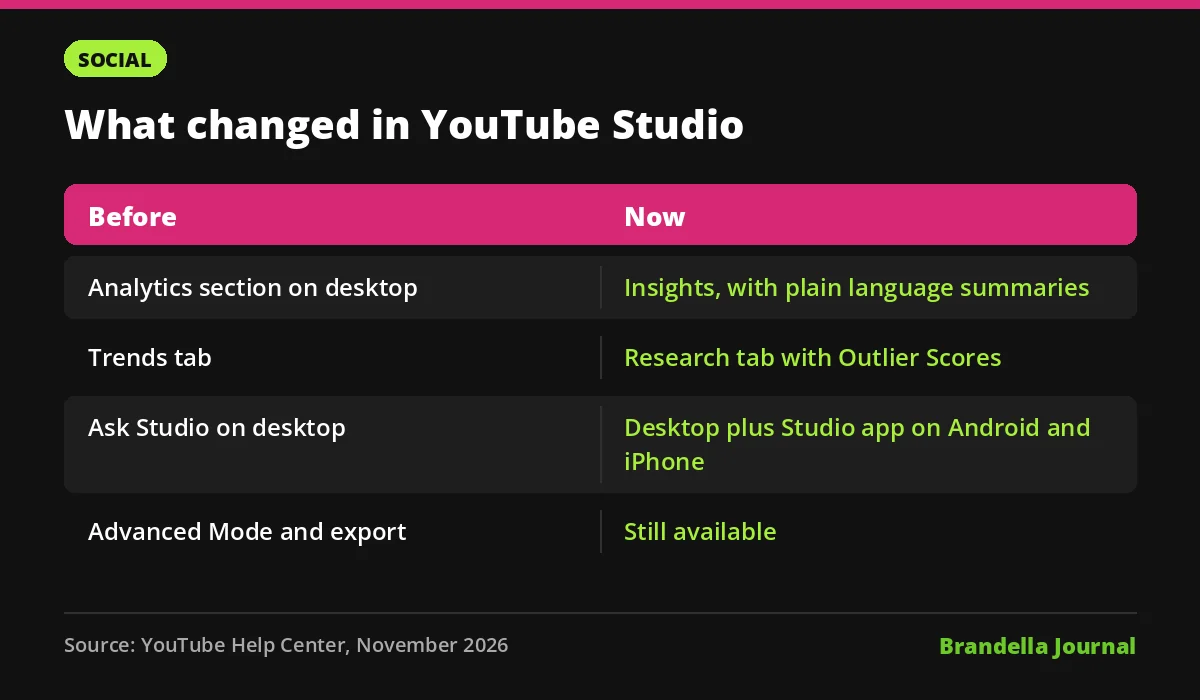
According to PPC Land’s report on the announcement, the Insights page adds plain language summaries, groups metrics into shelves and keeps one click access to detailed tables and custom date ranges. YouTube says advanced analytics and real time data are unchanged.
The help page confirms how to open it. At channel level, select Insights from the left menu in YouTube Studio. For a single video, go to Content, point to the video and select Insights. Advanced Mode still opens the expanded report for detailed data, comparisons and export.
| Area | Before | Now |
|---|---|---|
| Desktop reporting section | Analytics | Insights, with plain language summaries |
| Trend and idea discovery | Trends tab | Research tab with outlier scores |
| Ask Studio assistant | Desktop | Desktop plus the Studio app on Android and iPhone |
| Advanced Mode and export | Available | Still available |
The report tabs you rely on are still listed: Overview, Content, Reach, Engagement, Audience and Revenue for Partner Program members. Impressions, click through rate, watch time and average view duration all keep their place.
The new Research tab and outlier scores
The Research tab help page explains that Research shows high performing videos across YouTube and in your niche, so you can find ideas for topics, titles and thumbnails. You open it on a computer from Insights.
Its key filter is the Outlier Score. It compares a video with the channel’s earlier uploads in the same format, so a 5x score means five times the views of those earlier videos. Other filters include type (videos or Shorts), views, upload date, subscribers, duration, channel age and “Watched by my viewers”, which shows what your audience watched on other channels in the last month.
For brands this is useful competitive research. A small channel with a 5x outlier tells you a topic or format pulled far beyond its normal audience, which is a stronger signal than raw views on a huge channel.
Ask Studio on mobile and image uploads
The Ask Studio help page says most creators worldwide can now use the assistant on desktop and in the YouTube Studio mobile app. It helps with video ideas, channel insights, performance analysis, titles and thumbnails, and can give feedback on scripts and on draft, private or unlisted videos.
You can attach up to 10 images per prompt, for example thumbnail options to compare. Official Artist Channels, Made for Kids channels and creators under 18 cannot use Ask Studio. If you do not see the icon, you do not have access yet.
Two privacy points matter for business channels. Conversations are saved for up to 30 days, and human reviewers may read them after identifying details are removed. To remove an uploaded image you must delete the whole conversation.
What brand channels should do now
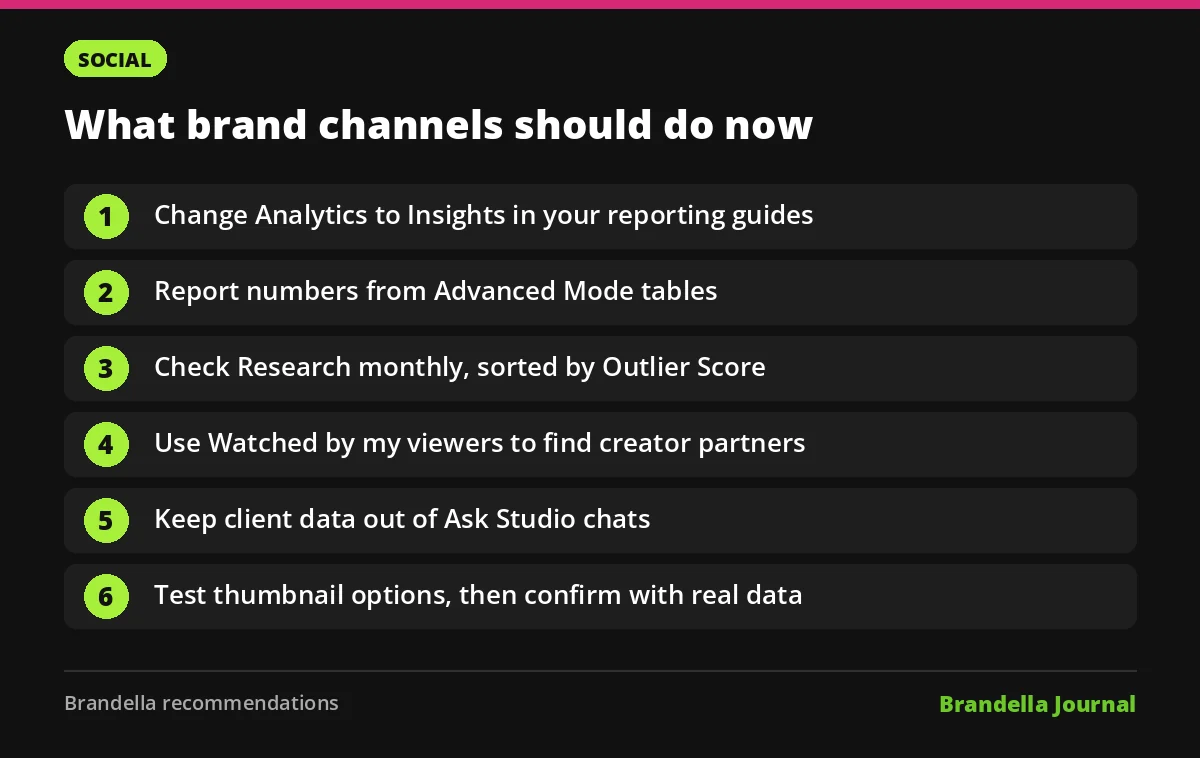
These steps are Brandella recommendations, not official YouTube guidance.
- Update your reporting guides. Any internal doc or client template that says “go to Analytics” now needs to say Insights. Check screenshots in training material too.
- Keep Advanced Mode as the source of truth. Use the new summaries as a quick read, but pull the numbers you report from Advanced Mode tables so month on month comparisons stay consistent.
- Build a monthly Research routine. Filter by your niche, sort by Outlier Score and note three formats or title patterns that beat their channel average. Turn the best one into a test video.
- Use “Watched by my viewers” for partnerships. It shows which other channels your audience watches, which is a practical shortlist for creator collaborations.
- Set a rule for Ask Studio. Never paste unreleased campaign details, client data or contracts into the assistant, because chats are stored and may be reviewed.
- Test thumbnails with images. Upload two or three thumbnail options and ask for feedback, then confirm with a real test rather than trusting the answer alone.
If you are also using the new clips tool, our guide to YouTube Studio podcast clips for Shorts covers that workflow. For broader planning, see creative video marketing ideas and our explainer on Demand Gen campaigns if you promote videos with paid media.
What is still unclear
PPC Land notes several open questions. YouTube has not defined “eligible creators” beyond the help center exclusions, and it is not clear whether Research or the Insights layout will reach the mobile app. YouTube has also not said what happened to saved Trends keywords or how the plain language summaries are generated.
Some help pages still describe the old Trends tab, so expect documentation to change over the coming weeks. Treat any summary as a starting point and check the underlying numbers.
FAQ about YouTube Studio Insights
Is YouTube Analytics gone?
No. On desktop the section is now called Insights, but the same reports, Advanced Mode and data export are still available, according to YouTube’s help page.
Where is the Trends tab now?
It has been replaced by Research. Open YouTube Studio on a computer, go to Insights and select Research.
What is an Outlier Score on YouTube?
It compares a video’s views with the channel’s earlier uploads in the same format. A 5x score means five times the views of those earlier videos.
Can I use Ask Studio on my phone?
Yes, most creators can use it in the YouTube Studio app on Android and iPhone. Official Artist Channels, Made for Kids channels and creators under 18 are excluded.