Ads in AI Overviews on Bing Go Live in All Markets but China
Microsoft confirms ads in AI Overviews on Bing in all markets except China, served from existing campaigns. What changed and what advertisers should check.


In this article
Microsoft has confirmed that ads in AI Overviews on Bing are now live. In its November product roundup, Microsoft Advertising writes that “Ads in AI Overviews are now available in all markets except China,” and that “There’s no separate campaign set-up required.”
This affects every Microsoft Advertising account with Search campaigns, Performance Max or AI Max. Your ads can now appear beside the AI written answer on Bing results, without any opt in.
Search Engine Roundtable reported the confirmation on November 19, 2026, and says it first spotted these ads about three weeks earlier.

How ads in AI Overviews on Bing work
Microsoft calls this “the latest step in bringing ads to AI experiences, building on ads in Copilot.” It says your ads “can now show up next to AI-powered answers on Bing when your offers are relevant.”
Its example is a hotel advertiser whose ad appears next to an AI Overview with a travel plan for Snowdonia National Park.
Microsoft also repeats a number it has used before: a 21% increase in purchases after a Copilot interaction. PPC Land notes that this figure comes from data for December 21 to 31, 2024, so it is an old Copilot number, not a result from AI Overview ads.
What else is in the November update
The same roundup covers several other changes. PPC Land lists them with Microsoft’s own wording:
| Change | What Microsoft says |
|---|---|
| Ads in AI Overviews on Bing | Live in all markets except China, no separate setup |
| Discover feed (Edge new tab page and Windows) | 35% fewer ads per page than classic MSN, live in the US, Canada, UK, Australia and India |
| AI Max | URL inclusions added to final URL expansion |
| AI content labels | “AI content transparency controls are now generally available” |
For Discover, PPC Land reports Microsoft’s internal figures of 35% higher viewability and 8% to 12% higher click through rate, comparing October 2026 with MSN Classic. The AI labels apply to Product Ads, Multimedia Ads, Audience Ads, Display Ads, Video Ads and Performance Max assets.
The roundup also cites a Microsoft holiday survey. PPC Land reports that 76% of respondents in the US, 74% in Australia and 70% in the UK said they plan to use conversational AI. The same post includes an update to the Microsoft Advertising MCP server, for teams that connect AI tools to their ad accounts.
The roundup also recaps the Microsoft Advertising automated bidding upgrade announced on November 18.
What this means for your Bing traffic
Your ads can now sit right next to the AI answer. There is no new campaign type and no switch to turn on. Placement depends on Microsoft judging your offer relevant to the answer. Neither report we read mentions a separate report for AI Overview placements, so you may not be able to see these clicks on their own yet.
Searchers who dislike AI answers can already hide them. Our guide on how to turn off AI answers in Bing explains the extension and the -ai operator.
What advertisers should do now
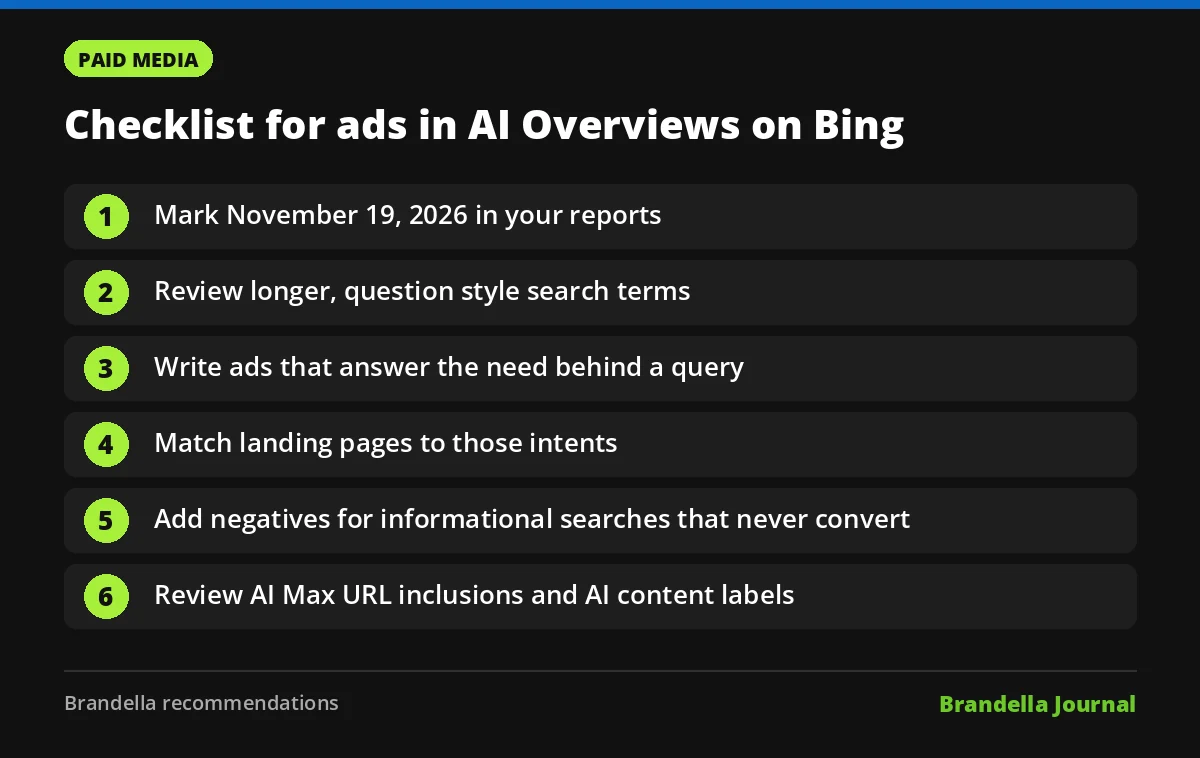
The steps below are Brandella recommendations, not Microsoft guidance.
- Note November 19, 2026 in your reports so you can compare click through rate, conversion rate and cost per acquisition before and after.
- Read your search terms report for longer, question style queries. These are the searches most likely to trigger an AI Overview.
- Write ads and assets that answer the need behind a query, not just repeat the keyword. Microsoft’s hotel example works because the offer fits the plan in the answer.
- Check that landing pages match those intents. A click from next to a detailed AI answer expects a page that continues it.
- Review negative keywords if you see spend on informational searches that never convert.
- If you run AI Max, look at the new URL inclusions for final URL expansion and decide which pages you want it to use.
- If you use AI generated images or text in ads, check the AI content label settings now that they are generally available.
Running both Microsoft and Google ads? Compare this with Google AI Mode ads, and read our guide to search campaigns vs Performance Max before you move budget.
FAQ about ads in AI Overviews on Bing
Do I need a new campaign to show ads in AI Overviews on Bing?
No. Microsoft says there is no separate campaign setup. Existing campaigns can serve there, including Performance Max and AI Max.
Which countries get ads in AI Overviews on Bing?
Microsoft says all markets except China.
Can I opt out of AI Overview ad placements?
Microsoft does not mention an opt out in the quotes we read. Placement depends on relevance, so your keywords, negatives and ads are the main levers.
Is the 21% purchase lift about AI Overview ads?
No. It is a Copilot figure, and PPC Land says it comes from December 2024 data. Microsoft has not shared results specific to AI Overview ads.