

- Home
- SEODiscover the latest updates from across the United States, including politics, culture, economy, and trending stories. Stay informed on the key events shaping the nation and the topics everyone’s talking about.
- Technical SEOLearn technical SEO concepts including crawling, indexing, XML sitemaps, robots.txt, canonical tags, site architecture, and website performance.
- Local SEOOptimize your business for local seo with Google Business Profile, local citations, reviews, maps, and location-based SEO.
- Mobile SEOImprove your website’s mobile seo performance with responsive design, mobile-first indexing, usability, and page speed optimization.
- On-Page SEOExplore on-page seo optimization techniques such as title tags, meta descriptions, headings, URLs, internal linking, and content optimization.
- Off-Page SEODiscover off-page SEO strategies such as backlinks, digital PR, brand mentions, outreach, and authority building.
- SEO ToolsExplore the best SEO tools for keyword research, technical audits, backlink analysis, rank tracking, and website optimization.
- Core Web VitalsLearn how to improve Core Web Vitals including LCP, INP, CLS, page speed, and overall user experience for better rankings.
- Keyword ResearchLearn how to find profitable keywords, analyze search intent, evaluate competition, and build effective keyword strategies.
- Link BuildingMaster ethical link building techniques, backlink analysis, outreach methods, guest posting, and authority growth strategies.
- Google Search ConsoleLearn how to use Google Search Console to monitor indexing, fix errors, analyze search performance, and improve SEO.
- SEO BasicsLearn the fundamentals of search engine optimization (SEO Basics), including how search engines work, SEO terminology, and beginner-friendly best practices.
- Paid Media
- Display AdvertisingLearn display advertising strategies, banner ads, audience targeting, remarketing, Google Display campaigns, and optimization techniques.
- Google AdsLearn Google Ads strategies, campaign setup, bidding, keywords, Performance Max, Search Ads, and optimization techniques.
- LinkedIn AdsLearn LinkedIn Ads strategies for B2B marketing, lead generation, audience targeting, campaign optimization, and paid social advertising.
- Meta AdsLearn Meta Ads strategies for Facebook and Instagram, including campaign setup, targeting, retargeting, and performance optimization.
- Paid Media AnalyticsLearn paid media analytics, including CPC, CTR, CPA, ROAS, conversion tracking, attribution, reporting, and campaign performance analysis.
- PPC StrategyLearn effective PPC strategies, campaign planning, bidding, keyword targeting, landing pages, conversion optimization, and more.
- ContentTransform your living spaces with inspiration, tips, and trends in interior design. From minimalist decor to bold statements, find ideas for every style and budget.
- Social
- Digital MarketingExplore stories and advice on living your best life. From personal growth to entertainment, dive into the latest in lifestyle trends and inspiration.
- Artificial IntelligenceStay informed about health and wellness with expert advice, fitness tips, and the latest medical breakthroughs. Your guide to a healthier and happier life.
- DevelopmentYou will find development related educational articles
- GTMLearn Google Tag Manager (GTM) with practical guides for tags, triggers, variables, tracking, conversions, and website analytics implementation.
- HTMLLearn HTML with simple tutorials, examples, tags, elements, attributes, and best practices for building modern web pages.
- HTML CSSLearn HTML CSS together with practical tutorials, examples, layouts, styling techniques, responsive design, and modern web development practices.
- HTML JSLearn HTML JS – JavaScript with practical tutorials and examples for adding interactivity, dynamic content, events, and functionality to web pages.
- JavaScriptExplore JavaScript tutorials, examples, concepts, and practical techniques for creating interactive and dynamic websites and web applications.
- PHPLearn PHP programming with practical tutorials, examples, functions, syntax, and web development techniques for beginners and developers.
- PythonLearn Python programming with practical tutorials, examples, syntax, functions, automation techniques, and useful programming concepts.
- Home
- SEODiscover the latest updates from across the United States, including politics, culture, economy, and trending stories. Stay informed on the key events shaping the nation and the topics everyone’s talking about.
- Technical SEOLearn technical SEO concepts including crawling, indexing, XML sitemaps, robots.txt, canonical tags, site architecture, and website performance.
- Local SEOOptimize your business for local seo with Google Business Profile, local citations, reviews, maps, and location-based SEO.
- Mobile SEOImprove your website’s mobile seo performance with responsive design, mobile-first indexing, usability, and page speed optimization.
- On-Page SEOExplore on-page seo optimization techniques such as title tags, meta descriptions, headings, URLs, internal linking, and content optimization.
- Off-Page SEODiscover off-page SEO strategies such as backlinks, digital PR, brand mentions, outreach, and authority building.
- SEO ToolsExplore the best SEO tools for keyword research, technical audits, backlink analysis, rank tracking, and website optimization.
- Core Web VitalsLearn how to improve Core Web Vitals including LCP, INP, CLS, page speed, and overall user experience for better rankings.
- Keyword ResearchLearn how to find profitable keywords, analyze search intent, evaluate competition, and build effective keyword strategies.
- Link BuildingMaster ethical link building techniques, backlink analysis, outreach methods, guest posting, and authority growth strategies.
- Google Search ConsoleLearn how to use Google Search Console to monitor indexing, fix errors, analyze search performance, and improve SEO.
- SEO BasicsLearn the fundamentals of search engine optimization (SEO Basics), including how search engines work, SEO terminology, and beginner-friendly best practices.
- Paid Media
- Display AdvertisingLearn display advertising strategies, banner ads, audience targeting, remarketing, Google Display campaigns, and optimization techniques.
- Google AdsLearn Google Ads strategies, campaign setup, bidding, keywords, Performance Max, Search Ads, and optimization techniques.
- LinkedIn AdsLearn LinkedIn Ads strategies for B2B marketing, lead generation, audience targeting, campaign optimization, and paid social advertising.
- Meta AdsLearn Meta Ads strategies for Facebook and Instagram, including campaign setup, targeting, retargeting, and performance optimization.
- Paid Media AnalyticsLearn paid media analytics, including CPC, CTR, CPA, ROAS, conversion tracking, attribution, reporting, and campaign performance analysis.
- PPC StrategyLearn effective PPC strategies, campaign planning, bidding, keyword targeting, landing pages, conversion optimization, and more.
- ContentTransform your living spaces with inspiration, tips, and trends in interior design. From minimalist decor to bold statements, find ideas for every style and budget.
- Social
- Digital MarketingExplore stories and advice on living your best life. From personal growth to entertainment, dive into the latest in lifestyle trends and inspiration.
- Artificial IntelligenceStay informed about health and wellness with expert advice, fitness tips, and the latest medical breakthroughs. Your guide to a healthier and happier life.
- DevelopmentYou will find development related educational articles
- GTMLearn Google Tag Manager (GTM) with practical guides for tags, triggers, variables, tracking, conversions, and website analytics implementation.
- HTMLLearn HTML with simple tutorials, examples, tags, elements, attributes, and best practices for building modern web pages.
- HTML CSSLearn HTML CSS together with practical tutorials, examples, layouts, styling techniques, responsive design, and modern web development practices.
- HTML JSLearn HTML JS – JavaScript with practical tutorials and examples for adding interactivity, dynamic content, events, and functionality to web pages.
- JavaScriptExplore JavaScript tutorials, examples, concepts, and practical techniques for creating interactive and dynamic websites and web applications.
- PHPLearn PHP programming with practical tutorials, examples, functions, syntax, and web development techniques for beginners and developers.
- PythonLearn Python programming with practical tutorials, examples, syntax, functions, automation techniques, and useful programming concepts.
Now Reading: Cumulative Layout Shift (CLS) Explained: Fix Unexpected Layout Shifts for Better SEO
-
01
Cumulative Layout Shift (CLS) Explained: Fix Unexpected Layout Shifts for Better SEO
- Home//
- SEO//Discover the latest updates from across the United States, including politics, culture, economy, and trending stories. Stay informed on the key events shaping the nation and the topics everyone’s talking about.
- Technical SEO//Learn technical SEO concepts including crawling, indexing, XML sitemaps, robots.txt, canonical tags, site architecture, and website performance.
- Local SEO//Optimize your business for local seo with Google Business Profile, local citations, reviews, maps, and location-based SEO.
- Mobile SEO//Improve your website’s mobile seo performance with responsive design, mobile-first indexing, usability, and page speed optimization.
- On-Page SEO//Explore on-page seo optimization techniques such as title tags, meta descriptions, headings, URLs, internal linking, and content optimization.
- Off-Page SEO//Discover off-page SEO strategies such as backlinks, digital PR, brand mentions, outreach, and authority building.
- SEO Tools//Explore the best SEO tools for keyword research, technical audits, backlink analysis, rank tracking, and website optimization.
- Core Web Vitals//Learn how to improve Core Web Vitals including LCP, INP, CLS, page speed, and overall user experience for better rankings.
- Keyword Research//Learn how to find profitable keywords, analyze search intent, evaluate competition, and build effective keyword strategies.
- Link Building//Master ethical link building techniques, backlink analysis, outreach methods, guest posting, and authority growth strategies.
- Google Search Console//Learn how to use Google Search Console to monitor indexing, fix errors, analyze search performance, and improve SEO.
- SEO Basics//Learn the fundamentals of search engine optimization (SEO Basics), including how search engines work, SEO terminology, and beginner-friendly best practices.
- Paid Media//
- Display Advertising//Learn display advertising strategies, banner ads, audience targeting, remarketing, Google Display campaigns, and optimization techniques.
- Google Ads//Learn Google Ads strategies, campaign setup, bidding, keywords, Performance Max, Search Ads, and optimization techniques.
- LinkedIn Ads//Learn LinkedIn Ads strategies for B2B marketing, lead generation, audience targeting, campaign optimization, and paid social advertising.
- Meta Ads//Learn Meta Ads strategies for Facebook and Instagram, including campaign setup, targeting, retargeting, and performance optimization.
- Paid Media Analytics//Learn paid media analytics, including CPC, CTR, CPA, ROAS, conversion tracking, attribution, reporting, and campaign performance analysis.
- PPC Strategy//Learn effective PPC strategies, campaign planning, bidding, keyword targeting, landing pages, conversion optimization, and more.
- Content//Transform your living spaces with inspiration, tips, and trends in interior design. From minimalist decor to bold statements, find ideas for every style and budget.
- Social//
- Digital Marketing//Explore stories and advice on living your best life. From personal growth to entertainment, dive into the latest in lifestyle trends and inspiration.
- Artificial Intelligence//Stay informed about health and wellness with expert advice, fitness tips, and the latest medical breakthroughs. Your guide to a healthier and happier life.
- Development//You will find development related educational articles
- GTM//Learn Google Tag Manager (GTM) with practical guides for tags, triggers, variables, tracking, conversions, and website analytics implementation.
- HTML//Learn HTML with simple tutorials, examples, tags, elements, attributes, and best practices for building modern web pages.
- HTML CSS//Learn HTML CSS together with practical tutorials, examples, layouts, styling techniques, responsive design, and modern web development practices.
- HTML JS//Learn HTML JS – JavaScript with practical tutorials and examples for adding interactivity, dynamic content, events, and functionality to web pages.
- JavaScript//Explore JavaScript tutorials, examples, concepts, and practical techniques for creating interactive and dynamic websites and web applications.
- PHP//Learn PHP programming with practical tutorials, examples, functions, syntax, and web development techniques for beginners and developers.
- Python//Learn Python programming with practical tutorials, examples, syntax, functions, automation techniques, and useful programming concepts.
- Home
- SEO
- Core Web Vitals
- Cumulative Layout Shift (CLS) Explained: Fix Unexpected Layout Shifts for Better SEO
Cumulative Layout Shift (CLS) Explained: Fix Unexpected Layout Shifts for Better SEO

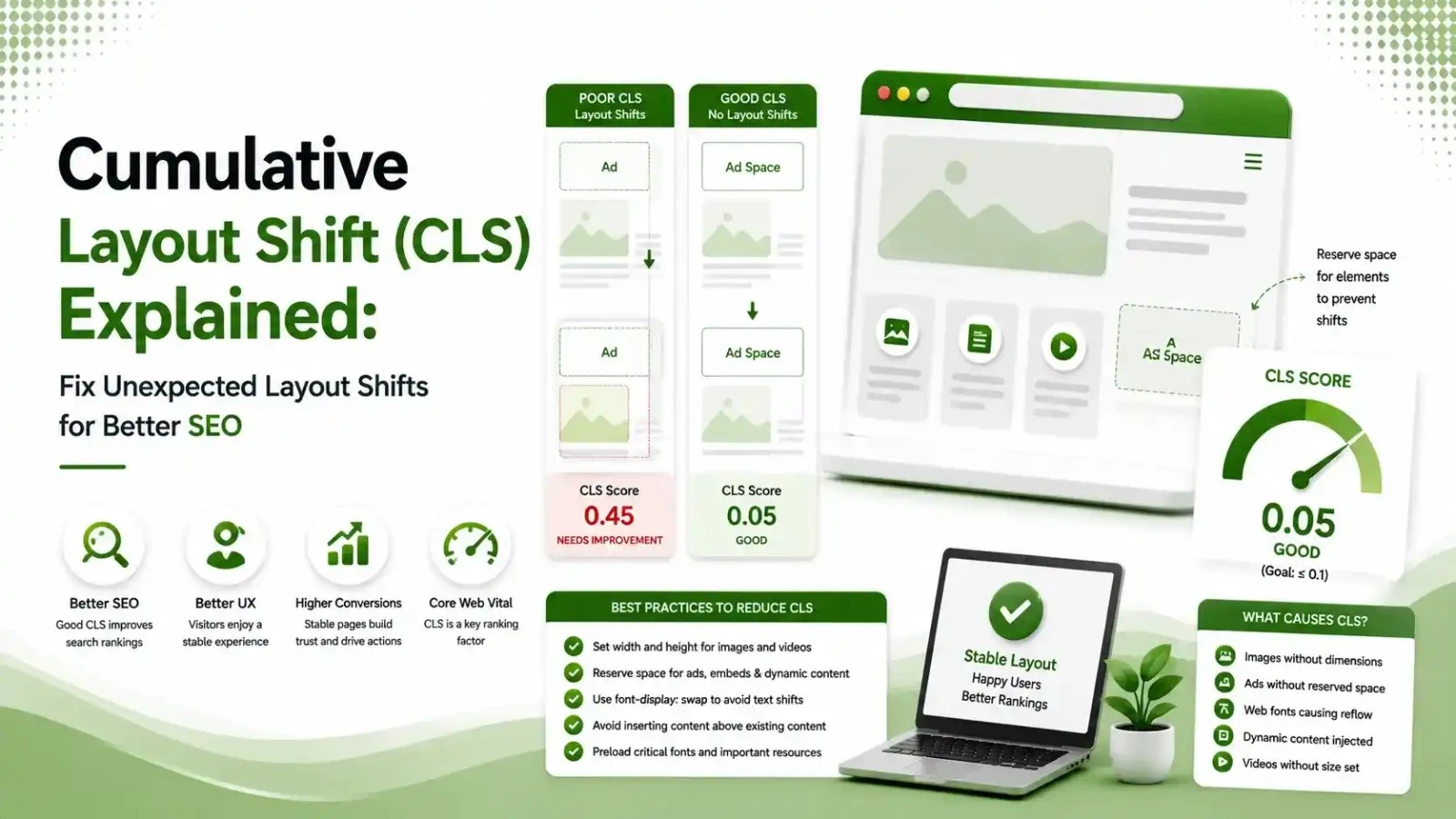
Cumulative Layout Shift (CLS) measures visual stability by tracking unexpected layout shifts while a page loads. In this guide, learn what causes poor CLS scores, how Google measures them, and the best techniques to fix layout shifts for better Core Web Vitals, improved SEO, and a smoother user experience.
Table of Contents
ToggleA visitor reaches for the "Submit" button on a lead form. A late-loading promo banner shoves it down half a second before the tap lands, and they hit a blank space instead, or worse, an ad. That single moment is what Cumulative Layout Shift measures, and it is quietly costing sites real conversions, not just Core Web Vitals points.
Cumulative Layout Shift measures how much visible content moves unexpectedly during a page's entire lifespan, not just while it loads. Every unplanned jump, whether from a late image, an injected banner, or a font swap, adds to the score.
We covered CLS alongside LCP and INP in our Core Web Vitals overview, and went deep on the other two in our LCP guide and INP guide. This article completes the set.
or lower is a good CLS score, measured at the 75th percentile of page visits
of mobile pages still ship at least one image with no reserved dimensions
typical bounce rate reduction reported after fixing a site from poor to good CLS
What a Layout Shift Actually Looks Like
Picture the same page loading two different ways.
CLS Thresholds: Good, Needs Improvement, and Poor
0-0.1
0.1-0.25
0.25+
How a CLS Score Is Actually Calculated
CLS is unitless, which confuses a lot of people the first time they see it.
According to Parachute Design's 2026 CLS guide, the browser calculates each individual shift by multiplying two components: impact fraction, how much of the viewport was affected, and distance fraction, how far the elements actually moved.
These individual shift scores accumulate within session windows, groups of rapid shifts occurring within one second of each other, capped at five seconds total. The single highest-scoring session window becomes your page's CLS value, not a simple sum of every shift that ever happened.
Five Common Causes of Poor CLS
Images Without Width and Height Attributes
According to Sprout Sage Solutions' 2026 CLS guide, this is the single biggest CLS offender. Without explicit dimensions, the browser has no way to reserve space before the image finishes loading.
Ads and Embeds With No Reserved Space
Dynamic ad slots and third-party embeds that inject content after the initial layout renders are a frequent, hard-to-predict source of shifting, especially on ad-supported pages.
Web Fonts Swapping Late
According to Logos Web Designs' 2026 CLS guide, only about 11% of pages preload their web fonts, and a late font swap can noticeably resize text and push surrounding content.
Cookie Banners and Injected Notices
A consent banner that appears at the top of the viewport after the page has already rendered pushes everything below it down, a shift many sites never test for since it happens so early.
Animating the Wrong CSS Properties
Animating properties like top, left, width, or height triggers layout recalculation and counts toward CLS. Animating transform and opacity instead avoids this entirely.
Expected vs. Unexpected Shifts: What Actually Counts
Not every layout change counts against your CLS score. Tap through both categories to see the distinction.
A late-loading image pushing text down, a banner injecting itself above existing content, or a font swap resizing a headline are all unexpected shifts, since the user did nothing to trigger them.
According to Parachute Design's guide referenced above, any shift occurring within 500 milliseconds of user input is excluded from CLS calculations. Clicking an accordion to expand it, or tapping a button that intentionally reveals more content, does not count against your score.
How CLS Is Measured Across Impact and Distance
| Factor | What It Measures | Example |
|---|---|---|
| Impact fraction | How much of the viewport was affected by the shift | A banner covering half the visible screen scores higher than a small icon |
| Distance fraction | How far the shifted elements actually moved | Content moving 300px scores higher than content moving 20px |
| Session window | Groups rapid shifts within 1 second, capped at 5 seconds | Several small shifts in quick succession combine into one window score |
How to Fix the Most Common CLS Problems
Start with images, since they are the most common and easiest fix. Add explicit width and height attributes, or a CSS aspect-ratio value, to every image, ad slot, and embed on the page so the browser reserves the correct space before content arrives.
For fonts, according to Logos Web Designs' guide, using font-display: optional rather than swap, paired with size-adjust overrides, can eliminate font-swap shifts entirely rather than just reducing them.
For ads, embeds, and cookie banners, reserve a fixed-height container in the layout from the very first paint, even before the actual content has loaded into it.
According to CoreWebVitals.io's broader Core Web Vitals reference, this same reserve-space principle applies across all dynamic content types, not just images, so nothing needs to move once it arrives.
Common CLS Mistakes That Undo Good Fixes
The most common mistake is fixing images but ignoring third-party embeds and ad slots, which often cause the largest individual shifts on a page even when every first-party image is properly sized.
A second mistake, according to OnDigitals' 2026 CLS guide, is relying only on the PageSpeed Insights score without investigating which specific element is actually shifting, since the number alone can hide the real underlying issue on pages with complex, dynamic content.
A third mistake is treating a "good" CLS score as permanent. According to TechMarg's deep dive into CLS, new content additions, plugin updates, or design changes can quietly reintroduce shifts that were fixed months earlier, so periodic rechecks matter as much as the initial fix.
Why CLS Still Matters Alongside LCP and INP
A page that loads fast and responds instantly can still feel broken if content keeps jumping around underneath the visitor's cursor.
Google treats all three Core Web Vitals as one connected page experience signal, the same way it treats schema markup and crawl budget as pieces of one larger technical health picture, not isolated boxes to check off separately.
Why CLS Damages Conversions More Than It Damages Rankings
The SEO impact of CLS is real but modest. The conversion impact is often larger and more immediate, since a shifting layout directly interferes with the moment a visitor decides to act.
According to White Label SEO Service's CLS optimization guide, visitors who abandon a form mid-completion or click the wrong button because of a layout shift rarely come back to try again.
The lost conversion happens instantly, while the ranking penalty, if any, unfolds far more gradually.
This is especially costly on high-intent pages like checkout flows, lead forms, and pricing pages, where a single misplaced tap can end a conversion that would otherwise have completed successfully.
Testing for CLS on Mobile, Not Just Desktop
Layout shifts often show up more severely on mobile, since smaller viewports mean the same absolute pixel movement represents a larger share of what the user can actually see.
According to OnDigitals' CLS guide, ads, embeds, and review widgets that arrive after the first paint create disproportionately large shifts on mobile screens compared to how the same elements behave on a wider desktop layout.
Testing exclusively on a desktop browser during development is a common reason CLS problems go unnoticed until real mobile users start experiencing them, since the visual proportions genuinely differ between the two environments.
FAQs on Cumulative Layout Shift (CLS)
Related Articles
What We Learn Today
CLS measures unexpected visual movement, not just during loading but the whole visit.
A good CLS score is 0.1 or lower, measured at the 75th percentile of visits.
Unsized images are the single biggest, most common cause of poor CLS.
Shifts within 500ms of user input are excluded from the score entirely.
Reserving space for ads, embeds, and fonts prevents most shifts before they happen.
Fixing CLS improves conversions directly, not just search rankings.
Related Posts



Previous Post
Next Post





- Artificial Intelligence
- Content
- Core Web Vitals
- Development
- Digital Marketing
- Google Ads
- Google Search Console
- GTM
- HTML
- HTML CSS
- JavaScript
- Keyword Research
- Link Building
- Local SEO
- Meta Ads
- Mobile SEO
- Off-Page SEO
- On-Page SEO
- Paid Media
- Paid Media Analytics
- PHP
- PPC Strategy
- Python
- SEO
- SEO Basics
- SEO Tools
- Social
- Technical SEO




