

- Home
- SEODiscover the latest updates from across the United States, including politics, culture, economy, and trending stories. Stay informed on the key events shaping the nation and the topics everyone’s talking about.
- Technical SEOLearn technical SEO concepts including crawling, indexing, XML sitemaps, robots.txt, canonical tags, site architecture, and website performance.
- Local SEOOptimize your business for local seo with Google Business Profile, local citations, reviews, maps, and location-based SEO.
- Mobile SEOImprove your website’s mobile seo performance with responsive design, mobile-first indexing, usability, and page speed optimization.
- On-Page SEOExplore on-page seo optimization techniques such as title tags, meta descriptions, headings, URLs, internal linking, and content optimization.
- Off-Page SEODiscover off-page SEO strategies such as backlinks, digital PR, brand mentions, outreach, and authority building.
- SEO ToolsExplore the best SEO tools for keyword research, technical audits, backlink analysis, rank tracking, and website optimization.
- Core Web VitalsLearn how to improve Core Web Vitals including LCP, INP, CLS, page speed, and overall user experience for better rankings.
- Keyword ResearchLearn how to find profitable keywords, analyze search intent, evaluate competition, and build effective keyword strategies.
- Link BuildingMaster ethical link building techniques, backlink analysis, outreach methods, guest posting, and authority growth strategies.
- Google Search ConsoleLearn how to use Google Search Console to monitor indexing, fix errors, analyze search performance, and improve SEO.
- SEO BasicsLearn the fundamentals of search engine optimization (SEO Basics), including how search engines work, SEO terminology, and beginner-friendly best practices.
- Paid Media
- Display AdvertisingLearn display advertising strategies, banner ads, audience targeting, remarketing, Google Display campaigns, and optimization techniques.
- Google AdsLearn Google Ads strategies, campaign setup, bidding, keywords, Performance Max, Search Ads, and optimization techniques.
- LinkedIn AdsLearn LinkedIn Ads strategies for B2B marketing, lead generation, audience targeting, campaign optimization, and paid social advertising.
- Meta AdsLearn Meta Ads strategies for Facebook and Instagram, including campaign setup, targeting, retargeting, and performance optimization.
- Paid Media AnalyticsLearn paid media analytics, including CPC, CTR, CPA, ROAS, conversion tracking, attribution, reporting, and campaign performance analysis.
- PPC StrategyLearn effective PPC strategies, campaign planning, bidding, keyword targeting, landing pages, conversion optimization, and more.
- ContentTransform your living spaces with inspiration, tips, and trends in interior design. From minimalist decor to bold statements, find ideas for every style and budget.
- Social
- Digital MarketingExplore stories and advice on living your best life. From personal growth to entertainment, dive into the latest in lifestyle trends and inspiration.
- Artificial IntelligenceStay informed about health and wellness with expert advice, fitness tips, and the latest medical breakthroughs. Your guide to a healthier and happier life.
- DevelopmentYou will find development related educational articles
- GTMLearn Google Tag Manager (GTM) with practical guides for tags, triggers, variables, tracking, conversions, and website analytics implementation.
- HTMLLearn HTML with simple tutorials, examples, tags, elements, attributes, and best practices for building modern web pages.
- HTML CSSLearn HTML CSS together with practical tutorials, examples, layouts, styling techniques, responsive design, and modern web development practices.
- HTML JSLearn HTML JS – JavaScript with practical tutorials and examples for adding interactivity, dynamic content, events, and functionality to web pages.
- JavaScriptExplore JavaScript tutorials, examples, concepts, and practical techniques for creating interactive and dynamic websites and web applications.
- PHPLearn PHP programming with practical tutorials, examples, functions, syntax, and web development techniques for beginners and developers.
- PythonLearn Python programming with practical tutorials, examples, syntax, functions, automation techniques, and useful programming concepts.
- Home
- SEODiscover the latest updates from across the United States, including politics, culture, economy, and trending stories. Stay informed on the key events shaping the nation and the topics everyone’s talking about.
- Technical SEOLearn technical SEO concepts including crawling, indexing, XML sitemaps, robots.txt, canonical tags, site architecture, and website performance.
- Local SEOOptimize your business for local seo with Google Business Profile, local citations, reviews, maps, and location-based SEO.
- Mobile SEOImprove your website’s mobile seo performance with responsive design, mobile-first indexing, usability, and page speed optimization.
- On-Page SEOExplore on-page seo optimization techniques such as title tags, meta descriptions, headings, URLs, internal linking, and content optimization.
- Off-Page SEODiscover off-page SEO strategies such as backlinks, digital PR, brand mentions, outreach, and authority building.
- SEO ToolsExplore the best SEO tools for keyword research, technical audits, backlink analysis, rank tracking, and website optimization.
- Core Web VitalsLearn how to improve Core Web Vitals including LCP, INP, CLS, page speed, and overall user experience for better rankings.
- Keyword ResearchLearn how to find profitable keywords, analyze search intent, evaluate competition, and build effective keyword strategies.
- Link BuildingMaster ethical link building techniques, backlink analysis, outreach methods, guest posting, and authority growth strategies.
- Google Search ConsoleLearn how to use Google Search Console to monitor indexing, fix errors, analyze search performance, and improve SEO.
- SEO BasicsLearn the fundamentals of search engine optimization (SEO Basics), including how search engines work, SEO terminology, and beginner-friendly best practices.
- Paid Media
- Display AdvertisingLearn display advertising strategies, banner ads, audience targeting, remarketing, Google Display campaigns, and optimization techniques.
- Google AdsLearn Google Ads strategies, campaign setup, bidding, keywords, Performance Max, Search Ads, and optimization techniques.
- LinkedIn AdsLearn LinkedIn Ads strategies for B2B marketing, lead generation, audience targeting, campaign optimization, and paid social advertising.
- Meta AdsLearn Meta Ads strategies for Facebook and Instagram, including campaign setup, targeting, retargeting, and performance optimization.
- Paid Media AnalyticsLearn paid media analytics, including CPC, CTR, CPA, ROAS, conversion tracking, attribution, reporting, and campaign performance analysis.
- PPC StrategyLearn effective PPC strategies, campaign planning, bidding, keyword targeting, landing pages, conversion optimization, and more.
- ContentTransform your living spaces with inspiration, tips, and trends in interior design. From minimalist decor to bold statements, find ideas for every style and budget.
- Social
- Digital MarketingExplore stories and advice on living your best life. From personal growth to entertainment, dive into the latest in lifestyle trends and inspiration.
- Artificial IntelligenceStay informed about health and wellness with expert advice, fitness tips, and the latest medical breakthroughs. Your guide to a healthier and happier life.
- DevelopmentYou will find development related educational articles
- GTMLearn Google Tag Manager (GTM) with practical guides for tags, triggers, variables, tracking, conversions, and website analytics implementation.
- HTMLLearn HTML with simple tutorials, examples, tags, elements, attributes, and best practices for building modern web pages.
- HTML CSSLearn HTML CSS together with practical tutorials, examples, layouts, styling techniques, responsive design, and modern web development practices.
- HTML JSLearn HTML JS – JavaScript with practical tutorials and examples for adding interactivity, dynamic content, events, and functionality to web pages.
- JavaScriptExplore JavaScript tutorials, examples, concepts, and practical techniques for creating interactive and dynamic websites and web applications.
- PHPLearn PHP programming with practical tutorials, examples, functions, syntax, and web development techniques for beginners and developers.
- PythonLearn Python programming with practical tutorials, examples, syntax, functions, automation techniques, and useful programming concepts.
Now Reading: Interaction to Next Paint (INP) Explained: Improve Website Responsiveness and Pass Core Web Vitals
-
01
Interaction to Next Paint (INP) Explained: Improve Website Responsiveness and Pass Core Web Vitals
- Home//
- SEO//Discover the latest updates from across the United States, including politics, culture, economy, and trending stories. Stay informed on the key events shaping the nation and the topics everyone’s talking about.
- Technical SEO//Learn technical SEO concepts including crawling, indexing, XML sitemaps, robots.txt, canonical tags, site architecture, and website performance.
- Local SEO//Optimize your business for local seo with Google Business Profile, local citations, reviews, maps, and location-based SEO.
- Mobile SEO//Improve your website’s mobile seo performance with responsive design, mobile-first indexing, usability, and page speed optimization.
- On-Page SEO//Explore on-page seo optimization techniques such as title tags, meta descriptions, headings, URLs, internal linking, and content optimization.
- Off-Page SEO//Discover off-page SEO strategies such as backlinks, digital PR, brand mentions, outreach, and authority building.
- SEO Tools//Explore the best SEO tools for keyword research, technical audits, backlink analysis, rank tracking, and website optimization.
- Core Web Vitals//Learn how to improve Core Web Vitals including LCP, INP, CLS, page speed, and overall user experience for better rankings.
- Keyword Research//Learn how to find profitable keywords, analyze search intent, evaluate competition, and build effective keyword strategies.
- Link Building//Master ethical link building techniques, backlink analysis, outreach methods, guest posting, and authority growth strategies.
- Google Search Console//Learn how to use Google Search Console to monitor indexing, fix errors, analyze search performance, and improve SEO.
- SEO Basics//Learn the fundamentals of search engine optimization (SEO Basics), including how search engines work, SEO terminology, and beginner-friendly best practices.
- Paid Media//
- Display Advertising//Learn display advertising strategies, banner ads, audience targeting, remarketing, Google Display campaigns, and optimization techniques.
- Google Ads//Learn Google Ads strategies, campaign setup, bidding, keywords, Performance Max, Search Ads, and optimization techniques.
- LinkedIn Ads//Learn LinkedIn Ads strategies for B2B marketing, lead generation, audience targeting, campaign optimization, and paid social advertising.
- Meta Ads//Learn Meta Ads strategies for Facebook and Instagram, including campaign setup, targeting, retargeting, and performance optimization.
- Paid Media Analytics//Learn paid media analytics, including CPC, CTR, CPA, ROAS, conversion tracking, attribution, reporting, and campaign performance analysis.
- PPC Strategy//Learn effective PPC strategies, campaign planning, bidding, keyword targeting, landing pages, conversion optimization, and more.
- Content//Transform your living spaces with inspiration, tips, and trends in interior design. From minimalist decor to bold statements, find ideas for every style and budget.
- Social//
- Digital Marketing//Explore stories and advice on living your best life. From personal growth to entertainment, dive into the latest in lifestyle trends and inspiration.
- Artificial Intelligence//Stay informed about health and wellness with expert advice, fitness tips, and the latest medical breakthroughs. Your guide to a healthier and happier life.
- Development//You will find development related educational articles
- GTM//Learn Google Tag Manager (GTM) with practical guides for tags, triggers, variables, tracking, conversions, and website analytics implementation.
- HTML//Learn HTML with simple tutorials, examples, tags, elements, attributes, and best practices for building modern web pages.
- HTML CSS//Learn HTML CSS together with practical tutorials, examples, layouts, styling techniques, responsive design, and modern web development practices.
- HTML JS//Learn HTML JS – JavaScript with practical tutorials and examples for adding interactivity, dynamic content, events, and functionality to web pages.
- JavaScript//Explore JavaScript tutorials, examples, concepts, and practical techniques for creating interactive and dynamic websites and web applications.
- PHP//Learn PHP programming with practical tutorials, examples, functions, syntax, and web development techniques for beginners and developers.
- Python//Learn Python programming with practical tutorials, examples, syntax, functions, automation techniques, and useful programming concepts.
- Home
- SEO
- Core Web Vitals
- Interaction to Next Paint (INP) Explained: Improve Website Responsiveness and Pass Core Web Vitals
Interaction to Next Paint (INP) Explained: Improve Website Responsiveness and Pass Core Web Vitals

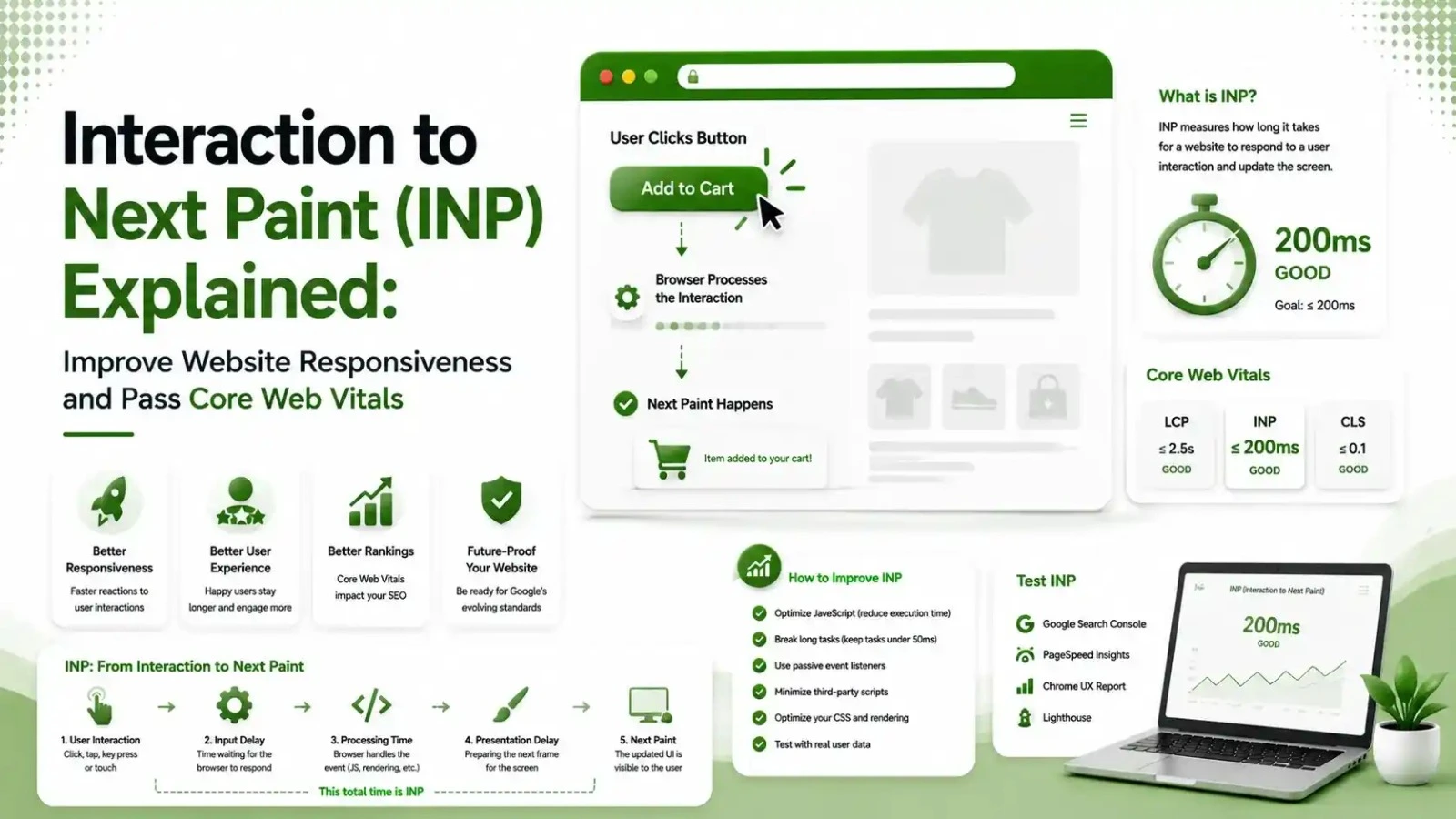
Interaction to Next Paint (INP) is Google's Core Web Vitals metric for measuring website responsiveness after user interactions. This guide explains how INP works, what affects your score, and practical optimization techniques to reduce input delay, improve responsiveness, and strengthen SEO performance.
Table of Contents
ToggleInteraction to Next Paint fails on roughly 43% of websites, more than LCP or CLS, making it the single most commonly failed Core Web Vital in 2026. A site can pass every other performance check and still feel broken if a menu, filter, or "Add to Cart" button takes half a second to respond. This is what INP measures, why so many sites suddenly started failing it, and how to fix it.
Interaction to Next Paint measures how long a page takes to visually respond after someone clicks, taps, or presses a key.
The browser tracks every interaction throughout a visit and reports the worst one, or near-worst on pages with many interactions, as the page's INP score.
We covered INP alongside LCP and CLS in our Core Web Vitals overview, and went deep on the loading metric in our LCP guide. This article does the same for INP specifically.
of websites still fail the 200ms INP threshold, the most commonly failed Core Web Vital
is the "good" INP threshold Google measures, at the 75th percentile of real visits
third-party scripts a typical page-builder site can load before any of its own code runs
What Interaction to Next Paint Actually Measures
Every INP score breaks into three phases that happen between a click and the next visual update.
Why INP Replaced First Input Delay in 2024
Google announced on March 12, 2024 that INP officially replaced First Input Delay as a Core Web Vital.
According to Parachute Design's 2026 INP guide, FID only measured the delay before the browser started handling the very first interaction. It ignored all processing time and rendering work that happened after that initial moment.
A site could score well on FID yet still feel sluggish on every interaction after the first click.
According to Logos Web Designs' 2026 INP guide, this is exactly why sites built on WordPress, Webflow, and Wix that scored "good" under FID now commonly score "poor" on INP without a single code change.
INP Thresholds: Good, Needs Improvement, and Poor
0-200ms
200-500ms
500ms+
Five Common Causes of Poor INP
Long JavaScript Tasks Blocking the Main Thread
Any script running longer than 50 milliseconds blocks the browser from responding to input until it finishes, directly adding to processing time.
Too Many Third-Party Scripts
According to Logos Web Designs' guide referenced above, a typical page-builder site with a form plugin and a tag manager can load 20 or more third-party scripts before any first-party code runs, each one competing for the main thread.
Non-Essential Work Inside Click Handlers
According to SitePoint's 2026 INP fixing guide, event handlers often run analytics logging or state synchronization that has nothing to do with the visible response, delaying the paint the user is actually waiting for.
Large DOM Size
Pages with an excessive number of DOM elements take longer for the browser to recalculate styles and layout after any interaction, even a simple one.
Rendering Heavy Visual Updates Synchronously
Complex animations or large content updates triggered directly by a click can hold up the presentation delay phase, the final step before the next frame paints.
Debouncing vs. Throttling: Which Fix Applies to Your Interaction
These two techniques get confused constantly, and using the wrong one wastes effort. Tap through both to see which applies to your situation.
According to SitePoint's guide, debouncing delays execution until rapid-fire events stop, making it effective for search inputs where processing should only happen once the user pauses typing.
It does not help click-driven INP at all, since a click is a single discrete event, not a rapid stream.
Throttling limits execution to a fixed interval, suiting scroll or resize-driven updates where some responsiveness during the event stream is still needed.
Neither technique fixes a slow click handler. The real fix for clicks is reducing the actual work inside the handler, not delaying when it fires.
How to Measure and Diagnose Your Own INP Score
Start with Google Search Console's Core Web Vitals report, which groups URLs by Good, Needs Improvement, and Poor status separately for mobile and desktop.
According to LinkGraph's INP optimization guide, Google reports the P75 value, meaning the score at which 75% of your visitors experience that number or better. A P75 INP of 250 milliseconds means a quarter of visitors experience something worse than that.
If your site does not have enough traffic for field data to appear, according to WP Rocket's guide to the INP insight, Real User Monitoring through the open-source web-vitals JavaScript library fills the gap and can even identify which specific interaction is causing the slowdown.
Fixing INP Step by Step
| INP Phase | What Causes Delay Here | Fix |
|---|---|---|
| Input delay | Main thread busy with unrelated work | Break up long tasks, defer non-critical scripts |
| Processing time | Heavy logic inside the event handler | Move non-visual work out of the handler's synchronous path |
| Presentation delay | Complex rendering or large DOM updates | Simplify the visual update, reduce DOM size |
Why Mobile Devices Struggle More With Responsiveness
Mobile processors are significantly less powerful than desktop chips, which means the exact same JavaScript workload takes noticeably longer to execute on a phone than on a laptop.
This gap widens further on lower-end devices, which make up a meaningful share of real traffic in many markets.
A script that runs in 40 milliseconds on a flagship phone can easily take 150 milliseconds or more on a budget device, pushing a page from comfortably passing into failing territory without any change to the code itself.
This is one reason field data, gathered from real devices, tells a more honest story than a lab test run on a single development machine.
Testing exclusively on a fast device gives a misleadingly optimistic picture of how the majority of visitors actually experience a page.
Building Responsiveness Into New Features From the Start
The cheapest way to keep a page responsive is designing new features with responsiveness in mind from the beginning, rather than retrofitting fixes after a feature ships and users start complaining.
Before adding a new interactive element, a reasonable question to ask is what work actually needs to happen synchronously to update the screen.
What can be deferred to run afterward without the user noticing any delay is the second question. Analytics calls, background data syncing, and non-visual logging are common candidates for deferral, since none of them need to block the visual response a user is waiting to see.
Common INP Mistakes That Waste Optimization Effort
The most common mistake is over-optimizing rare interactions.
According to Rollin's INP optimization guide, INP reports approximately the worst interaction, so fixing the most common interaction paths on a page improves overall experience more effectively than chasing an edge case a handful of users ever trigger.
A second mistake is assuming a CDN fixes INP the way it fixes LCP. According to LinkGraph's guide referenced above, CDNs primarily help loading performance, since INP measures runtime responsiveness that happens well after the page has already loaded.
A third mistake, according to Egochi's guide to fixing INP, is treating INP as a one-time fix rather than an ongoing discipline. Every new script, plugin, or feature added after the initial fix can quietly reintroduce the same responsiveness problems.
Why INP Matters Alongside the Rest of Your Technical SEO
A page that responds instantly to clicks also tends to sit on a leaner, better-maintained codebase overall, the same discipline behind clean schema markup and efficient crawl budget usage. Google treats page experience as one connected signal, not three isolated checkboxes.
FAQs on Interaction to Next Paint (INP)
Related Articles
What We Learn Today
200ms is the good INP threshold, measured at the 75th percentile
43% of sites still fail INP, more than any other Core Web Vital
2024 is when INP officially replaced First Input Delay
3 phases make up every INP score: input delay, processing, presentation
Scripts especially third-party ones, are the most common root cause
Ongoing discipline is required, not a one-time fix
Related Posts

Previous Post
Next Post
Previous Post
Next Post





- Artificial Intelligence
- Content
- Core Web Vitals
- Development
- Digital Marketing
- Google Ads
- Google Search Console
- GTM
- HTML
- HTML CSS
- JavaScript
- Keyword Research
- Link Building
- Local SEO
- Meta Ads
- Mobile SEO
- Off-Page SEO
- On-Page SEO
- Paid Media
- Paid Media Analytics
- PHP
- PPC Strategy
- Python
- SEO
- SEO Basics
- SEO Tools
- Social
- Technical SEO




