

- Home
- SEODiscover the latest updates from across the United States, including politics, culture, economy, and trending stories. Stay informed on the key events shaping the nation and the topics everyone’s talking about.
- Technical SEOLearn technical SEO concepts including crawling, indexing, XML sitemaps, robots.txt, canonical tags, site architecture, and website performance.
- Local SEOOptimize your business for local seo with Google Business Profile, local citations, reviews, maps, and location-based SEO.
- Mobile SEOImprove your website’s mobile seo performance with responsive design, mobile-first indexing, usability, and page speed optimization.
- On-Page SEOExplore on-page seo optimization techniques such as title tags, meta descriptions, headings, URLs, internal linking, and content optimization.
- Off-Page SEODiscover off-page SEO strategies such as backlinks, digital PR, brand mentions, outreach, and authority building.
- SEO ToolsExplore the best SEO tools for keyword research, technical audits, backlink analysis, rank tracking, and website optimization.
- Core Web VitalsLearn how to improve Core Web Vitals including LCP, INP, CLS, page speed, and overall user experience for better rankings.
- Keyword ResearchLearn how to find profitable keywords, analyze search intent, evaluate competition, and build effective keyword strategies.
- Link BuildingMaster ethical link building techniques, backlink analysis, outreach methods, guest posting, and authority growth strategies.
- Google Search ConsoleLearn how to use Google Search Console to monitor indexing, fix errors, analyze search performance, and improve SEO.
- SEO BasicsLearn the fundamentals of search engine optimization (SEO Basics), including how search engines work, SEO terminology, and beginner-friendly best practices.
- Paid Media
- Display AdvertisingLearn display advertising strategies, banner ads, audience targeting, remarketing, Google Display campaigns, and optimization techniques.
- Google AdsLearn Google Ads strategies, campaign setup, bidding, keywords, Performance Max, Search Ads, and optimization techniques.
- LinkedIn AdsLearn LinkedIn Ads strategies for B2B marketing, lead generation, audience targeting, campaign optimization, and paid social advertising.
- Meta AdsLearn Meta Ads strategies for Facebook and Instagram, including campaign setup, targeting, retargeting, and performance optimization.
- Paid Media AnalyticsLearn paid media analytics, including CPC, CTR, CPA, ROAS, conversion tracking, attribution, reporting, and campaign performance analysis.
- PPC StrategyLearn effective PPC strategies, campaign planning, bidding, keyword targeting, landing pages, conversion optimization, and more.
- ContentTransform your living spaces with inspiration, tips, and trends in interior design. From minimalist decor to bold statements, find ideas for every style and budget.
- Social
- Digital MarketingExplore stories and advice on living your best life. From personal growth to entertainment, dive into the latest in lifestyle trends and inspiration.
- Artificial IntelligenceStay informed about health and wellness with expert advice, fitness tips, and the latest medical breakthroughs. Your guide to a healthier and happier life.
- DevelopmentYou will find development related educational articles
- GTMLearn Google Tag Manager (GTM) with practical guides for tags, triggers, variables, tracking, conversions, and website analytics implementation.
- HTMLLearn HTML with simple tutorials, examples, tags, elements, attributes, and best practices for building modern web pages.
- HTML CSSLearn HTML CSS together with practical tutorials, examples, layouts, styling techniques, responsive design, and modern web development practices.
- HTML JSLearn HTML JS – JavaScript with practical tutorials and examples for adding interactivity, dynamic content, events, and functionality to web pages.
- JavaScriptExplore JavaScript tutorials, examples, concepts, and practical techniques for creating interactive and dynamic websites and web applications.
- PHPLearn PHP programming with practical tutorials, examples, functions, syntax, and web development techniques for beginners and developers.
- PythonLearn Python programming with practical tutorials, examples, syntax, functions, automation techniques, and useful programming concepts.
- Home
- SEODiscover the latest updates from across the United States, including politics, culture, economy, and trending stories. Stay informed on the key events shaping the nation and the topics everyone’s talking about.
- Technical SEOLearn technical SEO concepts including crawling, indexing, XML sitemaps, robots.txt, canonical tags, site architecture, and website performance.
- Local SEOOptimize your business for local seo with Google Business Profile, local citations, reviews, maps, and location-based SEO.
- Mobile SEOImprove your website’s mobile seo performance with responsive design, mobile-first indexing, usability, and page speed optimization.
- On-Page SEOExplore on-page seo optimization techniques such as title tags, meta descriptions, headings, URLs, internal linking, and content optimization.
- Off-Page SEODiscover off-page SEO strategies such as backlinks, digital PR, brand mentions, outreach, and authority building.
- SEO ToolsExplore the best SEO tools for keyword research, technical audits, backlink analysis, rank tracking, and website optimization.
- Core Web VitalsLearn how to improve Core Web Vitals including LCP, INP, CLS, page speed, and overall user experience for better rankings.
- Keyword ResearchLearn how to find profitable keywords, analyze search intent, evaluate competition, and build effective keyword strategies.
- Link BuildingMaster ethical link building techniques, backlink analysis, outreach methods, guest posting, and authority growth strategies.
- Google Search ConsoleLearn how to use Google Search Console to monitor indexing, fix errors, analyze search performance, and improve SEO.
- SEO BasicsLearn the fundamentals of search engine optimization (SEO Basics), including how search engines work, SEO terminology, and beginner-friendly best practices.
- Paid Media
- Display AdvertisingLearn display advertising strategies, banner ads, audience targeting, remarketing, Google Display campaigns, and optimization techniques.
- Google AdsLearn Google Ads strategies, campaign setup, bidding, keywords, Performance Max, Search Ads, and optimization techniques.
- LinkedIn AdsLearn LinkedIn Ads strategies for B2B marketing, lead generation, audience targeting, campaign optimization, and paid social advertising.
- Meta AdsLearn Meta Ads strategies for Facebook and Instagram, including campaign setup, targeting, retargeting, and performance optimization.
- Paid Media AnalyticsLearn paid media analytics, including CPC, CTR, CPA, ROAS, conversion tracking, attribution, reporting, and campaign performance analysis.
- PPC StrategyLearn effective PPC strategies, campaign planning, bidding, keyword targeting, landing pages, conversion optimization, and more.
- ContentTransform your living spaces with inspiration, tips, and trends in interior design. From minimalist decor to bold statements, find ideas for every style and budget.
- Social
- Digital MarketingExplore stories and advice on living your best life. From personal growth to entertainment, dive into the latest in lifestyle trends and inspiration.
- Artificial IntelligenceStay informed about health and wellness with expert advice, fitness tips, and the latest medical breakthroughs. Your guide to a healthier and happier life.
- DevelopmentYou will find development related educational articles
- GTMLearn Google Tag Manager (GTM) with practical guides for tags, triggers, variables, tracking, conversions, and website analytics implementation.
- HTMLLearn HTML with simple tutorials, examples, tags, elements, attributes, and best practices for building modern web pages.
- HTML CSSLearn HTML CSS together with practical tutorials, examples, layouts, styling techniques, responsive design, and modern web development practices.
- HTML JSLearn HTML JS – JavaScript with practical tutorials and examples for adding interactivity, dynamic content, events, and functionality to web pages.
- JavaScriptExplore JavaScript tutorials, examples, concepts, and practical techniques for creating interactive and dynamic websites and web applications.
- PHPLearn PHP programming with practical tutorials, examples, functions, syntax, and web development techniques for beginners and developers.
- PythonLearn Python programming with practical tutorials, examples, syntax, functions, automation techniques, and useful programming concepts.
Now Reading: Python Script to Check Broken Links: Build a Complete Site Auditor in 8 Steps
-
01
Python Script to Check Broken Links: Build a Complete Site Auditor in 8 Steps
- Home//
- SEO//Discover the latest updates from across the United States, including politics, culture, economy, and trending stories. Stay informed on the key events shaping the nation and the topics everyone’s talking about.
- Technical SEO//Learn technical SEO concepts including crawling, indexing, XML sitemaps, robots.txt, canonical tags, site architecture, and website performance.
- Local SEO//Optimize your business for local seo with Google Business Profile, local citations, reviews, maps, and location-based SEO.
- Mobile SEO//Improve your website’s mobile seo performance with responsive design, mobile-first indexing, usability, and page speed optimization.
- On-Page SEO//Explore on-page seo optimization techniques such as title tags, meta descriptions, headings, URLs, internal linking, and content optimization.
- Off-Page SEO//Discover off-page SEO strategies such as backlinks, digital PR, brand mentions, outreach, and authority building.
- SEO Tools//Explore the best SEO tools for keyword research, technical audits, backlink analysis, rank tracking, and website optimization.
- Core Web Vitals//Learn how to improve Core Web Vitals including LCP, INP, CLS, page speed, and overall user experience for better rankings.
- Keyword Research//Learn how to find profitable keywords, analyze search intent, evaluate competition, and build effective keyword strategies.
- Link Building//Master ethical link building techniques, backlink analysis, outreach methods, guest posting, and authority growth strategies.
- Google Search Console//Learn how to use Google Search Console to monitor indexing, fix errors, analyze search performance, and improve SEO.
- SEO Basics//Learn the fundamentals of search engine optimization (SEO Basics), including how search engines work, SEO terminology, and beginner-friendly best practices.
- Paid Media//
- Display Advertising//Learn display advertising strategies, banner ads, audience targeting, remarketing, Google Display campaigns, and optimization techniques.
- Google Ads//Learn Google Ads strategies, campaign setup, bidding, keywords, Performance Max, Search Ads, and optimization techniques.
- LinkedIn Ads//Learn LinkedIn Ads strategies for B2B marketing, lead generation, audience targeting, campaign optimization, and paid social advertising.
- Meta Ads//Learn Meta Ads strategies for Facebook and Instagram, including campaign setup, targeting, retargeting, and performance optimization.
- Paid Media Analytics//Learn paid media analytics, including CPC, CTR, CPA, ROAS, conversion tracking, attribution, reporting, and campaign performance analysis.
- PPC Strategy//Learn effective PPC strategies, campaign planning, bidding, keyword targeting, landing pages, conversion optimization, and more.
- Content//Transform your living spaces with inspiration, tips, and trends in interior design. From minimalist decor to bold statements, find ideas for every style and budget.
- Social//
- Digital Marketing//Explore stories and advice on living your best life. From personal growth to entertainment, dive into the latest in lifestyle trends and inspiration.
- Artificial Intelligence//Stay informed about health and wellness with expert advice, fitness tips, and the latest medical breakthroughs. Your guide to a healthier and happier life.
- Development//You will find development related educational articles
- GTM//Learn Google Tag Manager (GTM) with practical guides for tags, triggers, variables, tracking, conversions, and website analytics implementation.
- HTML//Learn HTML with simple tutorials, examples, tags, elements, attributes, and best practices for building modern web pages.
- HTML CSS//Learn HTML CSS together with practical tutorials, examples, layouts, styling techniques, responsive design, and modern web development practices.
- HTML JS//Learn HTML JS – JavaScript with practical tutorials and examples for adding interactivity, dynamic content, events, and functionality to web pages.
- JavaScript//Explore JavaScript tutorials, examples, concepts, and practical techniques for creating interactive and dynamic websites and web applications.
- PHP//Learn PHP programming with practical tutorials, examples, functions, syntax, and web development techniques for beginners and developers.
- Python//Learn Python programming with practical tutorials, examples, syntax, functions, automation techniques, and useful programming concepts.
- Home
- Development
- Python
- Python Script to Check Broken Links: Build a Complete Site Auditor in 8 Steps
Python Script to Check Broken Links: Build a Complete Site Auditor in 8 Steps

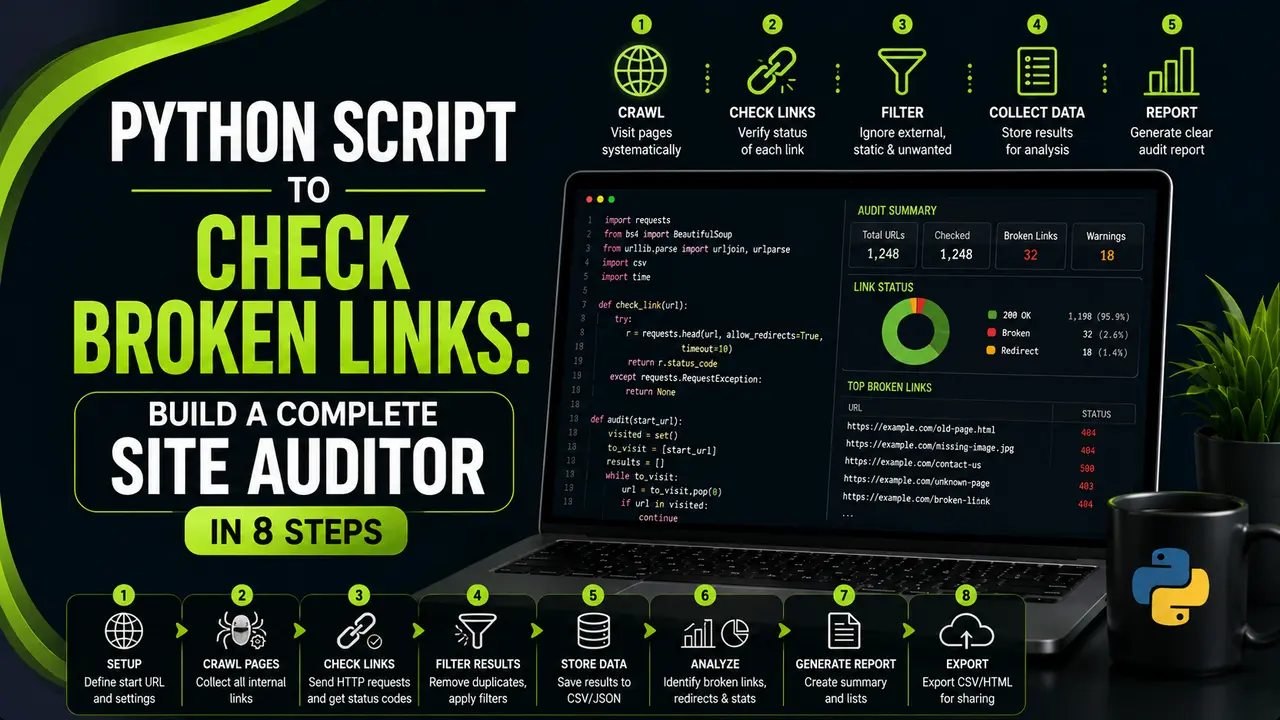
This guide builds a working python script to check broken links from scratch, using Python, requests, and concurrent crawling to scan an entire site in minutes.
Table of Contents
ToggleClicking through a five hundred page site link by link is not a real option for anyone. A python script to check broken links does the same job while you get on with the rest of your day.
A client site once had 46 broken internal links quietly sitting on pages that had not been touched in two years. Nobody noticed until rankings on a handful of those pages started slipping.
Finding all 46 by hand would have meant clicking through the entire site, page by page, hoping nothing got missed.
The script we ran instead found every one of them in about four minutes, sorted by status code, with the exact page each broken link lived on.
That is what a python script to check broken links is actually for. It is not a replacement for fixing the links yourself, but it replaces the slow, error prone job of finding them.
This guide builds that script from the ground up. You will crawl a whole site to discover its links, check each one for a working response, speed the process up with concurrent requests, and turn the results into a report you can hand off or act on directly.
Why a Python Script to Check Broken Links Beats Manual Review
A broken link is a small thing until it is not. Every 404 a crawler hits burns part of your crawl budget on a dead end instead of a page worth indexing.
Visitors notice too. A reader who clicks through to a dead page is a reader who just learned your site is not maintained, even if the rest of the content is excellent.
Most sites already run some kind of manual spot check, usually a few pages here and there when someone happens to notice a problem. That approach misses far more than it catches.
A JavaScript based checker running in a browser works well for a single page. A python script to check broken links is built for the opposite case: an entire site, checked the same way, every time.
Setting Up Your Python Environment
The toolkit here is small on purpose. Everything needed to crawl, check, and report on broken links fits into a handful of well known packages.
# create an isolated environment so package versions don't clash
python -m venv venv
source venv/bin/activate      # Windows: venv\Scripts\activate

pip install requests beautifulsoup4 lxml pandas tenacity
The requests library sends the actual HTTP calls, Beautiful Soup reads the HTML to find links, pandas organizes the results, and Tenacity retries a request that fails without crashing the whole run.
concurrent.futures also does a lot of the heavy lifting later in this guide, and it ships with Python already, so there is nothing extra to install for it.
| Approach | Setup Effort | Speed at Scale | Best For |
|---|---|---|---|
| requests, single threaded | Very low | Slow on large sites | Small sites, quick one off checks |
| requests with concurrent.futures | Low | Fast | Most sites, the approach this guide builds |
| Scrapy | Moderate | Very fast | Recurring, large scale crawling jobs |
| Screaming Frog or similar desktop tool | None, install and run | Fast | One off audits without writing code |
Crawling Your Site to Discover Every Link
Before you can check a link, you need to find it. A breadth first crawl starting from the homepage follows every internal link it discovers, one layer at a time, until it has mapped the whole site.
import requests
from bs4 import BeautifulSoup
from urllib.parse import urljoin, urlparse

def discover_site_links(start_url: str, max_pages: int = 300) -> set:
    domain = urlparse(start_url).netloc
    to_visit = [start_url]
    visited = set()
    all_links = set()

    while to_visit and len(visited) < max_pages:
        url = to_visit.pop(0)
        if url in visited:
            continue
        visited.add(url)

        try:
            response = requests.get(url, timeout=10)
            soup = BeautifulSoup(response.text, "lxml")
        except Exception:
            continue

        for tag in soup.find_all("a", href=True):
            full_url = urljoin(url, tag["href"])
            all_links.add(full_url)

            if urlparse(full_url).netloc == domain and full_url not in visited:
                to_visit.append(full_url)

    return all_links
The domain check on the last line matters. It keeps the crawler following pages within your own site while still collecting every external link it passes along the way, internal and external together, for the checking step next.
Checking Each Link for a Working Response
With every link collected, checking one is simple in principle. Send a request, read the status code, and record whether it counts as broken.
import requests
from tenacity import retry, wait_exponential, stop_after_attempt

HEADERS = {"User-Agent": "BrandellaLinkAuditBot/1.0 (contact: audits@example.com)"}
BROKEN_THRESHOLD = 400

@retry(wait=wait_exponential(multiplier=1, min=1, max=10), stop=stop_after_attempt(3))
def check_link(url: str) -> dict:
    try:
        response = requests.head(url, headers=HEADERS, timeout=10, allow_redirects=True)
        if response.status_code == 405:
            # some servers block HEAD, fall back to GET
            response = requests.get(url, headers=HEADERS, timeout=10, allow_redirects=True)

        return {
            "url": url,
            "status_code": response.status_code,
            "final_url": response.url,
            "is_broken": response.status_code >= BROKEN_THRESHOLD,
            "redirected": response.url != url,
        }
    except requests.RequestException as error:
        return {
            "url": url,
            "status_code": None,
            "final_url": None,
            "is_broken": True,
            "redirected": False,
            "error": str(error),
        }
Using HEAD instead of GET where possible matters at scale. A HEAD request asks a server for just the headers, not the full page body, which is faster and lighter for both sides when you are checking thousands of links.
RFC 9110, the current HTTP semantics standard, is the authoritative reference for what every status code actually means if a response ever looks ambiguous.
Speeding This Up With Concurrent Requests
Checking links one at a time is fine for a handful of pages. On a site with a few thousand links, a single threaded script can take longer than a coffee break allows.
concurrent.futures fixes this by running many checks in parallel instead of waiting for each one to finish before starting the next.
from concurrent.futures import ThreadPoolExecutor, as_completed
import pandas as pd
from checker import check_link

def check_all_links(links: set, max_workers: int = 10) -> pd.DataFrame:
    results = []

    with ThreadPoolExecutor(max_workers=max_workers) as executor:
        future_to_url = {executor.submit(check_link, url): url for url in links}

        for future in as_completed(future_to_url):
            results.append(future.result())

    return pd.DataFrame(results)

if __name__ == "__main__":
    from crawler import discover_site_links

    links = discover_site_links("https://example.com")
    df = check_all_links(links)
    df.to_csv("link_audit.csv", index=False)
    print(f"Checked {len(df)} links, found {df['is_broken'].sum()} broken")
Keep max_workers reasonable rather than maxing it out. Ten to twenty workers checks a large site quickly without hammering your own server or a third party site hard enough to trigger a block.
Separating Internal Links From External Ones
Not every broken link deserves the same response. A broken internal link is entirely within your control to fix. A broken external link just means someone else's page moved or disappeared.
Splitting the results by domain early makes the report far more useful to whoever reads it next.
from urllib.parse import urlparse

def classify_links(df, own_domain: str):
    df["link_domain"] = df["url"].apply(lambda u: urlparse(u).netloc)
    df["link_type"] = df["link_domain"].apply(
        lambda d: "internal" if d == own_domain else "external"
    )
    return df
Internal broken links usually go to the top of the fix list. External ones are worth reviewing too, since a page full of dead outbound links looks neglected even when your own content is current.
Turning Results Into a Report You Can Act On
A spreadsheet of status codes only helps once it is organized around what someone needs to do next. Grouping by status code and link type gets you there quickly.
import pandas as pd

def summarize_report(df: pd.DataFrame) -> None:
    broken = df[df["is_broken"]]

    print(f"Total links checked: {len(df)}")
    print(f"Broken links found: {len(broken)}")
    print("\nBroken by status code:")
    print(broken["status_code"].value_counts())
    print("\nBroken by link type:")
    print(broken["link_type"].value_counts())

    broken.to_csv("broken_links_report.csv", index=False)
A short console summary like this, paired with the full CSV, is usually enough to hand straight to a developer or content owner without any extra explanation needed.
Handling Redirects, Timeouts, and False Positives
Not every strange result is a genuinely broken link. A few situations look broken at first glance but need a closer look before you report them that way.
- Redirect chains: a 301 that eventually lands on a working page is not broken, but a long chain of redirects still hurts speed and is worth flagging separately.
- False 403 responses: some sites block automated requests entirely and return 403 even though the page works fine in a browser. Treat these as unverifiable rather than confirmed broken.
- Timeouts on slow servers: a slow response is not the same as a broken link. Retry with a longer timeout before marking it broken.
- Mailto and tel links: skip these entirely, since
requestscannot meaningfully check a mail client or phone dialer link. - Duplicate links across pages: the same broken URL often appears on several pages. Deduplicate before reporting so the count reflects unique broken links, not total occurrences.
None of these edge cases are rare. They show up on almost every real crawl, and Real Python's guide to the requests library covers most of the timeout and retry patterns worth borrowing before a large run.
Scheduling Regular Link Audits
A one time run catches what is broken today. Content ages, pages get moved, and external sites disappear, so a python script to check broken links earns the most value running on a schedule rather than once.
name: Weekly Broken Link Audit
on:
  schedule:
    - cron: "0 7 * * 1"   # every Monday at 07:00 UTC
  workflow_dispatch: {}

jobs:
  run_audit:
    runs-on: ubuntu-latest
    steps:
      - uses: actions/checkout@v4
      - uses: actions/setup-python@v5
        with:
          python-version: "3.11"
      - run: pip install -r requirements.txt
      - run: python run_checks.py
A weekly run through GitHub Actions catches new broken links within days instead of months, without anyone having to remember to run the script by hand. Search Engine Journal has covered how quickly link rot builds up on sites that skip this kind of recurring check.
Watch: Working With Requests and Response Status Codes
Watching a request and response cycle run step by step makes status code checking click faster than reading code alone. freeCodeCamp.org, a well known nonprofit coding education channel, published a full crash course covering exactly the requests pattern this script builds on, including reading responses and handling errors.
Video credit: freeCodeCamp.org.
The response handling shown there, checking a status and deciding what to do next, is the exact same logic this guide wraps in a retry decorator and a thread pool.
Related Articles
Frequently Asked Questions
No, as long as you crawl at a reasonable pace. A script checking your own site with sensible delays and a small number of workers puts negligible load on your server.
Start with HEAD, since it is faster and lighter on both sides. Fall back to GET only when a server returns a 405 or otherwise does not support HEAD properly.
Ten to twenty workers is a reasonable range for most sites. Going much higher speeds things up marginally while raising the risk of triggering rate limits or looking like an attack.
Not on their own. A redirect that eventually resolves to a working page is functioning as intended, though a long chain of redirects is still worth flagging for cleanup.
Not without extra work. Pages behind authentication need a logged in session passed through requests, and checking gated content is generally outside the scope of a routine audit like this one.
What We Learn Today
Manual checks do not scale
A python script to check broken links covers hundreds of pages as reliably as it covers ten.
Crawling comes before checking
A breadth first crawl maps every link on the site before a single status code gets checked.
Concurrency changes everything
A thread pool turns a slow, sequential check into a fast pass across thousands of links.
Internal and external are different problems
Splitting by link type points the fix at the right owner immediately.
Not everything odd is broken
Redirects, blocked bots, and slow servers all need a second look before landing on a report.
Scheduling closes the loop
A weekly run catches new broken links long before a manual review ever would.
Ready to Keep Your Whole Site Link Healthy?
Pair a python script to check broken links with a regular technical audit to catch problems long before they cost you rankings.
Related Posts



Previous Post
Next Post
Previous Post
Next Post





- Artificial Intelligence
- Content
- Core Web Vitals
- Development
- Digital Marketing
- Display Advertising
- Google Ads
- Google Search Console
- GTM
- HTML
- HTML CSS
- JavaScript
- Keyword Research
- Link Building
- LinkedIn Ads
- Local SEO
- Meta Ads
- Mobile SEO
- Off-Page SEO
- On-Page SEO
- Paid Media
- Paid Media Analytics
- PHP
- PPC Strategy
- Python
- SEO
- SEO Basics
- SEO Tools
- Social
- Technical SEO




