

- Home
- SEODiscover the latest updates from across the United States, including politics, culture, economy, and trending stories. Stay informed on the key events shaping the nation and the topics everyone’s talking about.
- Technical SEOLearn technical SEO concepts including crawling, indexing, XML sitemaps, robots.txt, canonical tags, site architecture, and website performance.
- Local SEOOptimize your business for local seo with Google Business Profile, local citations, reviews, maps, and location-based SEO.
- Mobile SEOImprove your website’s mobile seo performance with responsive design, mobile-first indexing, usability, and page speed optimization.
- On-Page SEOExplore on-page seo optimization techniques such as title tags, meta descriptions, headings, URLs, internal linking, and content optimization.
- Off-Page SEODiscover off-page SEO strategies such as backlinks, digital PR, brand mentions, outreach, and authority building.
- SEO ToolsExplore the best SEO tools for keyword research, technical audits, backlink analysis, rank tracking, and website optimization.
- Core Web VitalsLearn how to improve Core Web Vitals including LCP, INP, CLS, page speed, and overall user experience for better rankings.
- Keyword ResearchLearn how to find profitable keywords, analyze search intent, evaluate competition, and build effective keyword strategies.
- Link BuildingMaster ethical link building techniques, backlink analysis, outreach methods, guest posting, and authority growth strategies.
- Google Search ConsoleLearn how to use Google Search Console to monitor indexing, fix errors, analyze search performance, and improve SEO.
- SEO BasicsLearn the fundamentals of search engine optimization (SEO Basics), including how search engines work, SEO terminology, and beginner-friendly best practices.
- Paid Media
- Display AdvertisingLearn display advertising strategies, banner ads, audience targeting, remarketing, Google Display campaigns, and optimization techniques.
- Google AdsLearn Google Ads strategies, campaign setup, bidding, keywords, Performance Max, Search Ads, and optimization techniques.
- LinkedIn AdsLearn LinkedIn Ads strategies for B2B marketing, lead generation, audience targeting, campaign optimization, and paid social advertising.
- Meta AdsLearn Meta Ads strategies for Facebook and Instagram, including campaign setup, targeting, retargeting, and performance optimization.
- Paid Media AnalyticsLearn paid media analytics, including CPC, CTR, CPA, ROAS, conversion tracking, attribution, reporting, and campaign performance analysis.
- PPC StrategyLearn effective PPC strategies, campaign planning, bidding, keyword targeting, landing pages, conversion optimization, and more.
- ContentTransform your living spaces with inspiration, tips, and trends in interior design. From minimalist decor to bold statements, find ideas for every style and budget.
- Social
- Digital MarketingExplore stories and advice on living your best life. From personal growth to entertainment, dive into the latest in lifestyle trends and inspiration.
- Artificial IntelligenceStay informed about health and wellness with expert advice, fitness tips, and the latest medical breakthroughs. Your guide to a healthier and happier life.
- DevelopmentYou will find development related educational articles
- GTMLearn Google Tag Manager (GTM) with practical guides for tags, triggers, variables, tracking, conversions, and website analytics implementation.
- HTMLLearn HTML with simple tutorials, examples, tags, elements, attributes, and best practices for building modern web pages.
- HTML CSSLearn HTML CSS together with practical tutorials, examples, layouts, styling techniques, responsive design, and modern web development practices.
- HTML JSLearn HTML JS – JavaScript with practical tutorials and examples for adding interactivity, dynamic content, events, and functionality to web pages.
- JavaScriptExplore JavaScript tutorials, examples, concepts, and practical techniques for creating interactive and dynamic websites and web applications.
- PHPLearn PHP programming with practical tutorials, examples, functions, syntax, and web development techniques for beginners and developers.
- PythonLearn Python programming with practical tutorials, examples, syntax, functions, automation techniques, and useful programming concepts.
- Home
- SEODiscover the latest updates from across the United States, including politics, culture, economy, and trending stories. Stay informed on the key events shaping the nation and the topics everyone’s talking about.
- Technical SEOLearn technical SEO concepts including crawling, indexing, XML sitemaps, robots.txt, canonical tags, site architecture, and website performance.
- Local SEOOptimize your business for local seo with Google Business Profile, local citations, reviews, maps, and location-based SEO.
- Mobile SEOImprove your website’s mobile seo performance with responsive design, mobile-first indexing, usability, and page speed optimization.
- On-Page SEOExplore on-page seo optimization techniques such as title tags, meta descriptions, headings, URLs, internal linking, and content optimization.
- Off-Page SEODiscover off-page SEO strategies such as backlinks, digital PR, brand mentions, outreach, and authority building.
- SEO ToolsExplore the best SEO tools for keyword research, technical audits, backlink analysis, rank tracking, and website optimization.
- Core Web VitalsLearn how to improve Core Web Vitals including LCP, INP, CLS, page speed, and overall user experience for better rankings.
- Keyword ResearchLearn how to find profitable keywords, analyze search intent, evaluate competition, and build effective keyword strategies.
- Link BuildingMaster ethical link building techniques, backlink analysis, outreach methods, guest posting, and authority growth strategies.
- Google Search ConsoleLearn how to use Google Search Console to monitor indexing, fix errors, analyze search performance, and improve SEO.
- SEO BasicsLearn the fundamentals of search engine optimization (SEO Basics), including how search engines work, SEO terminology, and beginner-friendly best practices.
- Paid Media
- Display AdvertisingLearn display advertising strategies, banner ads, audience targeting, remarketing, Google Display campaigns, and optimization techniques.
- Google AdsLearn Google Ads strategies, campaign setup, bidding, keywords, Performance Max, Search Ads, and optimization techniques.
- LinkedIn AdsLearn LinkedIn Ads strategies for B2B marketing, lead generation, audience targeting, campaign optimization, and paid social advertising.
- Meta AdsLearn Meta Ads strategies for Facebook and Instagram, including campaign setup, targeting, retargeting, and performance optimization.
- Paid Media AnalyticsLearn paid media analytics, including CPC, CTR, CPA, ROAS, conversion tracking, attribution, reporting, and campaign performance analysis.
- PPC StrategyLearn effective PPC strategies, campaign planning, bidding, keyword targeting, landing pages, conversion optimization, and more.
- ContentTransform your living spaces with inspiration, tips, and trends in interior design. From minimalist decor to bold statements, find ideas for every style and budget.
- Social
- Digital MarketingExplore stories and advice on living your best life. From personal growth to entertainment, dive into the latest in lifestyle trends and inspiration.
- Artificial IntelligenceStay informed about health and wellness with expert advice, fitness tips, and the latest medical breakthroughs. Your guide to a healthier and happier life.
- DevelopmentYou will find development related educational articles
- GTMLearn Google Tag Manager (GTM) with practical guides for tags, triggers, variables, tracking, conversions, and website analytics implementation.
- HTMLLearn HTML with simple tutorials, examples, tags, elements, attributes, and best practices for building modern web pages.
- HTML CSSLearn HTML CSS together with practical tutorials, examples, layouts, styling techniques, responsive design, and modern web development practices.
- HTML JSLearn HTML JS – JavaScript with practical tutorials and examples for adding interactivity, dynamic content, events, and functionality to web pages.
- JavaScriptExplore JavaScript tutorials, examples, concepts, and practical techniques for creating interactive and dynamic websites and web applications.
- PHPLearn PHP programming with practical tutorials, examples, functions, syntax, and web development techniques for beginners and developers.
- PythonLearn Python programming with practical tutorials, examples, syntax, functions, automation techniques, and useful programming concepts.
Now Reading: Web Scraper for Competitor Content Audits: Build a Complete Python Tool in 9 Steps
-
01
Web Scraper for Competitor Content Audits: Build a Complete Python Tool in 9 Steps
- Home//
- SEO//Discover the latest updates from across the United States, including politics, culture, economy, and trending stories. Stay informed on the key events shaping the nation and the topics everyone’s talking about.
- Technical SEO//Learn technical SEO concepts including crawling, indexing, XML sitemaps, robots.txt, canonical tags, site architecture, and website performance.
- Local SEO//Optimize your business for local seo with Google Business Profile, local citations, reviews, maps, and location-based SEO.
- Mobile SEO//Improve your website’s mobile seo performance with responsive design, mobile-first indexing, usability, and page speed optimization.
- On-Page SEO//Explore on-page seo optimization techniques such as title tags, meta descriptions, headings, URLs, internal linking, and content optimization.
- Off-Page SEO//Discover off-page SEO strategies such as backlinks, digital PR, brand mentions, outreach, and authority building.
- SEO Tools//Explore the best SEO tools for keyword research, technical audits, backlink analysis, rank tracking, and website optimization.
- Core Web Vitals//Learn how to improve Core Web Vitals including LCP, INP, CLS, page speed, and overall user experience for better rankings.
- Keyword Research//Learn how to find profitable keywords, analyze search intent, evaluate competition, and build effective keyword strategies.
- Link Building//Master ethical link building techniques, backlink analysis, outreach methods, guest posting, and authority growth strategies.
- Google Search Console//Learn how to use Google Search Console to monitor indexing, fix errors, analyze search performance, and improve SEO.
- SEO Basics//Learn the fundamentals of search engine optimization (SEO Basics), including how search engines work, SEO terminology, and beginner-friendly best practices.
- Paid Media//
- Display Advertising//Learn display advertising strategies, banner ads, audience targeting, remarketing, Google Display campaigns, and optimization techniques.
- Google Ads//Learn Google Ads strategies, campaign setup, bidding, keywords, Performance Max, Search Ads, and optimization techniques.
- LinkedIn Ads//Learn LinkedIn Ads strategies for B2B marketing, lead generation, audience targeting, campaign optimization, and paid social advertising.
- Meta Ads//Learn Meta Ads strategies for Facebook and Instagram, including campaign setup, targeting, retargeting, and performance optimization.
- Paid Media Analytics//Learn paid media analytics, including CPC, CTR, CPA, ROAS, conversion tracking, attribution, reporting, and campaign performance analysis.
- PPC Strategy//Learn effective PPC strategies, campaign planning, bidding, keyword targeting, landing pages, conversion optimization, and more.
- Content//Transform your living spaces with inspiration, tips, and trends in interior design. From minimalist decor to bold statements, find ideas for every style and budget.
- Social//
- Digital Marketing//Explore stories and advice on living your best life. From personal growth to entertainment, dive into the latest in lifestyle trends and inspiration.
- Artificial Intelligence//Stay informed about health and wellness with expert advice, fitness tips, and the latest medical breakthroughs. Your guide to a healthier and happier life.
- Development//You will find development related educational articles
- GTM//Learn Google Tag Manager (GTM) with practical guides for tags, triggers, variables, tracking, conversions, and website analytics implementation.
- HTML//Learn HTML with simple tutorials, examples, tags, elements, attributes, and best practices for building modern web pages.
- HTML CSS//Learn HTML CSS together with practical tutorials, examples, layouts, styling techniques, responsive design, and modern web development practices.
- HTML JS//Learn HTML JS – JavaScript with practical tutorials and examples for adding interactivity, dynamic content, events, and functionality to web pages.
- JavaScript//Explore JavaScript tutorials, examples, concepts, and practical techniques for creating interactive and dynamic websites and web applications.
- PHP//Learn PHP programming with practical tutorials, examples, functions, syntax, and web development techniques for beginners and developers.
- Python//Learn Python programming with practical tutorials, examples, syntax, functions, automation techniques, and useful programming concepts.
- Home
- Development
- Python
- Web Scraper for Competitor Content Audits: Build a Complete Python Tool in 9 Steps
Web Scraper for Competitor Content Audits: Build a Complete Python Tool in 9 Steps

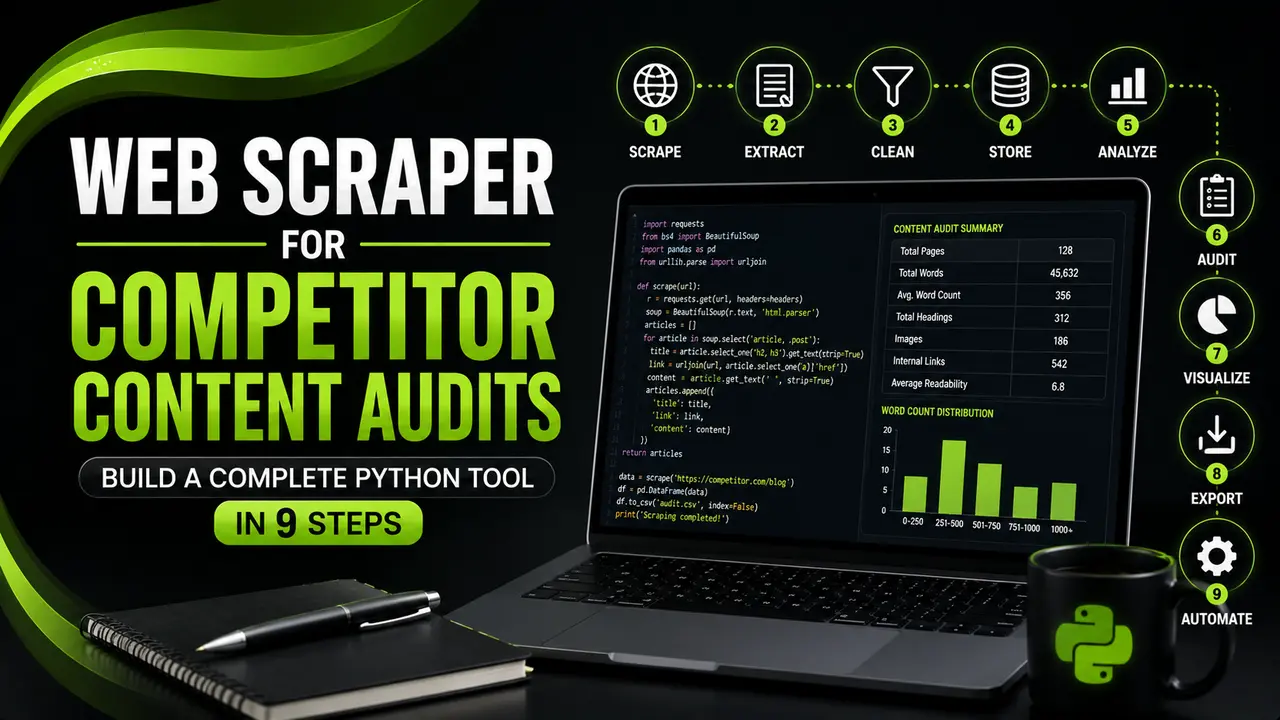
This guide builds a working web scraper for competitor content audits step by step, using Python, requests, and BeautifulSoup to pull structured data from competitor pages.
Table of Contents
ToggleChecking twenty competitor pages by hand means twenty open tabs, twenty word counts, and twenty chances to lose track of what you already reviewed. A web scraper for competitor content audits does the same job in the time it takes to make a coffee.
A client once asked us to review how forty competitor blog posts compared to their own content on word count, heading structure, and publish dates. Doing that by hand would have meant a full day of copying numbers into a spreadsheet.
The script we actually used finished the same forty pages in about ninety seconds, and it did not miss a single page or mistype a word count along the way.
That is the real value of a web scraper for competitor content audits. It is not about replacing your judgment on what makes content good.
It is about removing the copy and paste work so you can spend your time on the analysis instead of the data collection.
This guide builds a complete, respectful scraper in Python. You will fetch pages politely, respect robots.txt, pull the metrics that actually matter for a content audit, crawl a whole competitor sitemap automatically, and turn the results into a report you can act on.
Why a Web Scraper for Competitor Content Audits Beats Manual Review
A proper content audit looks at dozens or hundreds of pages across word count, heading structure, freshness, and media use. Reviewing that many pages by hand is slow, and slow work tends to get inconsistent.
One page gets a careful word count. The next gets an estimate because you are tired of counting. That inconsistency quietly wrecks the comparison you are trying to make.
A script treats every page the same way, every time. It counts words the same way on page one and page one hundred, and it never skips a field because it got bored.
Search Engine Journal and Search Engine Land both publish regular guidance on running content audits at scale, and consistency is the theme that comes up again and again.
There is also a coverage argument. A person can realistically review twenty or thirty competitor pages in a sitting before quality drops.
A script can work through an entire competitor sitemap, which might be five hundred pages, without losing accuracy on page four hundred and ninety nine.
Setting Up Your Python Scraping Environment
Keep the toolkit small. You need a way to fetch pages, a way to parse the HTML, a place to hold results, and a retry layer for the occasional slow or failed request.
# create an isolated environment so package versions don't clash
python -m venv venv
source venv/bin/activate      # Windows: venv\Scripts\activate

pip install requests beautifulsoup4 lxml pandas tenacity
The requests library handles the HTTP calls, Beautiful Soup parses the returned HTML, lxml makes that parsing fast, pandas holds and organizes the results, and Tenacity retries a request that fails without crashing the whole run.
Set a clear User-Agent header before you send a single request. Many sites use it to identify who is visiting, and an honest, identifiable value is part of scraping politely rather than pretending to be a regular browser.
HEADERS = {
    "User-Agent": "BrandellaContentAuditBot/1.0 (contact: audits@example.com)"
}
REQUEST_DELAY_SECONDS = 1.5
REQUEST_TIMEOUT = 15Reading robots.txt Before You Crawl a Single Page
Every respectful web scraper for competitor content audits starts by checking what the site actually allows. The Robots Exclusion Protocol is a published standard, and robots.txt is how a site tells automated tools which paths are off limits.
Python's standard library already includes a parser for this, so there is no reason to skip the check.
from urllib.robotparser import RobotFileParser
from urllib.parse import urljoin

def can_fetch(base_url: str, path: str, user_agent: str = "*") -> bool:
    parser = RobotFileParser()
    parser.set_url(urljoin(base_url, "/robots.txt"))
    parser.read()
    return parser.can_fetch(user_agent, path)

if __name__ == "__main__":
    site = "https://example.com"
    target = "https://example.com/blog/sample-post"
    if can_fetch(site, target):
        print("Allowed, proceed with the audit")
    else:
        print("Blocked by robots.txt, skip this path")
Build this check into every audit script from the start rather than adding it later. A site that disallows crawling on certain paths, like login areas or internal search results, is telling you plainly where the boundary sits.
- Check robots.txt first: run
can_fetchbefore requesting any URL, not after you notice a problem. - Identify yourself honestly: use a real
User-Agentstring with a contact method, not a spoofed browser signature. - Add real delays: a second or two between requests protects the target site and your own IP address from getting flagged.
- Stay on public pages: never attempt to scrape content behind a login wall or paywall for a competitor audit.
- Cache what you already fetched: save responses locally so a rerun does not hit the same server twice for no reason.
Building the Core Scraper Function
With permission checked and headers set, the core function is short. It fetches a page, retries on a transient failure, and hands the HTML to BeautifulSoup for parsing.
import time
import requests
from bs4 import BeautifulSoup
from tenacity import retry, wait_exponential, stop_after_attempt
from config import HEADERS, REQUEST_DELAY_SECONDS, REQUEST_TIMEOUT

@retry(wait=wait_exponential(multiplier=1, min=2, max=20), stop=stop_after_attempt(4))
def fetch_page(url: str) -> BeautifulSoup:
    response = requests.get(url, headers=HEADERS, timeout=REQUEST_TIMEOUT)
    response.raise_for_status()
    time.sleep(REQUEST_DELAY_SECONDS)   # be polite between requests
    return BeautifulSoup(response.text, "lxml")

def extract_basics(soup: BeautifulSoup, url: str) -> dict:
    title = soup.title.get_text(strip=True) if soup.title else ""
    meta_desc_tag = soup.find("meta", attrs={"name": "description"})
    meta_description = meta_desc_tag["content"] if meta_desc_tag else ""
    h1 = soup.find("h1")
    body_text = soup.get_text(separator=" ", strip=True)

    return {
        "url": url,
        "title": title,
        "meta_description": meta_description,
        "h1": h1.get_text(strip=True) if h1 else "",
        "word_count": len(body_text.split()),
    }
The retry decorator matters more than it looks. A single competitor site will occasionally hand back a slow response or a brief server error, and without a retry layer that one failure can quietly drop a page from your whole audit.
Extracting the Metrics That Actually Matter for the Audit
A web scraper for competitor content audits earns its real value once you look past word count alone. A content audit gets useful when you add heading structure, link counts, media presence, and whether the page carries schema markup.
def extract_content_metrics(soup, url: str, domain: str) -> dict:
    headings = {
        "h1_count": len(soup.find_all("h1")),
        "h2_count": len(soup.find_all("h2")),
        "h3_count": len(soup.find_all("h3")),
    }

    links = soup.find_all("a", href=True)
    internal_links = [a for a in links if domain in a["href"]]
    external_links = [a for a in links if domain not in a["href"] and a["href"].startswith("http")]

    schema_tags = soup.find_all("script", type="application/ld+json")

    return {
        "url": url,
        **headings,
        "internal_link_count": len(internal_links),
        "external_link_count": len(external_links),
        "image_count": len(soup.find_all("img")),
        "has_schema_markup": len(schema_tags) > 0,
}| Metric | What It Reveals | Why It Matters for the Audit |
|---|---|---|
| Word count | Depth of coverage on the topic | Flags thin pages that may need expanding |
| Heading structure | How the page is organized | Reveals scannability and topic breakdown |
| Internal and external links | How the page connects to other content | Shows linking patterns worth matching or beating |
| Image count | How visual the page is | Highlights gaps in media richness |
| Schema markup | Whether structured data is present | Signals technical SEO maturity |
Crawling an Entire Competitor Sitemap Automatically
A single page tells you very little about a competitor's overall content strategy. The real value of a web scraper for competitor content audits shows up once you point it at their whole sitemap.
Most sites publish one at a predictable path, so pulling every blog URL is usually a short step.
import requests
import pandas as pd
from bs4 import BeautifulSoup
from scraper import fetch_page, extract_basics
from metrics import extract_content_metrics
from config import HEADERS

def get_sitemap_urls(sitemap_url: str) -> list:
    response = requests.get(sitemap_url, headers=HEADERS, timeout=15)
    soup = BeautifulSoup(response.text, "xml")
    return [loc.get_text() for loc in soup.find_all("loc")]

def audit_competitor(sitemap_url: str, domain: str, limit: int = 50) -> pd.DataFrame:
    urls = get_sitemap_urls(sitemap_url)[:limit]
    rows = []

    for url in urls:
        try:
            soup = fetch_page(url)
            basics = extract_basics(soup, url)
            metrics = extract_content_metrics(soup, url, domain)
            rows.append({**basics, **metrics})
        except Exception as error:
            print(f"Skipped {url}: {error}")

    return pd.DataFrame(rows)

if __name__ == "__main__":
    df = audit_competitor("https://competitor.com/sitemap.xml", "competitor.com")
    df.to_csv("competitor_audit.csv", index=False)
    print(f"Audited {len(df)} pages")
Notice the try and except block wrapped around every page. A single broken page should never take down a fifty page audit, so one failure gets logged and the crawl moves on.
Turning Raw Data Into an Actual Content Audit Report
A CSV full of numbers is not a report yet. The last step is comparing what you found against your own content, or against the other competitors you audited.
import pandas as pd

def summarize_audit(df: pd.DataFrame) -> pd.DataFrame:
    summary = pd.DataFrame({
        "avg_word_count": [df["word_count"].mean()],
        "median_word_count": [df["word_count"].median()],
        "avg_h2_count": [df["h2_count"].mean()],
        "pct_with_schema": [df["has_schema_markup"].mean() * 100],
        "pages_below_800_words": [(df["word_count"] < 800).sum()],
    })
    return summary.round(1)

if __name__ == "__main__":
    df = pd.read_csv("competitor_audit.csv")
    print(summarize_audit(df))
Numbers like these turn into decisions fast. If a competitor averages 1,800 words on their top ranking posts and your own average sits at 900, that is a specific, evidence backed gap to close rather than a vague feeling that your content should be longer.
Handling Blocks, JavaScript Rendered Pages, and Other Failures
A web scraper for competitor content audits will eventually run into a page that fights back. Some sites block automated requests outright, and others render their content with JavaScript, so the HTML that requests receives is nearly empty.
- 403 or 429 responses: slow down further, respect a
Retry-Afterheader if one is present, and never retry aggressively against a site that is actively refusing you. - Empty or near empty HTML: if word count comes back near zero on a page you can see content on in a browser, the site likely renders with JavaScript and needs a headless browser instead.
- Encoding issues: set
response.encodingexplicitly when special characters show up as garbled text. - Timeouts: a generous but finite timeout, paired with the retry decorator, keeps one slow server from stalling the whole audit.
- Sites that require JavaScript: reach for Playwright instead of
requests. It runs an actual browser engine and waits for the page to render before you read the HTML.
from playwright.sync_api import sync_playwright

def fetch_rendered_html(url: str) -> str:
    with sync_playwright() as pw:
        browser = pw.chromium.launch(headless=True)
        page = browser.new_page()
        page.goto(url, wait_until="networkidle")
        html = page.content()
        browser.close()
        return html
Reach for this only when you actually need it. A headless browser is slower and heavier than a plain request, so keep it as a fallback for JavaScript rendered pages rather than your default approach.
Real Python's guide to the requests library covers most of the timeout and error handling patterns worth knowing before you run a large crawl.
Legal and Ethical Considerations for Competitor Scraping
Scraping publicly visible pages for a competitor analysis sits in genuinely nuanced territory, and this guide is not legal advice. The details depend on your jurisdiction, the site's terms of service, and exactly what you collect.
What is worth knowing is that courts have addressed this question directly. In hiQ Labs v. LinkedIn, a United States appeals court found that scraping data a site has made publicly accessible, without logging in, did not violate federal computer fraud law on its own.
That ruling did not settle every question. A site's terms of service can still create separate contract obligations, and scraping personal data brings privacy rules like GDPR into play regardless of what a court decided about one specific statute.
For a content audit built for internal strategy work, the practical guidance is simple. Stay on public pages, respect robots.txt, identify your bot honestly, keep request rates low, and never collect personal information you do not need.
If you want data with a clearer license and none of this ambiguity, an official API is always the safer starting point, the same way it is for keyword research tools that offer one.
Crawl Delay and Duration Estimator
Pick a crawl pace and a page count to see roughly how long a polite audit takes.
Watch: Web Scraping With Python and BeautifulSoup
Watching the request and parse cycle run in real time makes it click faster than reading code alone. freeCodeCamp.org, a well known nonprofit coding education channel, published a full crash course covering exactly the requests and BeautifulSoup pattern used throughout this guide.
Video credit: freeCodeCamp.org.
The fundamentals in that video, fetching a page and walking its parsed tags, are the same fundamentals this entire pipeline builds on. Everything past that point is really just organizing what BeautifulSoup already gives you.
Related Articles
Frequently Asked Questions
Scraping publicly visible pages without logging in has generally held up in cases like hiQ Labs v. LinkedIn, but this is not legal advice, and terms of service and privacy laws can still apply. Stay on public content, respect robots.txt, and keep your request rate low.
You do not typically need explicit permission for publicly available pages, but checking robots.txt and following any stated crawling rules is the closest thing to asking politely. If a site clearly disallows a path, treat that as a firm no.
Start with requests and beautifulsoup4 for most sites. Reach for Playwright only when a page renders its content with JavaScript and the plain HTML comes back nearly empty.
Add real delays between requests, use an honest User-Agent header, respect robots.txt, and back off completely if you see repeated 403 or 429 responses. A slow, polite crawl rarely gets blocked.
Usually not. If the rendered content only appears after JavaScript runs, plain requests will return incomplete HTML, and you will need a headless browser tool like Playwright instead.
What We Learn Today
Automation removes inconsistency
A web scraper for competitor content audits treats every page the same way, unlike a tired manual reviewer.
robots.txt comes first
Check permission before every crawl using Python's built in robot parser, not after something goes wrong.
Word count alone is not enough
Headings, links, images, and schema markup together tell the real content story.
Sitemaps unlock full coverage
Crawling a whole sitemap reveals patterns a handful of manually chosen pages cannot show.
JavaScript needs a different tool
Playwright picks up where plain requests calls stop working on rendered pages.
Ethics is not optional
Polite delays, honest identification, and public data only keep an audit sustainable and defensible.
Ready to Build Your Own Content Audit Workflow?
Pair this web scraper for competitor content audits with a full audit process to turn competitor data into a real content plan.
Related Posts



Previous Post
Next Post
Previous Post
Next Post





- Artificial Intelligence
- Content
- Core Web Vitals
- Development
- Digital Marketing
- Display Advertising
- Google Ads
- Google Search Console
- GTM
- HTML
- HTML CSS
- JavaScript
- Keyword Research
- Link Building
- LinkedIn Ads
- Local SEO
- Meta Ads
- Mobile SEO
- Off-Page SEO
- On-Page SEO
- Paid Media
- Paid Media Analytics
- PHP
- PPC Strategy
- Python
- SEO
- SEO Basics
- SEO Tools
- Social
- Technical SEO




