Now Reading: JavaScript Web Workers Explained: 7 Real Steps to Offload Heavy Tasks
-
01
JavaScript Web Workers Explained: 7 Real Steps to Offload Heavy Tasks
JavaScript Web Workers Explained: 7 Real Steps to Offload Heavy Tasks

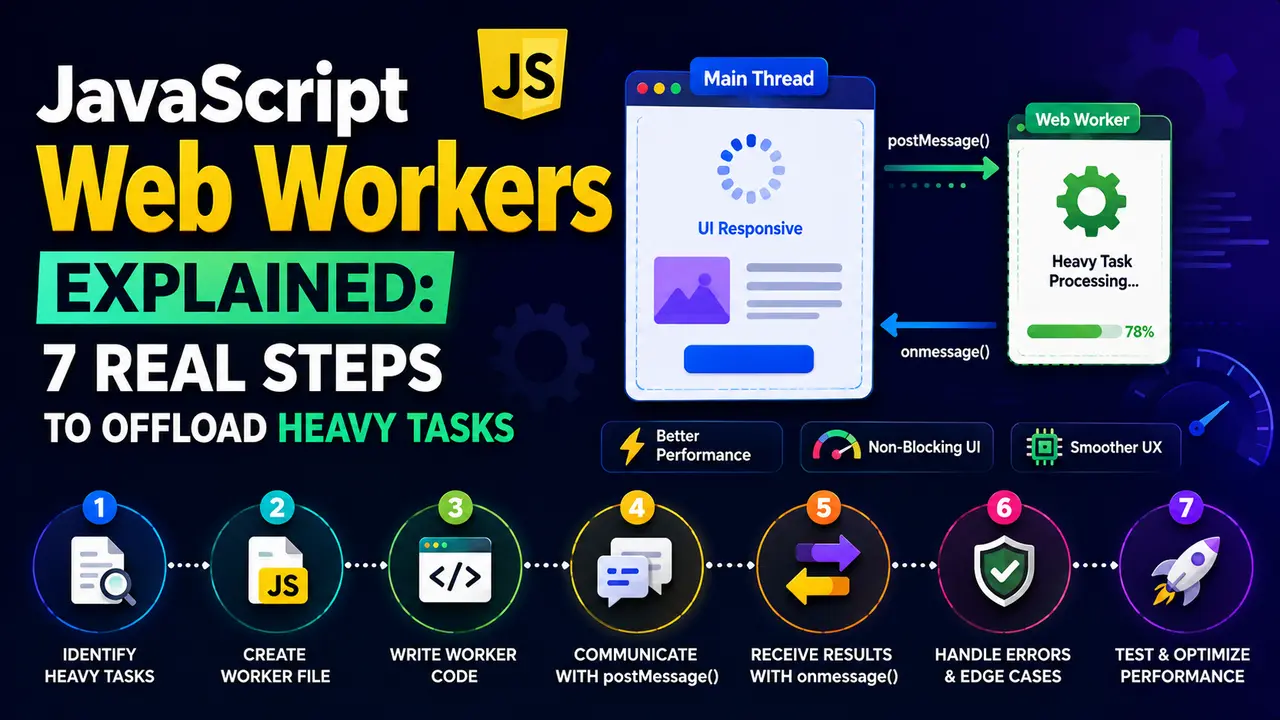
See real browser proof of JavaScript web workers keeping a page responsive during heavy computation, plus the code to build one.
Ever clicked a button and watched the entire page freeze, scroll included, while it crunched through some data? That freeze is the exact problem javascript web workers exist to solve, and below is real proof of both the freeze and the fix.
JavaScript Web Workers Explained: Why the Main Thread Needs Help
A browser tab runs your JavaScript on a single main thread, the same thread responsible for scrolling, clicking, typing, and painting the page. Covered in more depth in understanding the JavaScript event loop, that thread can only do one thing at a time.
A heavy synchronous task, parsing a large CSV, filtering thousands of rows, running an image filter, hogs that single thread completely. Nothing else gets a turn until it finishes. Javascript web workers give that heavy work a second thread to run on instead, one that never touches the page at all.
Browser support for javascript web workers is about as safe a bet as JavaScript features get. Every browser tracked on caniuse.com has shipped basic Worker support for well over a decade, including every version currently in meaningful use, so there is no real compatibility risk to weigh before reaching for one. The feature guide on web.dev covers the same ground from a performance angle, framing workers as one of the more reliable tools for moving work off the main thread without touching a bundler or a transpiler at all, and without shipping a single byte of polyfill.
Proving the Problem: What Happens Without a Worker
Before building the fix, it helps to see the actual problem measured, not just described. A small heartbeat counter ticking every 20 milliseconds makes a frozen main thread impossible to miss.
let ticks = 0;
setInterval(() => { ticks++; }, 20);

const ticksBefore = ticks;
countPrimesUpTo(3000000); // heavy, synchronous, runs right on the main thread
const ticksDuringWork = ticks - ticksBefore;
Running that exact page in a real browser, counting every prime number below three million entirely on the main thread, gives an honest measurement of how many heartbeat ticks actually survived.
That heartbeat interval is not a toy metric either. It is a rough proxy for the same thing Core Web Vitals measures as Interaction to Next Paint, how long a real click, tap, or keypress has to wait before the browser can respond to it. A frozen main thread during a synchronous computation is exactly the pattern that drags INP scores down on a page that otherwise looks fast, which is one more reason javascript web workers matter beyond raw code cleanliness.

Actual output from a real Chromium page. Zero heartbeat ticks survived 803ms of synchronous work.
Chrome DevTools' Performance panel shows this same freeze visually, as one long, solid task bar on the main thread track with nothing else able to run underneath it.
Creating a Real Worker and Sending It Work
A worker starts life as its own separate JavaScript file, loaded with new Worker(). Communication between the main thread and the worker only ever happens through messages, never through shared variables or direct function calls.
self.onmessage = function (e) {
  const primeCount = countPrimesUpTo(e.data.limit);
  self.postMessage({ primeCount });
};const worker = new Worker('worker.js');
worker.onmessage = (e) => console.log(e.data.primeCount);
worker.postMessage({ limit: 3000000 });The full behavior of javascript web workers, including exactly which global objects and APIs are available inside one, is defined in the HTML Living Standard's Web workers section, not in a separate spec of its own. Skimming it is worth the ten minutes it takes, because it settles arguments code comments cannot: which timers exist inside a worker, why importScripts still exists alongside module workers, and what exactly self refers to once there is no window in scope anymore.
A worker should also register an error handler before it ever gets sent real work, since an uncaught exception inside a worker fires an ErrorEvent on the worker object rather than crashing anything visible on the page, and that event is trivial to miss entirely if nothing on the main thread is listening for it.
Running the identical prime counting work, same limit, same real browser, this time entirely inside that worker, produces a dramatically different heartbeat result.

Actual output from a real Web Worker. The same 800ms of work, and the main thread heartbeat never missed a beat.
Data passed to postMessage() is not shared directly. The browser runs it through the structured clone algorithm, copying the value across to the worker rather than handing over a live reference, which is exactly why a worker cannot accidentally corrupt state on the main thread.
What a Worker Can and Cannot Do
A worker's isolation is exactly what makes it safe, and exactly what limits it. It runs in its own global scope with no access to the page at all.
| Capability | Main Thread | Web Worker |
|---|---|---|
| Access the DOM directly | Yes | No, not at all |
| Run heavy synchronous loops safely | No, blocks everything | Yes, isolated on its own thread |
| Make fetch requests | Yes | Yes |
| Read localStorage | Yes | No |
| Communicate with the other side | Via postMessage | Via postMessage |
That missing DOM access is not a bug to work around, it is the entire safety guarantee. A worker physically cannot introduce a race condition on the page's rendering because it has no path to touch it directly.
The comparison above covers a dedicated worker, the kind created with new Worker() that belongs to a single page. A SharedWorker variant exists too, reachable from multiple tabs or iframes on the same origin at once, though it is rarer in practice and less consistently supported across browsers than the dedicated flavor. For the large majority of javascript web workers use cases, especially anything scoped to a single page's own heavy computation, a plain dedicated worker stays the simpler and more predictable choice.
Real World Use Cases in Marketing and SEO Tooling
A client side tool that filters, sorts, or scores a large dataset entirely in the browser, like an SEO audit tool built in JavaScript crunching through hundreds of crawled URLs, is a natural fit for offloading that scoring logic into a worker.
A page still making its own network requests, whether through fetch or axios, can kick those requests off from inside a worker too, then hand the parsed, processed result back to the main thread once it is ready to render.
A rapid, repeated trigger for that kind of processing, a live filter box reacting to every keystroke, still benefits from the debounce pattern covered in an earlier guide, worker or no worker, since there is no reason to start ten worker jobs for ten keystrokes typed in under a second.
A large table of crawl results rendered entirely on the client, say a few thousand rows pulled back from a site audit, scored and sorted client side by title length, word count, and internal link count all at once, is another realistic case for javascript web workers in a marketing tool. Running that scoring pass on the main thread would visibly stutter the page the moment a user typed into a filter box while it ran; moving it into a worker keeps the interface responsive the entire time the scoring happens in the background.
Web Workers vs Other Async Tools: When Not to Reach for One
A worker solves a CPU problem, not a waiting problem. A slow network request already does not block the main thread, promises and async/await handle that case perfectly well without any worker involved.
Reaching for a worker to wrap a simple fetch call adds real overhead, message passing, serialization, a second thread to manage, for a problem that was never actually blocking anything in the first place. Save javascript web workers for genuinely heavy, synchronous computation instead.
On the server, Node's own worker_threads module solves the identical problem for a Node process, offloading CPU heavy work off the event loop that would otherwise stall every other request a server is handling.
Beyond Comlink, the npm registry lists a long tail of small helper packages built around javascript web workers, most of them thin wrappers over the same postMessage plumbing rather than anything structurally different underneath. Before adding one as a dependency, it is worth confirming what problem it actually solves, promise wrapping, request and response pairing, worker pooling, since the raw Worker API alone is often already enough for a single, well scoped task like the prime counting example used throughout this guide.
Common Mistakes When Using Web Workers
Most javascript web workers bugs come from forgetting the isolation rules above, not from the worker API itself being unreliable.
- Trying to touch the DOM from inside a worker: it simply is not there. Any DOM manipulation has to happen back on the main thread after the worker responds.
- Forgetting to call worker.terminate(): a worker that is no longer needed but never terminated keeps its thread alive, quietly leaking memory over a long running page.
- Sending huge payloads through postMessage repeatedly: the structured clone algorithm still costs time proportional to the data size, so a very large object copied on every message adds real overhead.
- Reaching for a worker for a simple network call: fetch and axios already run off the main thread's blocking path, a worker adds nothing there.
- Not handling worker errors: a worker's
onerrorhandler needs to be set explicitly, an uncaught error inside a worker will not automatically surface on the main thread otherwise.
Frequently Asked Questions
A heavy, synchronous computation that would otherwise freeze the page. A worker runs that work on its own thread so scrolling, clicking, and rendering keep working the entire time.
No, never. A worker runs in a completely separate global scope with no reference to the page at all, which is exactly what makes it safe to run heavy code on.
Through postMessage, which copies the data using the structured clone algorithm rather than sharing a live reference, and the worker receives it inside its onmessage handler.
Usually not. A network request already does not block the main thread, so wrapping it in a worker adds message passing overhead without solving a real problem.
Yes, Node's worker_threads module solves the same problem for a Node process, offloading CPU heavy work off the single event loop thread a Node server otherwise shares for every request.
No. Libraries like Comlink, available on npm, wrap the raw message passing in a proxy that lets a worker function be called as if it were a normal async function.
What We Learn Today
Heavy synchronous work blocks the main thread
Proven above with a real 803ms freeze, zero heartbeats.
A worker runs on a genuinely separate thread
The main thread heartbeat kept ticking, 41 times, real proof.
Workers have no DOM access
That isolation is the safety guarantee, not a limitation to fight.
Communication only happens via postMessage
Structured clone copies data, never a shared live reference.
Not every async task needs a worker
Fetch and promises already run off the blocking path.
Node has its own equivalent
worker_threads solves the same problem server side.
Ready to Stop a Heavy Task From Freezing Your Page?
Javascript web workers turn a page that visibly locks up during heavy computation into one that stays responsive the entire time, with real proof above, not just a promise.