Now Reading: Fetch API vs Axios: 8 Real Differences That Actually Matter
-
01
Fetch API vs Axios: 8 Real Differences That Actually Matter
Fetch API vs Axios: 8 Real Differences That Actually Matter

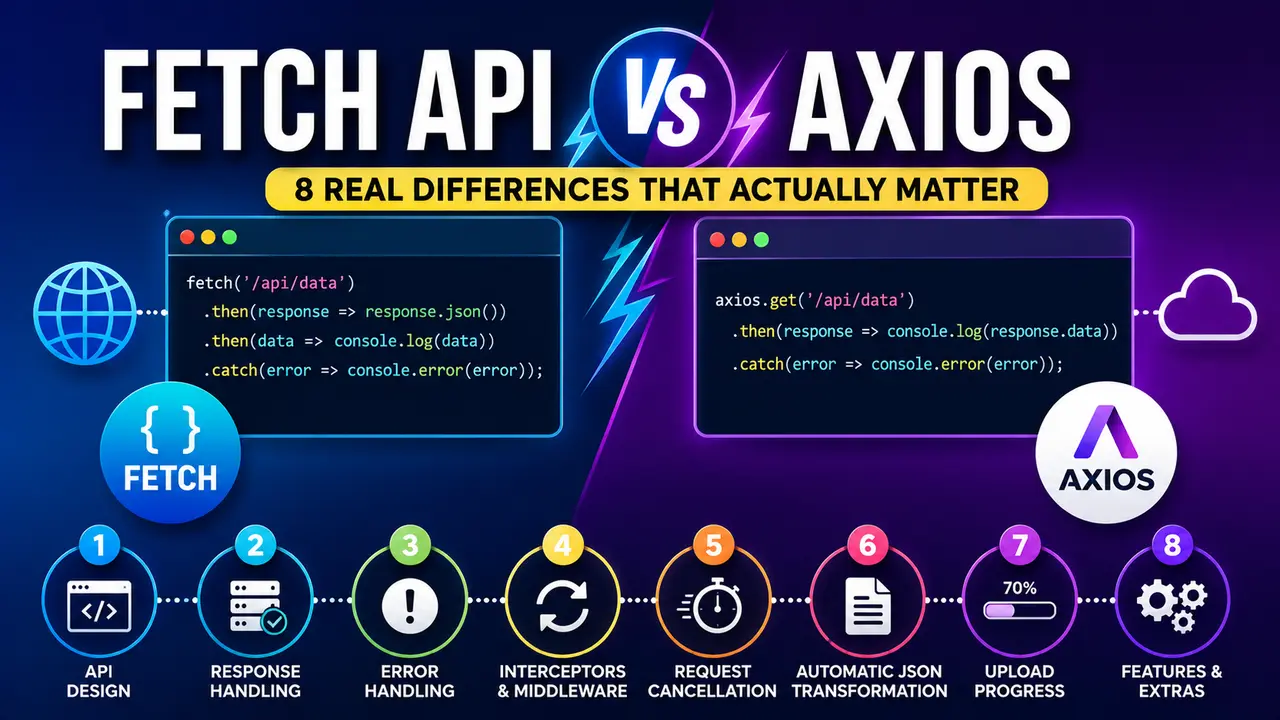
A practical fetch api vs axios comparison with real requests against a local server, showing how each one actually handles a failed response.
Ever had an API call fail silently, no error, no crash, just a broken looking page? There is a good chance the fetch api vs axios choice behind that request is exactly why, and it comes down to one small design decision most developers never think to question.
Fetch API vs Axios: What Each One Actually Is
The Fetch API is built into every modern browser and, since Node 18, into Node itself. Nothing to install, nothing to import, it is just there, ready to make an HTTP request with a single global function.
Axios is a third party library you add to a project through npm. It wraps the same underlying browser networking machinery in an interface built specifically to smooth over the rough edges the Fetch API leaves for you to handle yourself.
Neither one is simply better. The fetch api vs axios decision is really a question of how much convenience you want baked in versus how much you would rather write, or avoid shipping, yourself.
Both end up doing the same underlying job, sending a request and eventually handing back a response, so most of what actually separates the fetch api vs axios choice shows up only once something goes wrong, not while everything is working.
The Fetch API in Practice: A Basic GET Request
A fetch call returns a Response object, not the parsed data itself. Getting to actual JSON takes a second step, calling .json() on that response, which itself returns another promise.
const res = await fetch('http://127.0.0.1:8091/api/user');
console.log(`status ${res.status}, ok=${res.ok}`);

const data = await res.json();
console.log(data);
Running that against a real local server, one endpoint that returns a normal 200 response and one that returns a 404, shows the first genuinely surprising thing about the Fetch API.

Actual output. The 404 request resolved just fine, fetch never throws for it, res.ok is the only signal something went wrong.
Always check res.ok (or res.status) before trusting a fetch response. A 404 or 500 page from the server still resolves successfully as far as the promise is concerned.
Axios in Practice: The Same Request, a Different Contract
Axios parses JSON automatically, no second .json() call needed, and the parsed body lands directly on response.data. That alone removes a step every fetch call needs.
const axios = require('axios');

const res = await axios.get('http://127.0.0.1:8091/api/user');
console.log(`status ${res.status}`);
console.log(res.data);
Running the exact same two requests, the healthy endpoint and the 404, against Axios instead produces a completely different pattern for the failing one.

Actual output. The exact same 404 that fetch resolved quietly, axios throws, landing in a catch block automatically.
Node.js only gained a built in, global fetch() in Node 18, released in 2022. Before that, every single Node project needed a separate package just to make an HTTP request, exactly the gap libraries like Axios were built to fill on both the server and the browser.
The Core Difference: What Actually Counts as an Error
Everything demonstrated above traces back to one design decision. The Fetch API specification on MDN only rejects a fetch promise for a genuine network failure, a broken connection, a timeout, a CORS block. An HTTP error status is not considered a failure at the fetch level at all.
Axios makes the opposite choice by default. Any response outside the 2xx range gets treated as a rejected promise, which is often closer to what a developer actually wants without extra boilerplate on every single call.
Wrapping every fetch call in a small helper that checks res.ok and throws manually recreates axios' default behavior with plain fetch, without adding a dependency to the project.
Neither behavior is a bug. Both are documented, deliberate design choices, and the real mistake is not knowing which one a given codebase is using. A fetch api vs axios mismatch inside the same project, some calls checked, some not, is where a genuinely broken looking page with no visible error usually comes from.
JSON Parsing, Timeouts, and Interceptors: The Convenience Layer
Beyond error handling, axios bundles several conveniences that fetch leaves entirely up to the developer to build.
| Feature | Fetch API | Axios |
|---|---|---|
| Automatic JSON parsing | No, call .json() manually | Yes, on response.data |
| Throws on HTTP error status | No, check res.ok yourself | Yes, by default |
| Request timeout | Manual, via AbortController | Built in timeout option |
| Request/response interceptors | Not built in | Built in |
| Upload progress events | Limited, more complex | Built in |
| Bundle size added | Zero, it is native | A real dependency to ship |
None of these are things fetch cannot do. AbortController handles timeouts and cancellation, and a thin wrapper function can add interceptor style behavior. Axios just ships all of it already written and tested.
Bundle Size and Browser Support Are Part of the Decision Too
Every byte of axios added to a project has to be downloaded, parsed, and executed by every visitor. Checking a package's real cost on Bundlephobia before adding it is worth the thirty seconds it takes.
Browser support for the native Fetch API is effectively universal at this point. Can I Use's fetch compatibility table shows support across every modern browser, formalized in the WHATWG Fetch Standard that every implementation follows.
None of this makes axios a poor choice on its own. A well maintained, actively used dependency with predictable behavior across a large codebase is often worth more than the bytes it costs, especially once dozens of developers are calling the same networking code across a large application.
Edge functions and serverless environments add another wrinkle worth knowing about. Some lightweight runtimes only expose the native Fetch API and do not support every Node built in module axios can rely on internally, so a script built for a traditional Node server does not always run unmodified inside a Cloudflare Worker or a similarly restricted edge environment. Checking a platform's documented runtime support before committing to either library saves a rewrite later.
Real World Use Cases: When to Reach for Each
A small script calling one or two endpoints, like a page fetching data for a lightweight SEO audit tool built in JavaScript, rarely needs everything axios brings along. Plain fetch with a small error checking wrapper covers it cleanly, and this is usually where the fetch api vs axios choice leans hardest toward fetch.
A larger application making dozens of calls to different services, like a chatbot built against the OpenAI API, benefits far more from axios' interceptors, consistent error handling, and built in timeout support across every one of those calls.
Either way, every one of these calls still runs through the same underlying mechanics covered in understanding the JavaScript event loop, since both fetch and axios resolve through promises processed as microtasks. Rapid fire calls triggered by user typing, like a live search box, are also a natural fit for the debounce pattern covered in an earlier guide, regardless of which library actually sends the request.
Common Mistakes Developers Make With Either Library
Most fetch api vs axios bugs in production trace back to a small handful of assumptions that turn out to be wrong, and nearly all of them are quick to fix once the underlying assumption is named out loud.
- Assuming fetch throws on a 404 or 500: it does not. A try/catch around a plain fetch call will silently let an HTTP error through unless res.ok is checked explicitly.
- Forgetting axios already parsed the body: calling .json() on an axios response, a habit carried over from fetch, throws immediately since response.data is already a plain object.
- Adding axios for a single API call: a tiny script that calls one endpoint once rarely justifies the added dependency weight.
- Never setting a timeout: a hung request with no timeout on either library can leave a page waiting indefinitely on a server that stopped responding.
- Not reading the GitHub issue tracker before a major version bump: axios' release notes on GitHub occasionally include breaking changes worth reading before upgrading a production dependency.
Frequently Asked Questions
Error handling. Fetch only rejects for a network failure, treating a 404 or 500 as a successful resolution you have to check yourself. Axios rejects automatically on any status outside the 2xx range.
No. It is built into every modern browser and into Node.js since version 18, available as a global function with nothing to import.
For a large application making many calls, often yes, for the interceptors, automatic JSON parsing, and consistent error handling. For a small script, plain fetch usually covers it without an added dependency.
Pair it with an AbortController, passing its signal into the fetch options and calling abort() after a set delay. Axios offers this as a single built in timeout option instead.
Fetch, since it is native and universally supported in modern browsers. Axios works everywhere fetch does too, since modern versions can run on top of it, but adds its own bundle weight to get there.
Yes, though most teams pick one for consistency. Mixing both is common during a gradual migration away from axios, or when a specific call only needs a quick native fetch.
What We Learn Today
Fetch is native, axios is a library
One ships with the browser, the other with npm.
Fetch never throws on an HTTP error
Proven above with a real 404 that resolved quietly.
Axios throws outside the 2xx range
The same 404 landed in a real catch block instead.
Axios auto parses JSON
Fetch needs an explicit .json() call every time.
Interceptors and timeouts come built in
Fetch needs AbortController and manual wrapping instead.
Bundle size still matters
Fetch adds zero bytes, axios is a real dependency.
Ready to Pick the Right Tool for Your Next API Call?
The fetch api vs axios decision comes down to how much error handling and convenience you want built in versus how many bytes you are willing to ship to get it. Both are solid, well tested choices; the mistake is only ever picking blindly instead of on purpose.