

- Home
- SEODiscover the latest updates from across the United States, including politics, culture, economy, and trending stories. Stay informed on the key events shaping the nation and the topics everyone’s talking about.
- Technical SEOLearn technical SEO concepts including crawling, indexing, XML sitemaps, robots.txt, canonical tags, site architecture, and website performance.
- Local SEOOptimize your business for local seo with Google Business Profile, local citations, reviews, maps, and location-based SEO.
- Mobile SEOImprove your website’s mobile seo performance with responsive design, mobile-first indexing, usability, and page speed optimization.
- On-Page SEOExplore on-page seo optimization techniques such as title tags, meta descriptions, headings, URLs, internal linking, and content optimization.
- Off-Page SEODiscover off-page SEO strategies such as backlinks, digital PR, brand mentions, outreach, and authority building.
- SEO ToolsExplore the best SEO tools for keyword research, technical audits, backlink analysis, rank tracking, and website optimization.
- Core Web VitalsLearn how to improve Core Web Vitals including LCP, INP, CLS, page speed, and overall user experience for better rankings.
- Keyword ResearchLearn how to find profitable keywords, analyze search intent, evaluate competition, and build effective keyword strategies.
- Link BuildingMaster ethical link building techniques, backlink analysis, outreach methods, guest posting, and authority growth strategies.
- Google Search ConsoleLearn how to use Google Search Console to monitor indexing, fix errors, analyze search performance, and improve SEO.
- SEO BasicsLearn the fundamentals of search engine optimization (SEO Basics), including how search engines work, SEO terminology, and beginner-friendly best practices.
- Paid Media
- Display AdvertisingLearn display advertising strategies, banner ads, audience targeting, remarketing, Google Display campaigns, and optimization techniques.
- Google AdsLearn Google Ads strategies, campaign setup, bidding, keywords, Performance Max, Search Ads, and optimization techniques.
- LinkedIn AdsLearn LinkedIn Ads strategies for B2B marketing, lead generation, audience targeting, campaign optimization, and paid social advertising.
- Meta AdsLearn Meta Ads strategies for Facebook and Instagram, including campaign setup, targeting, retargeting, and performance optimization.
- Paid Media AnalyticsLearn paid media analytics, including CPC, CTR, CPA, ROAS, conversion tracking, attribution, reporting, and campaign performance analysis.
- PPC StrategyLearn effective PPC strategies, campaign planning, bidding, keyword targeting, landing pages, conversion optimization, and more.
- ContentTransform your living spaces with inspiration, tips, and trends in interior design. From minimalist decor to bold statements, find ideas for every style and budget.
- Social
- Digital MarketingExplore stories and advice on living your best life. From personal growth to entertainment, dive into the latest in lifestyle trends and inspiration.
- Artificial IntelligenceStay informed about health and wellness with expert advice, fitness tips, and the latest medical breakthroughs. Your guide to a healthier and happier life.
- DevelopmentYou will find development related educational articles
- GTMLearn Google Tag Manager (GTM) with practical guides for tags, triggers, variables, tracking, conversions, and website analytics implementation.
- HTMLLearn HTML with simple tutorials, examples, tags, elements, attributes, and best practices for building modern web pages.
- HTML CSSLearn HTML CSS together with practical tutorials, examples, layouts, styling techniques, responsive design, and modern web development practices.
- HTML JSLearn HTML JS – JavaScript with practical tutorials and examples for adding interactivity, dynamic content, events, and functionality to web pages.
- JavaScriptExplore JavaScript tutorials, examples, concepts, and practical techniques for creating interactive and dynamic websites and web applications.
- PHPLearn PHP programming with practical tutorials, examples, functions, syntax, and web development techniques for beginners and developers.
- PythonLearn Python programming with practical tutorials, examples, syntax, functions, automation techniques, and useful programming concepts.
- Home
- SEODiscover the latest updates from across the United States, including politics, culture, economy, and trending stories. Stay informed on the key events shaping the nation and the topics everyone’s talking about.
- Technical SEOLearn technical SEO concepts including crawling, indexing, XML sitemaps, robots.txt, canonical tags, site architecture, and website performance.
- Local SEOOptimize your business for local seo with Google Business Profile, local citations, reviews, maps, and location-based SEO.
- Mobile SEOImprove your website’s mobile seo performance with responsive design, mobile-first indexing, usability, and page speed optimization.
- On-Page SEOExplore on-page seo optimization techniques such as title tags, meta descriptions, headings, URLs, internal linking, and content optimization.
- Off-Page SEODiscover off-page SEO strategies such as backlinks, digital PR, brand mentions, outreach, and authority building.
- SEO ToolsExplore the best SEO tools for keyword research, technical audits, backlink analysis, rank tracking, and website optimization.
- Core Web VitalsLearn how to improve Core Web Vitals including LCP, INP, CLS, page speed, and overall user experience for better rankings.
- Keyword ResearchLearn how to find profitable keywords, analyze search intent, evaluate competition, and build effective keyword strategies.
- Link BuildingMaster ethical link building techniques, backlink analysis, outreach methods, guest posting, and authority growth strategies.
- Google Search ConsoleLearn how to use Google Search Console to monitor indexing, fix errors, analyze search performance, and improve SEO.
- SEO BasicsLearn the fundamentals of search engine optimization (SEO Basics), including how search engines work, SEO terminology, and beginner-friendly best practices.
- Paid Media
- Display AdvertisingLearn display advertising strategies, banner ads, audience targeting, remarketing, Google Display campaigns, and optimization techniques.
- Google AdsLearn Google Ads strategies, campaign setup, bidding, keywords, Performance Max, Search Ads, and optimization techniques.
- LinkedIn AdsLearn LinkedIn Ads strategies for B2B marketing, lead generation, audience targeting, campaign optimization, and paid social advertising.
- Meta AdsLearn Meta Ads strategies for Facebook and Instagram, including campaign setup, targeting, retargeting, and performance optimization.
- Paid Media AnalyticsLearn paid media analytics, including CPC, CTR, CPA, ROAS, conversion tracking, attribution, reporting, and campaign performance analysis.
- PPC StrategyLearn effective PPC strategies, campaign planning, bidding, keyword targeting, landing pages, conversion optimization, and more.
- ContentTransform your living spaces with inspiration, tips, and trends in interior design. From minimalist decor to bold statements, find ideas for every style and budget.
- Social
- Digital MarketingExplore stories and advice on living your best life. From personal growth to entertainment, dive into the latest in lifestyle trends and inspiration.
- Artificial IntelligenceStay informed about health and wellness with expert advice, fitness tips, and the latest medical breakthroughs. Your guide to a healthier and happier life.
- DevelopmentYou will find development related educational articles
- GTMLearn Google Tag Manager (GTM) with practical guides for tags, triggers, variables, tracking, conversions, and website analytics implementation.
- HTMLLearn HTML with simple tutorials, examples, tags, elements, attributes, and best practices for building modern web pages.
- HTML CSSLearn HTML CSS together with practical tutorials, examples, layouts, styling techniques, responsive design, and modern web development practices.
- HTML JSLearn HTML JS – JavaScript with practical tutorials and examples for adding interactivity, dynamic content, events, and functionality to web pages.
- JavaScriptExplore JavaScript tutorials, examples, concepts, and practical techniques for creating interactive and dynamic websites and web applications.
- PHPLearn PHP programming with practical tutorials, examples, functions, syntax, and web development techniques for beginners and developers.
- PythonLearn Python programming with practical tutorials, examples, syntax, functions, automation techniques, and useful programming concepts.
Now Reading: Canonical Tag Implementation Guide with Real HTML Examples
-
01
Canonical Tag Implementation Guide with Real HTML Examples
- Home//
- SEO//Discover the latest updates from across the United States, including politics, culture, economy, and trending stories. Stay informed on the key events shaping the nation and the topics everyone’s talking about.
- Technical SEO//Learn technical SEO concepts including crawling, indexing, XML sitemaps, robots.txt, canonical tags, site architecture, and website performance.
- Local SEO//Optimize your business for local seo with Google Business Profile, local citations, reviews, maps, and location-based SEO.
- Mobile SEO//Improve your website’s mobile seo performance with responsive design, mobile-first indexing, usability, and page speed optimization.
- On-Page SEO//Explore on-page seo optimization techniques such as title tags, meta descriptions, headings, URLs, internal linking, and content optimization.
- Off-Page SEO//Discover off-page SEO strategies such as backlinks, digital PR, brand mentions, outreach, and authority building.
- SEO Tools//Explore the best SEO tools for keyword research, technical audits, backlink analysis, rank tracking, and website optimization.
- Core Web Vitals//Learn how to improve Core Web Vitals including LCP, INP, CLS, page speed, and overall user experience for better rankings.
- Keyword Research//Learn how to find profitable keywords, analyze search intent, evaluate competition, and build effective keyword strategies.
- Link Building//Master ethical link building techniques, backlink analysis, outreach methods, guest posting, and authority growth strategies.
- Google Search Console//Learn how to use Google Search Console to monitor indexing, fix errors, analyze search performance, and improve SEO.
- SEO Basics//Learn the fundamentals of search engine optimization (SEO Basics), including how search engines work, SEO terminology, and beginner-friendly best practices.
- Paid Media//
- Display Advertising//Learn display advertising strategies, banner ads, audience targeting, remarketing, Google Display campaigns, and optimization techniques.
- Google Ads//Learn Google Ads strategies, campaign setup, bidding, keywords, Performance Max, Search Ads, and optimization techniques.
- LinkedIn Ads//Learn LinkedIn Ads strategies for B2B marketing, lead generation, audience targeting, campaign optimization, and paid social advertising.
- Meta Ads//Learn Meta Ads strategies for Facebook and Instagram, including campaign setup, targeting, retargeting, and performance optimization.
- Paid Media Analytics//Learn paid media analytics, including CPC, CTR, CPA, ROAS, conversion tracking, attribution, reporting, and campaign performance analysis.
- PPC Strategy//Learn effective PPC strategies, campaign planning, bidding, keyword targeting, landing pages, conversion optimization, and more.
- Content//Transform your living spaces with inspiration, tips, and trends in interior design. From minimalist decor to bold statements, find ideas for every style and budget.
- Social//
- Digital Marketing//Explore stories and advice on living your best life. From personal growth to entertainment, dive into the latest in lifestyle trends and inspiration.
- Artificial Intelligence//Stay informed about health and wellness with expert advice, fitness tips, and the latest medical breakthroughs. Your guide to a healthier and happier life.
- Development//You will find development related educational articles
- GTM//Learn Google Tag Manager (GTM) with practical guides for tags, triggers, variables, tracking, conversions, and website analytics implementation.
- HTML//Learn HTML with simple tutorials, examples, tags, elements, attributes, and best practices for building modern web pages.
- HTML CSS//Learn HTML CSS together with practical tutorials, examples, layouts, styling techniques, responsive design, and modern web development practices.
- HTML JS//Learn HTML JS – JavaScript with practical tutorials and examples for adding interactivity, dynamic content, events, and functionality to web pages.
- JavaScript//Explore JavaScript tutorials, examples, concepts, and practical techniques for creating interactive and dynamic websites and web applications.
- PHP//Learn PHP programming with practical tutorials, examples, functions, syntax, and web development techniques for beginners and developers.
- Python//Learn Python programming with practical tutorials, examples, syntax, functions, automation techniques, and useful programming concepts.
- Home
- Development
- HTML
- Canonical Tag Implementation Guide with Real HTML Examples
Canonical Tag Implementation Guide with Real HTML Examples

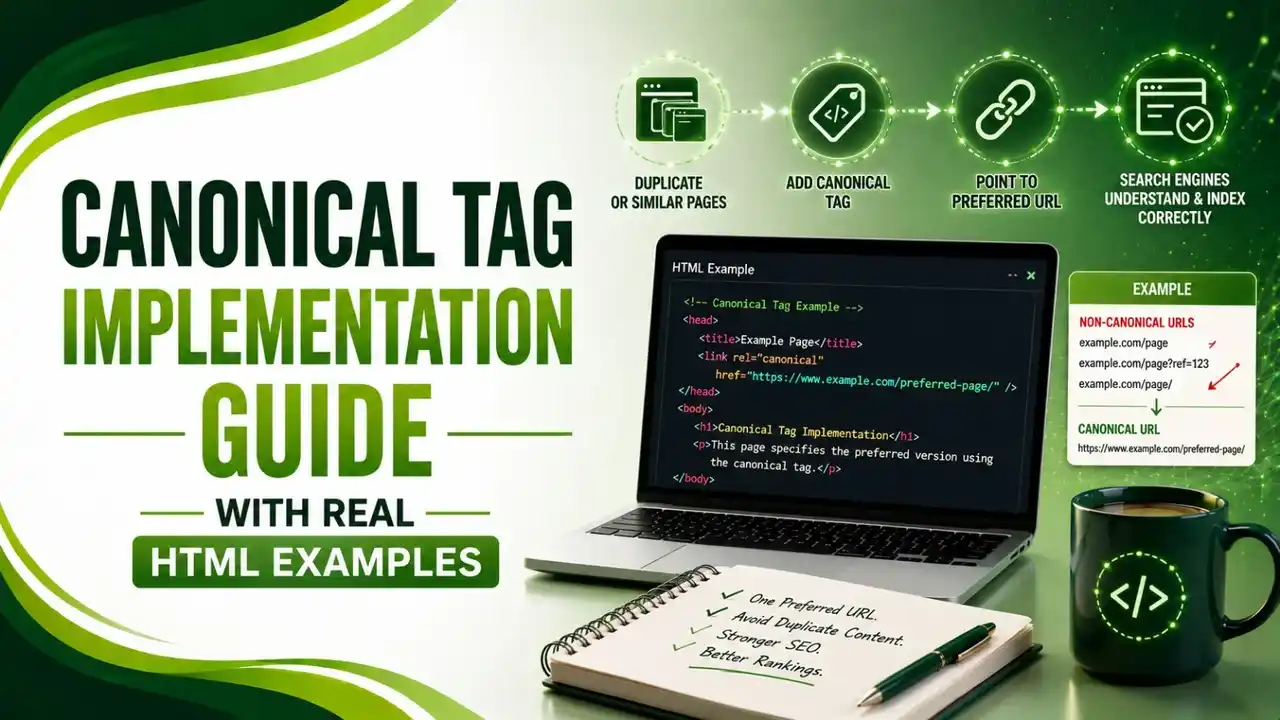
Canonical tag implementation looks simple, but small mistakes cause Google to ignore it entirely. Here's the real HTML for every common scenario.
Table of Contents
ToggleCanonical tag implementation looks simple on paper, one line of HTML pointing search engines to your preferred URL, but small mistakes in placement or formatting cause Google to silently ignore it. A single fix once increased ranking keywords by 320%, from 154 to 724, which shows exactly how much is riding on getting this right.
Research from theStacc found roughly 29% to 67% of websites have some form of duplicate content, and canonical tags are the primary tool for telling search engines which version actually deserves to rank.
Here's the exact HTML for every common scenario, the mistakes that quietly break implementations, and how Google actually weighs your canonical against conflicting signals.
01Canonical Tag Implementation: The Basic Rules
Sentinel's guide is precise about the formatting rules that quietly break implementations: the tag must appear inside the head element, reference an absolute URL including the protocol, and match the exact casing and trailing slash style of the canonical version. Relative paths work in browsers but get interpreted inconsistently by crawlers.
Greadme's guide adds the four hard requirements to check every time: absolute URL, placed in the head (Google ignores canonicals found in the body), exactly one per page, and pointing to a URL that actually returns a 200 status. For background on what canonical tags fundamentally do, see our what is a canonical tag guide.
02Basic Self-Referencing and Cross-URL Examples
Every indexable page should carry one of these two patterns. Here's what each looks like in actual HTML.
<head>
  <link rel="canonical" href="https://example.com/products/iphone-15" />
</head>
<!-- On https://example.com/product/shoes?ref=facebook -->
<head>
  <link rel="canonical" href="https://example.com/product/shoes" />
</head>
03Pagination: The Mistake Almost Everyone Makes
Search Engine Land's guide is direct about the most damaging pagination error: canonicalizing every paginated page back to page one effectively tells Google that all deeper pages are duplicates and should be ignored. If page 2 or page 10 contains unique products or articles, they may never get crawled or indexed at all.
theStacc's guide confirms the correct pattern: each paginated page should have its own self-referencing canonical, not one pointing back to page one. Google explicitly recommends this approach for paginated series.
<!-- On https://example.com/blog/page/3 -->
<head>
  <link rel="canonical" href="https://example.com/blog/page/3" />
</head>

<!-- WRONG: don't point page/3 back to page/1 -->
<!-- <link rel="canonical" href="https://example.com/blog" /> -->
04International and Localized Content
Greadme's guide, referenced above, flags a costly mistake specific to multilingual sites: canonicalizing all language variants to the English version de-indexes every other language entirely. For translated content, use self-referencing canonicals on each language version paired with hreflang tags.
<!-- On https://example.com/fr/page -->
<head>
  <link rel="canonical" href="https://example.com/fr/page" />
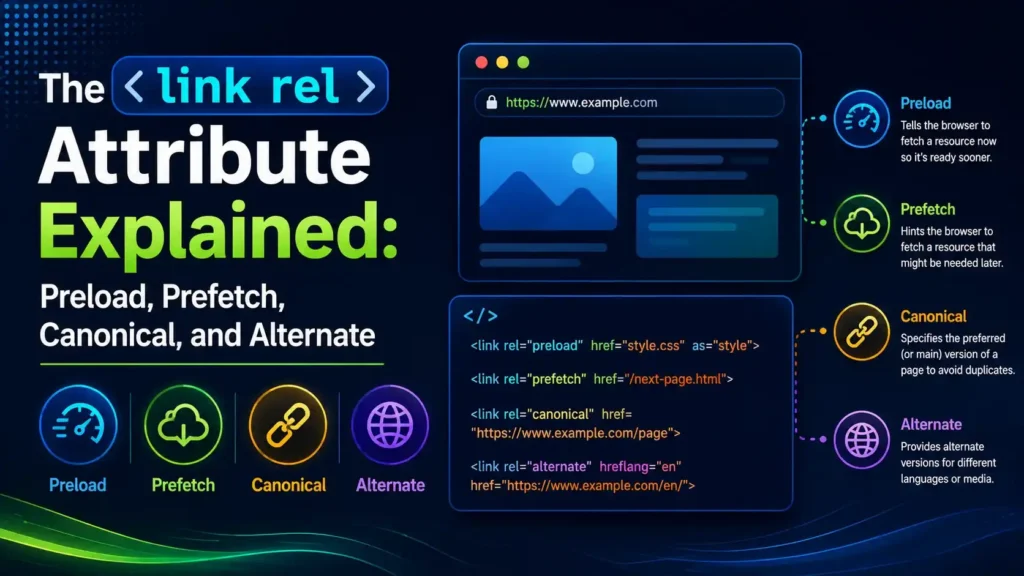
  <link rel="alternate" hreflang="en" href="https://example.com/en/page" />
  <link rel="alternate" hreflang="fr" href="https://example.com/fr/page" />
</head>
05Non-HTML Files: PDFs and Documents
Sentinel's guide, referenced above, covers a scenario most guides skip: for non-HTML resources like PDFs, you can't add a link element inside a head that doesn't exist. Instead, declare the canonical via the Link HTTP response header, the only way to canonicalize a binary file, as Metaflow's guide confirms as well.
Link: <https://example.com/whitepaper.pdf>; rel="canonical"
06The Mistakes That Silently Break Implementations
dbeta's guide names the most common structural error: outputting more than one canonical tag on a single page. Google's own JavaScript SEO guidance explicitly warns that incorrect implementations can create multiple canonicals or overwrite an existing one, leading to unpredictable results.
Panpan Digital's guide adds where this usually comes from in practice: multiple SEO plugins on WordPress each injecting their own tag, or a theme and a plugin both writing to the head independently. Two canonical tags pointing to different URLs cancel each other out, and Google ignores both entirely, a pattern Sitebulb's audit guide recommends catching through regular crawl checks rather than one-time reviews.
Greadme's guide, referenced above, is specific about a chain problem worth avoiding: if your canonical points to a URL that 301 redirects somewhere else, Google often ignores the canonical entirely. Always canonicalize directly to the final destination URL, and never point a canonical at a page that 404s or is blocked by noindex.
07Signals Google Weighs Alongside Your Canonical
Canonical is a hint, not a directive. Here's what else Google considers when signals conflict.
| Signal | Strength | What Happens if It Conflicts |
|---|---|---|
| XML sitemap inclusion | Strong | Google often trusts the sitemap over your canonical tag |
| 301 redirects | Very strong | A redirect A→B outweighs a canonical from B→A |
| Internal linking patterns | Moderate-strong | If your whole site links to URL X but canonical points to Y, Google notices |
| HTTPS vs HTTP | Strong | Google strongly prefers HTTPS as the canonical version |
| URL cleanliness | Moderate | Shorter URLs without parameters are generally preferred |
08Pre-Launch Canonical Checklist
Run through this before assuming a new template or migration is canonical-clean.
View source to confirm exactly one canonical tag per page, not just in the rendered DOM.
Use absolute URLs only, including protocol, never relative paths.
Confirm the canonical target returns a 200 status, never a redirect, 404, or noindexed page.
Self-reference every paginated page, don't collapse a series back to page one.
Audit after any plugin, theme, or CMS change, competing tags most often appear after these updates.
09Is Your Canonical Implementation Clean?
Answer a few quick questions to check your current setup.
Is Your Canonical Implementation Clean?
Select the option that matches your site
10Common Questions
No. Multiple canonical tags pointing to different URLs cancel each other out, and Google ignores all of them. Only one canonical tag is allowed per page.
No, this is one of the most common mistakes. Each paginated page should self-reference its own URL, or unique content on deeper pages may never get indexed.
Yes, but not with an HTML link element since PDFs have no head section. Use the Link HTTP response header instead, the only method for canonicalizing binary files.
Google often ignores the canonical entirely in that case. Always canonicalize directly to the final destination URL, never to an intermediary that redirects elsewhere.
No. Canonical is a hint, not a directive. Google weighs it alongside sitemaps, redirects, internal linking, and HTTPS preference, and can choose a different URL if these signals conflict.
Related Articles
What We Learn Today
Only one canonical tag is allowed per page, ever
Paginated pages should self-reference, not point to page one
PDFs need the Link HTTP header, not an HTML element
Never canonicalize to a redirect, 404, or noindexed page
Canonical is a hint, Google weighs sitemaps and redirects too
Multilingual sites need self-canonical plus hreflang, not one language for all
Build a Complete Technical SEO Foundation
Canonical tags work best alongside proper pagination and robots directives. Explore both guides next.
Related Posts

Previous Post
Next Post
Previous Post

Next Post






- Artificial Intelligence
- Content
- Core Web Vitals
- Development
- Digital Marketing
- Display Advertising
- Google Ads
- Google Search Console
- GTM
- HTML
- HTML CSS
- JavaScript
- Keyword Research
- Link Building
- LinkedIn Ads
- Local SEO
- Meta Ads
- Mobile SEO
- Off-Page SEO
- On-Page SEO
- Paid Media
- Paid Media Analytics
- PHP
- PPC Strategy
- Python
- SEO
- SEO Basics
- SEO Tools
- Social
- Technical SEO




