

- Home
- SEODiscover the latest updates from across the United States, including politics, culture, economy, and trending stories. Stay informed on the key events shaping the nation and the topics everyone’s talking about.
- Technical SEOLearn technical SEO concepts including crawling, indexing, XML sitemaps, robots.txt, canonical tags, site architecture, and website performance.
- Local SEOOptimize your business for local seo with Google Business Profile, local citations, reviews, maps, and location-based SEO.
- Mobile SEOImprove your website’s mobile seo performance with responsive design, mobile-first indexing, usability, and page speed optimization.
- On-Page SEOExplore on-page seo optimization techniques such as title tags, meta descriptions, headings, URLs, internal linking, and content optimization.
- Off-Page SEODiscover off-page SEO strategies such as backlinks, digital PR, brand mentions, outreach, and authority building.
- SEO ToolsExplore the best SEO tools for keyword research, technical audits, backlink analysis, rank tracking, and website optimization.
- Core Web VitalsLearn how to improve Core Web Vitals including LCP, INP, CLS, page speed, and overall user experience for better rankings.
- Keyword ResearchLearn how to find profitable keywords, analyze search intent, evaluate competition, and build effective keyword strategies.
- Link BuildingMaster ethical link building techniques, backlink analysis, outreach methods, guest posting, and authority growth strategies.
- Google Search ConsoleLearn how to use Google Search Console to monitor indexing, fix errors, analyze search performance, and improve SEO.
- SEO BasicsLearn the fundamentals of search engine optimization (SEO Basics), including how search engines work, SEO terminology, and beginner-friendly best practices.
- Paid Media
- Display AdvertisingLearn display advertising strategies, banner ads, audience targeting, remarketing, Google Display campaigns, and optimization techniques.
- Google AdsLearn Google Ads strategies, campaign setup, bidding, keywords, Performance Max, Search Ads, and optimization techniques.
- LinkedIn AdsLearn LinkedIn Ads strategies for B2B marketing, lead generation, audience targeting, campaign optimization, and paid social advertising.
- Meta AdsLearn Meta Ads strategies for Facebook and Instagram, including campaign setup, targeting, retargeting, and performance optimization.
- Paid Media AnalyticsLearn paid media analytics, including CPC, CTR, CPA, ROAS, conversion tracking, attribution, reporting, and campaign performance analysis.
- PPC StrategyLearn effective PPC strategies, campaign planning, bidding, keyword targeting, landing pages, conversion optimization, and more.
- ContentTransform your living spaces with inspiration, tips, and trends in interior design. From minimalist decor to bold statements, find ideas for every style and budget.
- Social
- Digital MarketingExplore stories and advice on living your best life. From personal growth to entertainment, dive into the latest in lifestyle trends and inspiration.
- Artificial IntelligenceStay informed about health and wellness with expert advice, fitness tips, and the latest medical breakthroughs. Your guide to a healthier and happier life.
- DevelopmentYou will find development related educational articles
- GTMLearn Google Tag Manager (GTM) with practical guides for tags, triggers, variables, tracking, conversions, and website analytics implementation.
- HTMLLearn HTML with simple tutorials, examples, tags, elements, attributes, and best practices for building modern web pages.
- HTML CSSLearn HTML CSS together with practical tutorials, examples, layouts, styling techniques, responsive design, and modern web development practices.
- HTML JSLearn HTML JS – JavaScript with practical tutorials and examples for adding interactivity, dynamic content, events, and functionality to web pages.
- JavaScriptExplore JavaScript tutorials, examples, concepts, and practical techniques for creating interactive and dynamic websites and web applications.
- PHPLearn PHP programming with practical tutorials, examples, functions, syntax, and web development techniques for beginners and developers.
- PythonLearn Python programming with practical tutorials, examples, syntax, functions, automation techniques, and useful programming concepts.
- Home
- SEODiscover the latest updates from across the United States, including politics, culture, economy, and trending stories. Stay informed on the key events shaping the nation and the topics everyone’s talking about.
- Technical SEOLearn technical SEO concepts including crawling, indexing, XML sitemaps, robots.txt, canonical tags, site architecture, and website performance.
- Local SEOOptimize your business for local seo with Google Business Profile, local citations, reviews, maps, and location-based SEO.
- Mobile SEOImprove your website’s mobile seo performance with responsive design, mobile-first indexing, usability, and page speed optimization.
- On-Page SEOExplore on-page seo optimization techniques such as title tags, meta descriptions, headings, URLs, internal linking, and content optimization.
- Off-Page SEODiscover off-page SEO strategies such as backlinks, digital PR, brand mentions, outreach, and authority building.
- SEO ToolsExplore the best SEO tools for keyword research, technical audits, backlink analysis, rank tracking, and website optimization.
- Core Web VitalsLearn how to improve Core Web Vitals including LCP, INP, CLS, page speed, and overall user experience for better rankings.
- Keyword ResearchLearn how to find profitable keywords, analyze search intent, evaluate competition, and build effective keyword strategies.
- Link BuildingMaster ethical link building techniques, backlink analysis, outreach methods, guest posting, and authority growth strategies.
- Google Search ConsoleLearn how to use Google Search Console to monitor indexing, fix errors, analyze search performance, and improve SEO.
- SEO BasicsLearn the fundamentals of search engine optimization (SEO Basics), including how search engines work, SEO terminology, and beginner-friendly best practices.
- Paid Media
- Display AdvertisingLearn display advertising strategies, banner ads, audience targeting, remarketing, Google Display campaigns, and optimization techniques.
- Google AdsLearn Google Ads strategies, campaign setup, bidding, keywords, Performance Max, Search Ads, and optimization techniques.
- LinkedIn AdsLearn LinkedIn Ads strategies for B2B marketing, lead generation, audience targeting, campaign optimization, and paid social advertising.
- Meta AdsLearn Meta Ads strategies for Facebook and Instagram, including campaign setup, targeting, retargeting, and performance optimization.
- Paid Media AnalyticsLearn paid media analytics, including CPC, CTR, CPA, ROAS, conversion tracking, attribution, reporting, and campaign performance analysis.
- PPC StrategyLearn effective PPC strategies, campaign planning, bidding, keyword targeting, landing pages, conversion optimization, and more.
- ContentTransform your living spaces with inspiration, tips, and trends in interior design. From minimalist decor to bold statements, find ideas for every style and budget.
- Social
- Digital MarketingExplore stories and advice on living your best life. From personal growth to entertainment, dive into the latest in lifestyle trends and inspiration.
- Artificial IntelligenceStay informed about health and wellness with expert advice, fitness tips, and the latest medical breakthroughs. Your guide to a healthier and happier life.
- DevelopmentYou will find development related educational articles
- GTMLearn Google Tag Manager (GTM) with practical guides for tags, triggers, variables, tracking, conversions, and website analytics implementation.
- HTMLLearn HTML with simple tutorials, examples, tags, elements, attributes, and best practices for building modern web pages.
- HTML CSSLearn HTML CSS together with practical tutorials, examples, layouts, styling techniques, responsive design, and modern web development practices.
- HTML JSLearn HTML JS – JavaScript with practical tutorials and examples for adding interactivity, dynamic content, events, and functionality to web pages.
- JavaScriptExplore JavaScript tutorials, examples, concepts, and practical techniques for creating interactive and dynamic websites and web applications.
- PHPLearn PHP programming with practical tutorials, examples, functions, syntax, and web development techniques for beginners and developers.
- PythonLearn Python programming with practical tutorials, examples, syntax, functions, automation techniques, and useful programming concepts.
Now Reading: GA4 Events vs Conversions: What’s the Difference?
-
01
GA4 Events vs Conversions: What’s the Difference?
- Home//
- SEO//Discover the latest updates from across the United States, including politics, culture, economy, and trending stories. Stay informed on the key events shaping the nation and the topics everyone’s talking about.
- Technical SEO//Learn technical SEO concepts including crawling, indexing, XML sitemaps, robots.txt, canonical tags, site architecture, and website performance.
- Local SEO//Optimize your business for local seo with Google Business Profile, local citations, reviews, maps, and location-based SEO.
- Mobile SEO//Improve your website’s mobile seo performance with responsive design, mobile-first indexing, usability, and page speed optimization.
- On-Page SEO//Explore on-page seo optimization techniques such as title tags, meta descriptions, headings, URLs, internal linking, and content optimization.
- Off-Page SEO//Discover off-page SEO strategies such as backlinks, digital PR, brand mentions, outreach, and authority building.
- SEO Tools//Explore the best SEO tools for keyword research, technical audits, backlink analysis, rank tracking, and website optimization.
- Core Web Vitals//Learn how to improve Core Web Vitals including LCP, INP, CLS, page speed, and overall user experience for better rankings.
- Keyword Research//Learn how to find profitable keywords, analyze search intent, evaluate competition, and build effective keyword strategies.
- Link Building//Master ethical link building techniques, backlink analysis, outreach methods, guest posting, and authority growth strategies.
- Google Search Console//Learn how to use Google Search Console to monitor indexing, fix errors, analyze search performance, and improve SEO.
- SEO Basics//Learn the fundamentals of search engine optimization (SEO Basics), including how search engines work, SEO terminology, and beginner-friendly best practices.
- Paid Media//
- Display Advertising//Learn display advertising strategies, banner ads, audience targeting, remarketing, Google Display campaigns, and optimization techniques.
- Google Ads//Learn Google Ads strategies, campaign setup, bidding, keywords, Performance Max, Search Ads, and optimization techniques.
- LinkedIn Ads//Learn LinkedIn Ads strategies for B2B marketing, lead generation, audience targeting, campaign optimization, and paid social advertising.
- Meta Ads//Learn Meta Ads strategies for Facebook and Instagram, including campaign setup, targeting, retargeting, and performance optimization.
- Paid Media Analytics//Learn paid media analytics, including CPC, CTR, CPA, ROAS, conversion tracking, attribution, reporting, and campaign performance analysis.
- PPC Strategy//Learn effective PPC strategies, campaign planning, bidding, keyword targeting, landing pages, conversion optimization, and more.
- Content//Transform your living spaces with inspiration, tips, and trends in interior design. From minimalist decor to bold statements, find ideas for every style and budget.
- Social//
- Digital Marketing//Explore stories and advice on living your best life. From personal growth to entertainment, dive into the latest in lifestyle trends and inspiration.
- Artificial Intelligence//Stay informed about health and wellness with expert advice, fitness tips, and the latest medical breakthroughs. Your guide to a healthier and happier life.
- Development//You will find development related educational articles
- GTM//Learn Google Tag Manager (GTM) with practical guides for tags, triggers, variables, tracking, conversions, and website analytics implementation.
- HTML//Learn HTML with simple tutorials, examples, tags, elements, attributes, and best practices for building modern web pages.
- HTML CSS//Learn HTML CSS together with practical tutorials, examples, layouts, styling techniques, responsive design, and modern web development practices.
- HTML JS//Learn HTML JS – JavaScript with practical tutorials and examples for adding interactivity, dynamic content, events, and functionality to web pages.
- JavaScript//Explore JavaScript tutorials, examples, concepts, and practical techniques for creating interactive and dynamic websites and web applications.
- PHP//Learn PHP programming with practical tutorials, examples, functions, syntax, and web development techniques for beginners and developers.
- Python//Learn Python programming with practical tutorials, examples, syntax, functions, automation techniques, and useful programming concepts.
- Home
- Paid Media
- Paid Media Analytics
- GA4 Events vs Conversions: What’s the Difference?
GA4 Events vs Conversions: What’s the Difference?

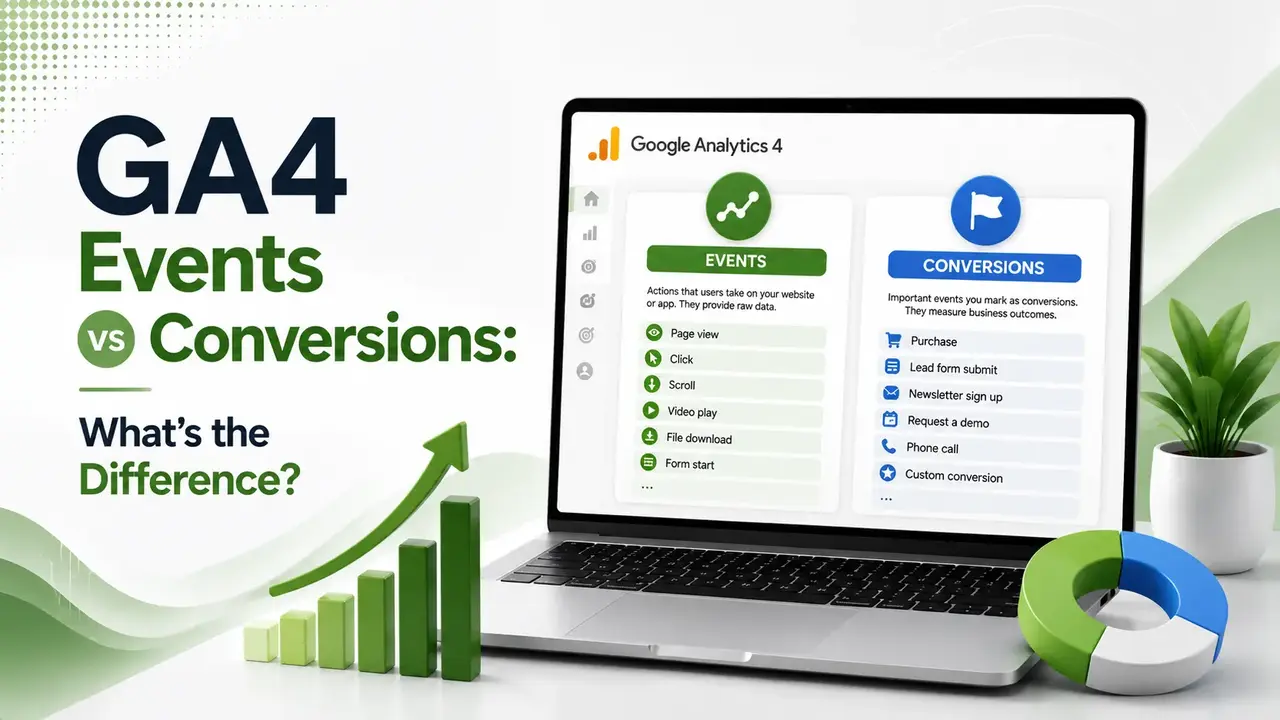
Without at least one marked conversion, GA4 is just a traffic report. Here's the actual difference between events and conversions (now called "key events"), and the setup mistakes that quietly distort every connected ad platform's bidding.
Table of Contents
ToggleEvery click, scroll, and page view in GA4 is an event. Almost none of them matter equally. Understanding GA4 events vs conversions is the difference between having a traffic report and having an actual performance measurement tool, and most marketers set this up wrong on their very first property.
GA4 tracks everything a visitor does on your site as an event, from a page view to a scroll to a video play.
A conversion, which Google now calls a key event, is simply an event you have deliberately marked as representing real business value, like a completed purchase or a submitted lead form.
This connects directly to the tracking infrastructure we covered in our server-side tagging guide. Clean event data feeds everything downstream, including which events are worth marking as conversions in the first place.
of marketing teams report struggling with GA4 setup, especially conversion configuration
key event is the minimum needed before GA4 functions as a performance tool, not just traffic data
possible custom events GA4 can track beyond the automatically collected defaults
GA4 Events vs Conversions, in One Picture
Every conversion is an event. Not every event is a conversion. This single relationship explains almost everything else in this guide.
(Key Events)
What Counts as an Event in GA4
According to ROI.com.au's guide to GA4 events and conversions, events are foundational. Every click, scroll, page view, video play, and file download is automatically recorded as an event, whether or not anyone ever looks at it.
According to Brillmark's 2026 GA4 tutorial, Enhanced Measurement automatically tracks scrolls, outbound clicks, file downloads, and video engagement with no extra code required, while custom events cover anything else specific to your business, like button clicks or CTA interactions.
Why Google Renamed Conversions to Key Events
This terminology shift confuses a lot of long-time GA4 users. The underlying concept has not changed, but the label has.
Early GA4 documentation and most existing tutorials refer to marked, high-value events simply as conversions, directly inherited from the Universal Analytics vocabulary marketers were already used to.
According to Brillmark's guide referenced above, Google now calls these marked events key events inside the GA4 interface itself, though the term conversions still appears throughout Google Ads integrations and most third-party tools, so both terms remain in active, everyday use.
How to Turn an Event Into a Conversion
Setting up a conversion, or key event, involves a short, repeatable sequence inside the GA4 interface.
Navigate to Admin → Events inside your GA4 property
Locate the event you want to mark, or create a new custom event
Toggle "Mark as conversion" to on for that event
Confirm the event now appears in your Conversions report
Five Events Most B2B and Ecommerce Sites Should Mark as Conversions
Not every business needs the same key events, but a few show up consistently across most setups.
| Business Type | Recommended Key Event | Why It Matters |
|---|---|---|
| Lead generation / B2B | form_submit | Direct signal of a genuine prospect |
| Ecommerce | purchase | The core revenue-driving action |
| SaaS / trial-based | sign_up | Marks the top of the activation funnel |
| Content / publisher | newsletter_signup | Indicates durable audience intent |
| Any site | file_download (whitepaper, PDF) | Often signals qualification before a lead form |
Common Mistakes When Setting Up GA4 Conversions
According to Incremys' guide to moving from Universal Analytics goals to GA4, treating GA4 as an exact substitute for old goal tracking causes real mistakes.
Consent settings, deduplication logic, and counting rules all differ enough that exact parity between the two systems should never be expected.
A second common mistake is marking too many events as conversions at once. According to 2POINT Agency's guide to GA4 conversions and key events, key events should reflect genuinely meaningful outcomes, not every button click a designer thought might be interesting to track someday.
A third mistake is ignoring micro-conversions entirely.
According to Incremys' guide referenced above, B2B sites in particular can wrongly conclude that content "doesn't convert" when it is actually driving upstream signals, like pricing page views or whitepaper downloads, that matter even without an immediate form submission.
Setting Up Conversions the Right Way
According to Ignite Digital's guide to GA4 events and conversions, starting with clear business objectives before touching the GA4 interface keeps event and conversion setup aligned with what the business actually needs to measure, rather than tracking everything technically possible.
According to InfluenceFlow's complete 2026 GA4 conversion tracking guide, this is especially important for teams evaluating channel performance, including influencer or affiliate partnerships, where a poorly defined conversion event can make an entire channel look worse or better than it actually performs.
Where GA4 Events and Conversions Fit Into Ad Platform Reporting
Google Ads, Meta, and other ad platforms increasingly pull conversion data directly from GA4 or connected server-side sources, rather than relying solely on their own native pixel tracking.
This makes clean GA4 event and conversion setup more than an internal reporting concern. A poorly defined conversion event can quietly distort bidding decisions across every connected ad platform, since automated bidding strategies optimize toward whatever signal they are given, accurate or not.
According to 2POINT Agency's step-by-step guide to configuring GA4 conversions, the setup process itself is straightforward once you know where to look, but the harder part is deciding which events genuinely deserve conversion status in the first place.
Auditing an Existing GA4 Property for Event and Conversion Health
If you inherited a GA4 property rather than setting it up yourself, a quick audit before making changes prevents accidentally breaking historical data continuity.
Start by reviewing the full Events report to see what is actually firing, then cross-reference against the Conversions report to confirm which events are currently marked.
It is common to find events marked as conversions that no longer reflect real business priorities, or genuinely important events that were never marked at all.
FAQs on GA4 Events vs Conversions
Related Articles
What We Learn Today
Every conversion is an event. Not every event is a conversion.
GA4 now calls marked conversions "key events" inside the interface.
Without at least one key event, GA4 is only a traffic report.
Mark actions with real business value, not every clickable element.
Micro-conversions matter, especially for B2B sites with longer funnels.
Expect different numbers than Universal Analytics; counting rules changed.
Related Posts
Previous Post
Next Post
Previous Post
Next Post






- Artificial Intelligence
- Content
- Core Web Vitals
- Development
- Digital Marketing
- Google Ads
- Google Search Console
- GTM
- HTML
- HTML CSS
- JavaScript
- Keyword Research
- Link Building
- Local SEO
- Meta Ads
- Mobile SEO
- Off-Page SEO
- On-Page SEO
- Paid Media
- Paid Media Analytics
- PHP
- PPC Strategy
- Python
- SEO
- SEO Basics
- SEO Tools
- Social
- Technical SEO




