

- Home
- SEODiscover the latest updates from across the United States, including politics, culture, economy, and trending stories. Stay informed on the key events shaping the nation and the topics everyone’s talking about.
- Technical SEOLearn technical SEO concepts including crawling, indexing, XML sitemaps, robots.txt, canonical tags, site architecture, and website performance.
- Local SEOOptimize your business for local seo with Google Business Profile, local citations, reviews, maps, and location-based SEO.
- Mobile SEOImprove your website’s mobile seo performance with responsive design, mobile-first indexing, usability, and page speed optimization.
- On-Page SEOExplore on-page seo optimization techniques such as title tags, meta descriptions, headings, URLs, internal linking, and content optimization.
- Off-Page SEODiscover off-page SEO strategies such as backlinks, digital PR, brand mentions, outreach, and authority building.
- SEO ToolsExplore the best SEO tools for keyword research, technical audits, backlink analysis, rank tracking, and website optimization.
- Core Web VitalsLearn how to improve Core Web Vitals including LCP, INP, CLS, page speed, and overall user experience for better rankings.
- Keyword ResearchLearn how to find profitable keywords, analyze search intent, evaluate competition, and build effective keyword strategies.
- Link BuildingMaster ethical link building techniques, backlink analysis, outreach methods, guest posting, and authority growth strategies.
- Google Search ConsoleLearn how to use Google Search Console to monitor indexing, fix errors, analyze search performance, and improve SEO.
- SEO BasicsLearn the fundamentals of search engine optimization (SEO Basics), including how search engines work, SEO terminology, and beginner-friendly best practices.
- Paid Media
- Display AdvertisingLearn display advertising strategies, banner ads, audience targeting, remarketing, Google Display campaigns, and optimization techniques.
- Google AdsLearn Google Ads strategies, campaign setup, bidding, keywords, Performance Max, Search Ads, and optimization techniques.
- LinkedIn AdsLearn LinkedIn Ads strategies for B2B marketing, lead generation, audience targeting, campaign optimization, and paid social advertising.
- Meta AdsLearn Meta Ads strategies for Facebook and Instagram, including campaign setup, targeting, retargeting, and performance optimization.
- Paid Media AnalyticsLearn paid media analytics, including CPC, CTR, CPA, ROAS, conversion tracking, attribution, reporting, and campaign performance analysis.
- PPC StrategyLearn effective PPC strategies, campaign planning, bidding, keyword targeting, landing pages, conversion optimization, and more.
- ContentTransform your living spaces with inspiration, tips, and trends in interior design. From minimalist decor to bold statements, find ideas for every style and budget.
- Social
- Digital MarketingExplore stories and advice on living your best life. From personal growth to entertainment, dive into the latest in lifestyle trends and inspiration.
- Artificial IntelligenceStay informed about health and wellness with expert advice, fitness tips, and the latest medical breakthroughs. Your guide to a healthier and happier life.
- DevelopmentYou will find development related educational articles
- GTMLearn Google Tag Manager (GTM) with practical guides for tags, triggers, variables, tracking, conversions, and website analytics implementation.
- HTMLLearn HTML with simple tutorials, examples, tags, elements, attributes, and best practices for building modern web pages.
- HTML CSSLearn HTML CSS together with practical tutorials, examples, layouts, styling techniques, responsive design, and modern web development practices.
- HTML JSLearn HTML JS – JavaScript with practical tutorials and examples for adding interactivity, dynamic content, events, and functionality to web pages.
- JavaScriptExplore JavaScript tutorials, examples, concepts, and practical techniques for creating interactive and dynamic websites and web applications.
- PHPLearn PHP programming with practical tutorials, examples, functions, syntax, and web development techniques for beginners and developers.
- PythonLearn Python programming with practical tutorials, examples, syntax, functions, automation techniques, and useful programming concepts.
- Home
- SEODiscover the latest updates from across the United States, including politics, culture, economy, and trending stories. Stay informed on the key events shaping the nation and the topics everyone’s talking about.
- Technical SEOLearn technical SEO concepts including crawling, indexing, XML sitemaps, robots.txt, canonical tags, site architecture, and website performance.
- Local SEOOptimize your business for local seo with Google Business Profile, local citations, reviews, maps, and location-based SEO.
- Mobile SEOImprove your website’s mobile seo performance with responsive design, mobile-first indexing, usability, and page speed optimization.
- On-Page SEOExplore on-page seo optimization techniques such as title tags, meta descriptions, headings, URLs, internal linking, and content optimization.
- Off-Page SEODiscover off-page SEO strategies such as backlinks, digital PR, brand mentions, outreach, and authority building.
- SEO ToolsExplore the best SEO tools for keyword research, technical audits, backlink analysis, rank tracking, and website optimization.
- Core Web VitalsLearn how to improve Core Web Vitals including LCP, INP, CLS, page speed, and overall user experience for better rankings.
- Keyword ResearchLearn how to find profitable keywords, analyze search intent, evaluate competition, and build effective keyword strategies.
- Link BuildingMaster ethical link building techniques, backlink analysis, outreach methods, guest posting, and authority growth strategies.
- Google Search ConsoleLearn how to use Google Search Console to monitor indexing, fix errors, analyze search performance, and improve SEO.
- SEO BasicsLearn the fundamentals of search engine optimization (SEO Basics), including how search engines work, SEO terminology, and beginner-friendly best practices.
- Paid Media
- Display AdvertisingLearn display advertising strategies, banner ads, audience targeting, remarketing, Google Display campaigns, and optimization techniques.
- Google AdsLearn Google Ads strategies, campaign setup, bidding, keywords, Performance Max, Search Ads, and optimization techniques.
- LinkedIn AdsLearn LinkedIn Ads strategies for B2B marketing, lead generation, audience targeting, campaign optimization, and paid social advertising.
- Meta AdsLearn Meta Ads strategies for Facebook and Instagram, including campaign setup, targeting, retargeting, and performance optimization.
- Paid Media AnalyticsLearn paid media analytics, including CPC, CTR, CPA, ROAS, conversion tracking, attribution, reporting, and campaign performance analysis.
- PPC StrategyLearn effective PPC strategies, campaign planning, bidding, keyword targeting, landing pages, conversion optimization, and more.
- ContentTransform your living spaces with inspiration, tips, and trends in interior design. From minimalist decor to bold statements, find ideas for every style and budget.
- Social
- Digital MarketingExplore stories and advice on living your best life. From personal growth to entertainment, dive into the latest in lifestyle trends and inspiration.
- Artificial IntelligenceStay informed about health and wellness with expert advice, fitness tips, and the latest medical breakthroughs. Your guide to a healthier and happier life.
- DevelopmentYou will find development related educational articles
- GTMLearn Google Tag Manager (GTM) with practical guides for tags, triggers, variables, tracking, conversions, and website analytics implementation.
- HTMLLearn HTML with simple tutorials, examples, tags, elements, attributes, and best practices for building modern web pages.
- HTML CSSLearn HTML CSS together with practical tutorials, examples, layouts, styling techniques, responsive design, and modern web development practices.
- HTML JSLearn HTML JS – JavaScript with practical tutorials and examples for adding interactivity, dynamic content, events, and functionality to web pages.
- JavaScriptExplore JavaScript tutorials, examples, concepts, and practical techniques for creating interactive and dynamic websites and web applications.
- PHPLearn PHP programming with practical tutorials, examples, functions, syntax, and web development techniques for beginners and developers.
- PythonLearn Python programming with practical tutorials, examples, syntax, functions, automation techniques, and useful programming concepts.
Now Reading: What Is Server-Side Tagging? A Non-Developer’s Guide
-
01
What Is Server-Side Tagging? A Non-Developer’s Guide
- Home//
- SEO//Discover the latest updates from across the United States, including politics, culture, economy, and trending stories. Stay informed on the key events shaping the nation and the topics everyone’s talking about.
- Technical SEO//Learn technical SEO concepts including crawling, indexing, XML sitemaps, robots.txt, canonical tags, site architecture, and website performance.
- Local SEO//Optimize your business for local seo with Google Business Profile, local citations, reviews, maps, and location-based SEO.
- Mobile SEO//Improve your website’s mobile seo performance with responsive design, mobile-first indexing, usability, and page speed optimization.
- On-Page SEO//Explore on-page seo optimization techniques such as title tags, meta descriptions, headings, URLs, internal linking, and content optimization.
- Off-Page SEO//Discover off-page SEO strategies such as backlinks, digital PR, brand mentions, outreach, and authority building.
- SEO Tools//Explore the best SEO tools for keyword research, technical audits, backlink analysis, rank tracking, and website optimization.
- Core Web Vitals//Learn how to improve Core Web Vitals including LCP, INP, CLS, page speed, and overall user experience for better rankings.
- Keyword Research//Learn how to find profitable keywords, analyze search intent, evaluate competition, and build effective keyword strategies.
- Link Building//Master ethical link building techniques, backlink analysis, outreach methods, guest posting, and authority growth strategies.
- Google Search Console//Learn how to use Google Search Console to monitor indexing, fix errors, analyze search performance, and improve SEO.
- SEO Basics//Learn the fundamentals of search engine optimization (SEO Basics), including how search engines work, SEO terminology, and beginner-friendly best practices.
- Paid Media//
- Display Advertising//Learn display advertising strategies, banner ads, audience targeting, remarketing, Google Display campaigns, and optimization techniques.
- Google Ads//Learn Google Ads strategies, campaign setup, bidding, keywords, Performance Max, Search Ads, and optimization techniques.
- LinkedIn Ads//Learn LinkedIn Ads strategies for B2B marketing, lead generation, audience targeting, campaign optimization, and paid social advertising.
- Meta Ads//Learn Meta Ads strategies for Facebook and Instagram, including campaign setup, targeting, retargeting, and performance optimization.
- Paid Media Analytics//Learn paid media analytics, including CPC, CTR, CPA, ROAS, conversion tracking, attribution, reporting, and campaign performance analysis.
- PPC Strategy//Learn effective PPC strategies, campaign planning, bidding, keyword targeting, landing pages, conversion optimization, and more.
- Content//Transform your living spaces with inspiration, tips, and trends in interior design. From minimalist decor to bold statements, find ideas for every style and budget.
- Social//
- Digital Marketing//Explore stories and advice on living your best life. From personal growth to entertainment, dive into the latest in lifestyle trends and inspiration.
- Artificial Intelligence//Stay informed about health and wellness with expert advice, fitness tips, and the latest medical breakthroughs. Your guide to a healthier and happier life.
- Development//You will find development related educational articles
- GTM//Learn Google Tag Manager (GTM) with practical guides for tags, triggers, variables, tracking, conversions, and website analytics implementation.
- HTML//Learn HTML with simple tutorials, examples, tags, elements, attributes, and best practices for building modern web pages.
- HTML CSS//Learn HTML CSS together with practical tutorials, examples, layouts, styling techniques, responsive design, and modern web development practices.
- HTML JS//Learn HTML JS – JavaScript with practical tutorials and examples for adding interactivity, dynamic content, events, and functionality to web pages.
- JavaScript//Explore JavaScript tutorials, examples, concepts, and practical techniques for creating interactive and dynamic websites and web applications.
- PHP//Learn PHP programming with practical tutorials, examples, functions, syntax, and web development techniques for beginners and developers.
- Python//Learn Python programming with practical tutorials, examples, syntax, functions, automation techniques, and useful programming concepts.
- Home
- Paid Media
- Paid Media Analytics
- What Is Server-Side Tagging? A Non-Developer’s Guide
What Is Server-Side Tagging? A Non-Developer’s Guide

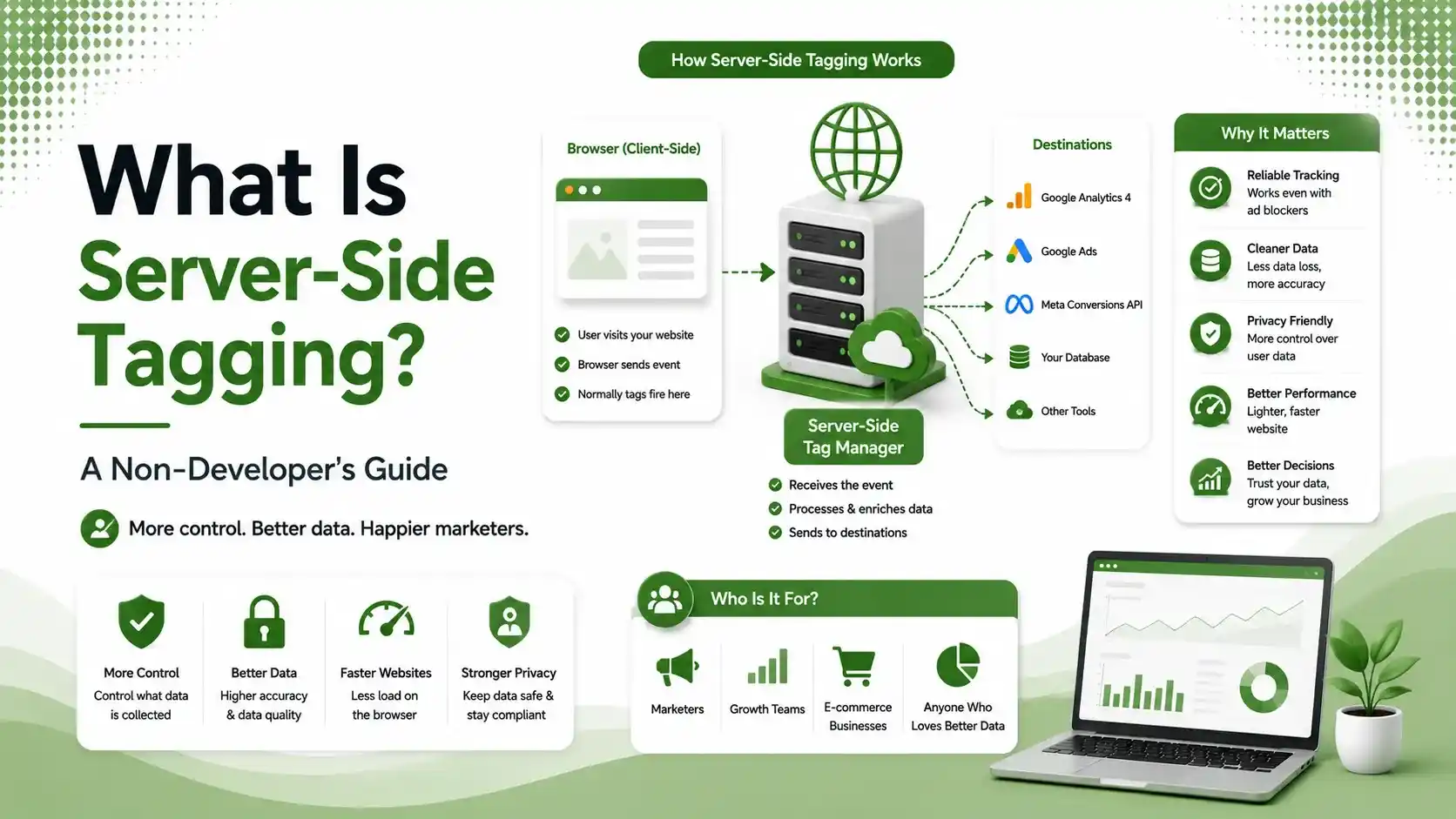
Learn what server-side tagging is, how it improves website speed, privacy, tracking accuracy, and why marketers are adopting it without needing coding skills.
Table of Contents
ToggleAd blockers now run on over 40% of browsers, and Apple's Safari quietly discards a huge share of your tracking data before it ever reaches Google Analytics. Server-side tagging is the fix marketers keep hearing about, but most explanations assume you already know what a "container" or a "cloud instance" is. This guide doesn't.
Server-side tagging moves the job of tracking a visitor from their browser to a server you control.
Instead of your website firing off ten different tracking scripts directly to Google, Meta, and every other tool you use, it sends one clean signal to your own server first, and your server decides what to forward and to whom.
We touched on a related shift in our piece on Meta's one-click Conversions API. That feature is actually a simplified, Meta-hosted version of the exact concept this article explains in full.
of browsers now run some form of ad blocker, based on 2026 adoption estimates
more conversions typically recovered after switching to server-side tracking
estimated first-year cost range for a mid-size business running server-side tagging
What Server-Side Tagging Actually Means, in Plain English
Picture the old way first. When someone visits your site, their browser directly sends little messages, called tracking pixels, straight to Google Analytics, Meta, and any other ad platform you use.
Every one of those messages travels through the visitor's own browser and can be blocked, delayed, or dropped along the way.
Server-side tagging adds a middleman you own. The visitor's browser sends one message to your server instead.
Your server, running quietly in the background, then relays that information on to GA4, Meta, and anywhere else it needs to go, using its own connection rather than the visitor's browser.
Why Server-Side Tagging Fixes Lost Tracking Data
The browser is a hostile place for tracking scripts in 2026. Ad blockers, Apple's Intelligent Tracking Prevention, and privacy-focused browsers all specifically target and block the kind of third-party requests that client-side tags rely on.
A server-to-server connection looks nothing like a tracking pixel to these tools. According to Trackingplan's 2026 server-side tag guide, ecommerce companies commonly report recovering 20 to 25% more measured conversions simply by moving to server-side tagging, with no actual increase in real sales.
Client-Side Tagging vs. Server-Side Tagging
Client-Side Tagging
Server-Side Tagging
Five Things a Non-Developer Should Know Before Starting
You Will Need Somewhere to Host the Server
Server-side tagging requires a small cloud server, typically through Google Cloud Run, AWS, or a managed service like Stape. This is the part that scares off non-developers, but managed options exist specifically to avoid hands-on server management.
Server-Side Tagging Does Not Bypass Consent
According to Pandectes' 2026 marketer's guide, server-side tagging works alongside consent management platforms, enforcing the same GDPR and CCPA rules, not circumventing them.
Your server, protected like any other part of your infrastructure, enforcing the same consent rules as before
It Costs Real Money, Not Just Time
According to Usercentrics' 2026 cost guide, hosting alone typically runs from $50 to several hundred dollars a month depending on traffic, before accounting for setup and maintenance time.
Small Sites Often Don't Need It Yet
According to WeltPixel's plain-English server-side GTM guide, stores under roughly $5,000 a month in ad spend rarely see the hosting cost pay back through improved attribution alone.
It Improves Site Speed Too
Moving tracking scripts off the visitor's browser and onto your server reduces the number of scripts a page has to load, which can meaningfully help the page speed metrics we covered in our Core Web Vitals guide.
Is Server-Side Tagging Worth It for Your Business?
The honest answer depends heavily on your ad spend and technical comfort level. Tap through both sides below.
According to Optizent's 2026 server-side tracking guide, businesses running meaningful ad spend with AI-driven bidding benefit most, since more accurate signals directly translate into better bidding decisions and lower cost per acquisition.
Smaller sites with modest ad budgets and straightforward tracking needs may get more value from a native platform tracking app or a hosted solution than from managing custom server infrastructure themselves, at least until spend grows.
Server-Side Tagging Cost vs. Benefit at a Glance
| Factor | Typical Range |
|---|---|
| Container hosting (annual) | $600 - $3,600 |
| Initial implementation (one-time) | $2,000 - $15,000 |
| Ongoing maintenance (annual) | $1,200 - $6,000 |
| Typical conversion recovery | 20% - 40% more tracked conversions |
| Typical CPA improvement | 10% - 20% reduction |
How to Get Started With Server-Side Tagging
The realistic starting point for most non-developers is a managed service rather than a fully self-built setup. Platforms like Stape or Addingwell handle the server hosting for you, so you configure tags through a familiar interface instead of managing cloud infrastructure directly.
Video: "Google Tag Manager Server-Side Tagging Tutorial (2026)" — credit to the original creator, via YouTube
According to Napkyn's guide for marketers and developers, most setups start by creating a server-side Google Tag Manager container, then connecting it to your existing client-side container so data flows through the new server rather than direct to each platform.
If you are not confident configuring this yourself, this is a reasonable task to hand to an agency or freelance analytics specialist for initial setup, then maintain with light ongoing check-ins rather than daily hands-on management.
Server-Side Tagging and Your Broader Analytics Strategy
Server-side tagging is not a replacement for good measurement practice, it is infrastructure that makes existing measurement more accurate.
According to Bounteous' 2026 server-side analytics guide, the real 2026 question for most organizations is no longer whether server-side tagging matters.
It is which implementation path fits their technical maturity and compliance needs. Datascale's 2026 breakdown of server-side tagging benefits frames it even more directly: it is the foundation for reliable analytics, not an edge-case optimization anymore.
This pairs directly with the broader shift we covered in our paid media strategy guide, where more of the technical burden across ad platforms keeps shifting from manual scripts toward managed, server-side infrastructure.
Managed vs. Self-Hosted Server-Side Tagging
Not every server-side tagging setup requires hiring a developer or learning cloud infrastructure from scratch. The choice generally comes down to two paths.
A self-hosted setup means creating and managing your own cloud server, typically through Google Cloud Run or AWS.
This gives maximum control and can be cheaper at scale, but it also means you or your team are responsible for updates, monitoring, and troubleshooting when something breaks.
A managed setup uses a third-party service that hosts and maintains the server-side tagging infrastructure for you.
You still configure your tags and triggers, but the underlying server, its uptime, and its security patches become someone else's responsibility. For most non-developers, this is the realistic entry point into server-side tagging.
Common Server-Side Tagging Mistakes to Avoid
The most common mistake is treating server-side tagging as a one-time setup rather than ongoing infrastructure. Ad platforms update their APIs, and a server-side tagging setup that goes unmaintained can quietly start dropping data without anyone noticing for weeks.
A second mistake is skipping proper testing before going live. Server-side tagging changes how data reaches your analytics tools entirely, so comparing old and new numbers side by side for at least a few weeks after launch catches discrepancies before they distort your reporting.
A third mistake is assuming server-side tagging fixes data quality issues on its own. If your event naming, deduplication logic, or consent configuration was messy under client-side tracking, moving to server-side tagging carries those same problems forward unless you clean them up during the migration.
FAQs on Server-Side Tagging
Related Articles
What We Learn Today
Server-side tagging routes tracking data through your own server first.
It bypasses ad blockers and browser restrictions that block direct tracking pixels.
Businesses commonly recover 20-40% more tracked conversions after switching.
Managed services like Stape remove most of the technical hosting burden.
It respects consent rules, it does not bypass privacy regulations.
Smaller sites with modest ad spend often don't need it yet.
Related Posts
Previous Post
Next Post
Previous Post
Next Post





- Artificial Intelligence
- Content
- Core Web Vitals
- Development
- Digital Marketing
- Google Ads
- Google Search Console
- GTM
- HTML
- HTML CSS
- JavaScript
- Keyword Research
- Link Building
- Local SEO
- Meta Ads
- Mobile SEO
- Off-Page SEO
- On-Page SEO
- Paid Media
- Paid Media Analytics
- PHP
- PPC Strategy
- Python
- SEO
- SEO Basics
- SEO Tools
- Social
- Technical SEO




