
Now Reading: What Is Google AI Mode? How to Use It and Its Best Features Explained
-
01
What Is Google AI Mode? How to Use It and Its Best Features Explained
What Is Google AI Mode? How to Use It and Its Best Features Explained

Google AI Mode is transforming how we search online. Instead of traditional links, it delivers AI-generated summaries, conversational answers, and multimodal search experiences powered by Gemini. Here’s everything you need to know about how it works and why it matters.
What Is Google AI Mode, How to Use It, and Its Best Features
Google AI Mode is changing how we search.
This is not a small update.
It is a structural shift in how answers are delivered.
After announcing it during Google I/O, Google began rolling out AI Mode as part of its broader Search evolution. Sundar Pichai described it clearly: AI Mode is where Google brings its most advanced AI capabilities directly into Search.
Instead of ten blue links, users now get synthesized answers.
Instead of keywords, users have conversations.
And that changes everything.
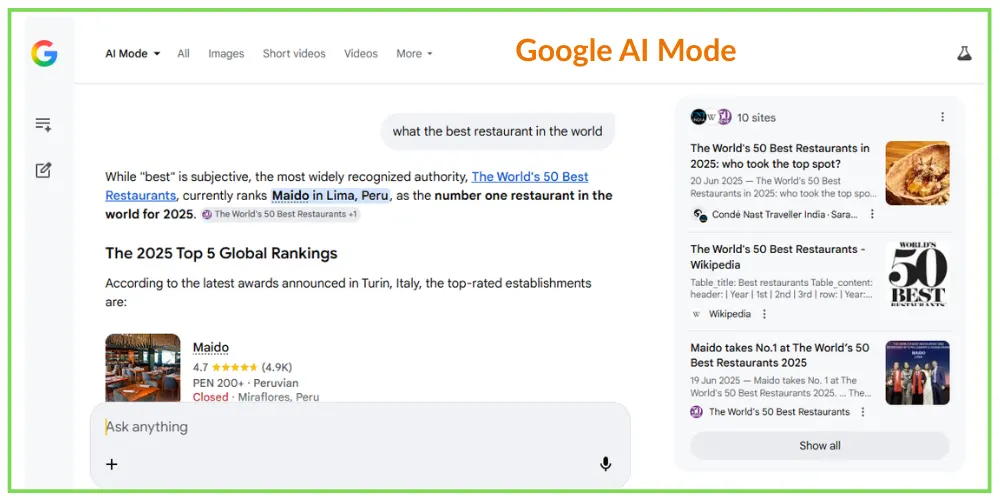
What Is Google AI Mode?
Google AI Mode is an AI-powered search experience.
Unlike traditional Google Search, which shows ranked webpages, AI Mode generates structured answers using AI models like Gemini.
It blends:
- AI-generated summaries
- Traditional web links
- Context-aware responses
This means when you search for something complex — like comparing smartphones or planning a trip — Google analyzes multiple sources and provides a direct, structured response.
Google has already introduced AI summaries through AI Overviews. AI Mode takes that concept further by making conversational search the core experience.
It also supports multimodal inputs.
You can type, speak, or upload images.
The AI understands context across formats.
How Search Is Changing
Search is no longer just about keywords.
It is about intent.
Elizabeth Reid, Google’s Head of Search, has explained that users are now asking layered and personal questions instead of short keyword phrases.
Instead of typing “best father’s day gifts,” users might ask:
“What are good gift ideas for my dad who likes fitness and travel?”
AI Mode responds conversationally.
It understands nuance.
It remembers follow-up questions.
This is closer to how people use tools like ChatGPT, but directly inside Google Search.
Even if you do not enable AI Mode, Google has confirmed many AI capabilities will gradually merge into standard Search.
This is not an experiment.
It is a direction.
How to Use Google AI Mode
AI Mode is currently rolling out in phases. It is officially available for English users in the United States and expanding gradually.
To access it:
- Visit Google Search Labs and enable AI Search features.
- Search normally on Google.com and select the AI tab if available.
- Use the Google app and look for AI Mode within Search.
Once enabled, you can:
- Ask conversational questions
- Compare products or services
- Upload images for visual search
- Use voice queries
AI Mode generates summaries at the top, often with cited sources for deeper reading.
Best Features of Google AI Mode
Google AI Mode is not just a chatbot.
It is a hybrid of AI and Search.
Here are its most important features.
1. Advanced AI Overviews
AI Mode summarizes complex topics instantly.
Instead of reading multiple blogs, you receive a concise overview with source links.
2. Conversational Follow-Ups
You can ask follow-up questions without repeating context.
The system remembers the thread.
It behaves more like a smart assistant than a search engine.
3. Multimodal Search
Powered by Gemini, AI Mode supports text, voice, and image input.
You can upload a product photo or speak a query while driving.
This reflects how people actually search today.
4. Personalized Suggestions
With permission, AI Mode can use contextual signals such as your location or activity to provide smarter suggestions.
You remain in control of privacy settings.
5. Deep Search Capabilities
For layered queries, AI Mode performs what Google calls deeper reasoning.
It scans multiple sources, synthesizes information, and produces structured comparisons.
This is especially useful for research, financial comparisons, or buying decisions.
6. Smart Shopping Tools
AI Mode refines product searches conversationally.
Users can filter by budget, size, features, or style naturally.
Google is also testing virtual try-on features within its AI shopping experience.
Is Google AI Mode the Future of Search?
AI Mode will not completely replace traditional search overnight.
For quick lookups, standard results still work well.
But for complex queries, comparisons, and decision-making, AI-generated responses are faster and more intuitive.
Even SEO professionals are monitoring this shift carefully. Platforms like Semrush have highlighted how AI-driven search experiences are reshaping traffic patterns.
The real shift is this:
Search is becoming conversational.
Authority is becoming synthesized.
Visibility is no longer just about ranking.
It is about being included in AI-generated answers.
What we learn today?
Google AI Mode represents a major evolution in Search.
It combines AI reasoning, conversational interaction, and traditional indexing into one system.
Users get answers faster.
Businesses must rethink visibility strategies.
Google is not just adding AI.
It is redesigning how information is delivered.
And this is only the beginning.
Google AI Mode FAQs
1. Is Google AI Mode available in India?
It is rolling out in phases. It is officially live for English-speaking users in the U.S., with gradual expansion.
2. How do I access Google AI Mode?
Visit Google Search Labs, enable AI features, or look for the AI tab within Google Search.
3. What is the difference between AI Mode and regular Search?
Regular Search shows ranked links. AI Mode generates structured answers and supports conversational follow-ups.
4. Is AI Mode better than ChatGPT or Gemini?
It depends on the task. AI Mode integrates AI directly into Search, while tools like ChatGPT are standalone conversational platforms.
5. Is Google AI Mode free?
Yes. It is currently free for users with a Google account.
Thanks for reading! Please share/repost if found useful.