Now Reading: The link rel Attribute Explained: Preload, Prefetch, Canonical, and Alternate
-
01
The link rel Attribute Explained: Preload, Prefetch, Canonical, and Alternate
The link rel Attribute Explained: Preload, Prefetch, Canonical, and Alternate

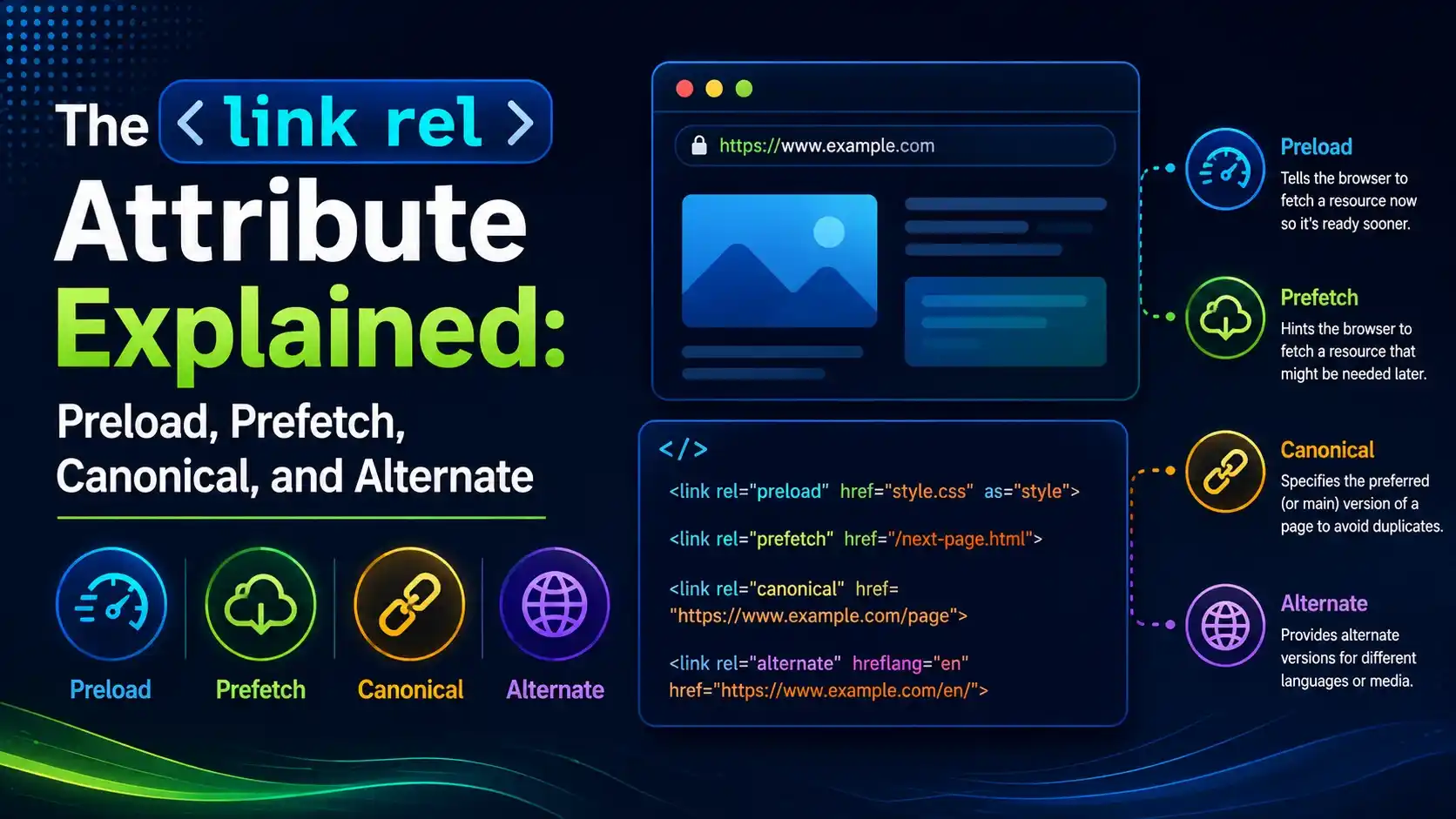
A practical, proof-backed guide to the link rel attribute, covering resource hints like preload and prefetch alongside SEO signals like canonical and alternate.
Alright, let us clear up something that trips up a lot of people staring at a page's source code. That short line in the head starting with <link rel= is not one tag with one job, the link rel attribute is a whole family of instructions packed into one place, and mixing them up can quietly cost you either load speed or search visibility.
You have probably pasted a font preload snippet from a tutorial, or added a canonical tag because a plugin told you to, without ever really knowing what the browser or Google does with either one. The link rel attribute is the switch that decides which behavior you get, and once you understand how the browser actually treats each value, the difference between a fast page and a duplicate content penalty comes down to one word in that attribute.
What Is the link rel Attribute?
The link rel attribute sits on a <link> element in the document head and tells the browser exactly what relationship the linked resource has to the current page. The same element, the same href, but a different value changes everything about what happens next.
<link rel="preload" href="/fonts/brand.woff2" as="font" crossorigin>
<link rel="canonical" href="https://brandella.in/link-rel-attribute-explained/">
<link rel="alternate" href="https://brandella.in/en/link-rel-attribute-explained/" hreflang="en">
Per the HTML living standard's own link types section, each recognized value carries a distinct, formally defined meaning the browser is expected to act on, not just a label a developer made up for readability.
A fast way to sort any link rel value in your head: does it change what the browser fetches and when, or does it describe how this document relates to another URL? The first group is a resource hint. The second group is a document relationship, and search engines pay close attention to it.
MDN's full reference for the rel attribute lists dozens of recognized values, but in day to day work, four cover almost every real use case: preload, prefetch, canonical, and alternate.
Resource Hints: Preload, Prefetch, and Preconnect
A resource hint value on the link rel attribute tells the browser about a fetch it should make earlier, later, or sooner than it normally would, purely for performance. Three values do most of the work here.
| Value | What It Actually Does |
|---|---|
preload | Fetches a resource this page needs, right now, before it would otherwise be discovered |
prefetch | Fetches a resource a likely next page will need, at low priority, during idle time |
preconnect | Opens the connection (DNS, TCP, TLS) to a domain early, without fetching anything yet |
According to Chrome's own developer documentation on rel=preload, a preloaded resource is fetched and cached but stays inert until something in the DOM, JavaScript, or CSS actually references it, which is what makes it safe to use ahead of need.
The as attribute is not optional decoration. It tells the browser what kind of request to make, which request priority to assign, and which Content Security Policy rules apply, so a preload link without a matching as value routinely gets fetched with the wrong priority or ignored outright.
Proof: Real Browser Timing With and Without the link rel Attribute Set to Preload
Rather than take the theory on faith, we built two identical pages served from a real local HTTP server, one with a preload link in the head and one without, then measured the exact moment each page's script actually issued its fetch call.

Before touching a real browser, the classification logic that groups every rel value into resource hint, document relationship, or external resource was checked against five real cases.
Both pages ran an identical 300 millisecond block of real synchronous JavaScript before calling fetch(), simulating a page doing real work before it actually needs the resource. The only difference was the presence of the preload link.

Real Chromium, real local server, real timestamps. The preload scanner started fetching before the blocking script even finished, while the unpreloaded page waited for the script to reach the fetch call.
The gap between 84ms and 369ms is not a rounding error, it is the browser's preload scanner discovering the <link rel="preload"> tag while parsing the head and starting the request in parallel with everything else, well before the application code that ultimately needs the data even runs.
Only preload something the current page genuinely needs for its first render, like a hero font or a critical script. Preloading things a user might never see just competes for bandwidth with resources that actually matter.
For a deeper comparison of all three resource hint values, including when preconnect beats preload for third party origins, see our dedicated resource hints guide, and for the render path context these hints exist to shortcut, see render blocking resources explained.
Document Relationships: Canonical and Alternate
The second family of link rel values has nothing to do with fetch timing. It tells a search engine, or a browser feature, how the current document relates to some other URL.
<link rel="canonical" href="https://brandella.in/link-rel-attribute-explained/">
<link rel="alternate" href="https://brandella.in/hi/link-rel-attribute-explained/" hreflang="hi">
Per the W3C's own Resource Hints specification, values like preload and prefetch are explicitly scoped to performance behavior, which is precisely why mixing them up with canonical or alternate, both purely relationship signals, causes so much confusion. One group changes what loads. The other only changes what gets indexed under which URL.
We confirmed this distinction directly in the browser too, reading both link elements straight out of the live DOM in the same test run shown above, rather than assuming the markup was correct.
According to caniuse.com's tracking data, rel="preload" has been reliably supported across every major browser engine for years, while rel="canonical" and rel="alternate" have been understood since the earliest days of HTML, since they describe document relationships rather than a newer performance feature.
The link rel Attribute Set to Canonical and SEO: What It Actually Does
Setting the link rel attribute to canonical tells a search engine which URL you would prefer it treat as the authoritative version when several near identical pages exist, a filtered category page, a URL with tracking parameters, an HTTP and HTTPS pair, and so on.
According to Google's own Search Central documentation, a rel canonical link is treated as a strong signal, not a strict directive. Google states plainly that none of the canonicalization signals are required and a site can do fine without them, but that stacking a canonical link with a consistent internal linking pattern meaningfully increases the odds Google agrees with your preferred URL.
This matters more than it sounds. A canonical link pointing at the wrong URL, or missing entirely on a duplicated page, can quietly split ranking signals across several near identical URLs instead of consolidating them onto one.
- Point canonical at the real preferred URL. Never at a redirect, a 404, or a page blocked by robots.txt.
- Use an absolute URL, not a relative path. A relative
hrefhere is a common source of silent misconfiguration. - Every page should self reference or point to one true version. Never let two pages point canonical at each other.
- Pair it with consistent internal links. Google weighs the canonical hint alongside the URLs your own site actually links to.
For a full implementation walkthrough, including how to handle pagination and parameterized URLs, see what is a canonical tag and our canonical tag implementation guide.
Common link rel Values at a Glance
Beyond the four headline values, a handful of other link rel values show up constantly in real page source and are worth recognizing on sight.
| Value | Category | Common Use |
|---|---|---|
stylesheet | External resource | Loading a CSS file, the original and most common link rel value |
icon | External resource | The favicon shown in a browser tab or bookmark |
manifest | External resource | Points to a web app manifest for installable, progressive web apps |
dns-prefetch | Resource hint | A lighter, older cousin of preconnect for resolving a domain early |
modulepreload | Resource hint | Preloads a JavaScript module and its dependency graph specifically |
One popular real world use of this exact preload mechanism is fonts. Harry Roberts' well known writeup on speeding up Google Fonts uses a preload link on the font file itself to cut out a slow, cascading chain of separate CSS and font requests, which is a great illustration of how the link rel attribute earns its keep on a real, high traffic page.
Google's own web.dev guidance on preloading critical assets recommends limiting preload to genuinely render critical resources, since preloading too much simply moves congestion earlier in the load rather than removing it.
Common Mistakes With the link rel Attribute
Most real world link rel attribute mistakes come down to picking the value that sounds right rather than checking what the browser or search engine actually does with it. The most common mistake is using preload for a resource on the next page instead of the current one. That is what prefetch is for. Getting the two swapped either wastes bandwidth on the current page or delays a resource the current page actually needs.
The second is forgetting the as attribute on a preload link, or setting it to the wrong resource type. Chrome's own developer tools will flag a preloaded resource that goes unused within a few seconds, which is usually a sign the as value or the reference that was supposed to use it does not actually match.
The third is treating rel canonical as automatic deduplication. It only works when the canonical URL itself returns a real 200 response and is not blocked, redirected, or noindexed, otherwise the signal is effectively ignored.
The fourth is missing a self referencing canonical entirely. Every indexable page, including the one Google should already treat as canonical, should still carry a canonical link pointing at itself, since this is what makes the signal consistent across a whole site rather than only present on the duplicates.
Getting the link rel attribute right on every page is a small piece of markup with an outsized effect on both how fast a page loads and which URL actually shows up in search results, which is exactly why it is worth double checking rather than copying blindly from a template.
Preload fetches a resource the current page needs, at high priority, right away. Prefetch fetches a resource a likely future page will need, at low priority, whenever the browser has spare capacity.
No. Google treats rel="canonical" as a strong signal, not a strict directive, and can still choose a different URL if other signals, like internal links or redirects, point elsewhere.
Practically, yes. Without a recognized value on the link rel attribute, the browser has no way to know what relationship or behavior the linked resource is supposed to have, so the link element is effectively meaningless.
Yes, one alternate link per language or region variant is standard practice for hreflang setups, each pointing to a different URL with its own language code.
Support is reliable across every major current browser engine, though the exact scanning and prioritization behavior can vary slightly, which is why real timing tests, not assumptions, are the only way to confirm the actual gain on a given page.
Learn Today
Link Rel Attribute
The attribute on a link element that defines its relationship to the current document or the browser's fetch behavior.
Resource Hint
A rel value, like preload or prefetch, that changes when or whether the browser fetches something, purely for speed.
Preload
A resource hint that fetches something the current page needs, before it is otherwise discovered, at high priority.
Prefetch
A resource hint that fetches something a likely next page will need, at low priority, during idle time.
Canonical
A document relationship value that signals your preferred URL among several near duplicate pages to search engines.
Alternate
A document relationship value most commonly used to point to a language or region specific version of the same page.
Ready to Audit Your Own Link Tags?
Open your page source and check whether your preload, canonical, and alternate links are actually doing what you think they are.