

- Home
- SEODiscover the latest updates from across the United States, including politics, culture, economy, and trending stories. Stay informed on the key events shaping the nation and the topics everyone’s talking about.
- Technical SEOLearn technical SEO concepts including crawling, indexing, XML sitemaps, robots.txt, canonical tags, site architecture, and website performance.
- Local SEOOptimize your business for local seo with Google Business Profile, local citations, reviews, maps, and location-based SEO.
- Mobile SEOImprove your website’s mobile seo performance with responsive design, mobile-first indexing, usability, and page speed optimization.
- On-Page SEOExplore on-page seo optimization techniques such as title tags, meta descriptions, headings, URLs, internal linking, and content optimization.
- Off-Page SEODiscover off-page SEO strategies such as backlinks, digital PR, brand mentions, outreach, and authority building.
- SEO ToolsExplore the best SEO tools for keyword research, technical audits, backlink analysis, rank tracking, and website optimization.
- Core Web VitalsLearn how to improve Core Web Vitals including LCP, INP, CLS, page speed, and overall user experience for better rankings.
- Keyword ResearchLearn how to find profitable keywords, analyze search intent, evaluate competition, and build effective keyword strategies.
- Link BuildingMaster ethical link building techniques, backlink analysis, outreach methods, guest posting, and authority growth strategies.
- Google Search ConsoleLearn how to use Google Search Console to monitor indexing, fix errors, analyze search performance, and improve SEO.
- SEO BasicsLearn the fundamentals of search engine optimization (SEO Basics), including how search engines work, SEO terminology, and beginner-friendly best practices.
- Paid Media
- Display AdvertisingLearn display advertising strategies, banner ads, audience targeting, remarketing, Google Display campaigns, and optimization techniques.
- Google AdsLearn Google Ads strategies, campaign setup, bidding, keywords, Performance Max, Search Ads, and optimization techniques.
- LinkedIn AdsLearn LinkedIn Ads strategies for B2B marketing, lead generation, audience targeting, campaign optimization, and paid social advertising.
- Meta AdsLearn Meta Ads strategies for Facebook and Instagram, including campaign setup, targeting, retargeting, and performance optimization.
- Paid Media AnalyticsLearn paid media analytics, including CPC, CTR, CPA, ROAS, conversion tracking, attribution, reporting, and campaign performance analysis.
- PPC StrategyLearn effective PPC strategies, campaign planning, bidding, keyword targeting, landing pages, conversion optimization, and more.
- ContentTransform your living spaces with inspiration, tips, and trends in interior design. From minimalist decor to bold statements, find ideas for every style and budget.
- Social
- Digital MarketingExplore stories and advice on living your best life. From personal growth to entertainment, dive into the latest in lifestyle trends and inspiration.
- Artificial IntelligenceStay informed about health and wellness with expert advice, fitness tips, and the latest medical breakthroughs. Your guide to a healthier and happier life.
- DevelopmentYou will find development related educational articles
- GTMLearn Google Tag Manager (GTM) with practical guides for tags, triggers, variables, tracking, conversions, and website analytics implementation.
- HTMLLearn HTML with simple tutorials, examples, tags, elements, attributes, and best practices for building modern web pages.
- HTML CSSLearn HTML CSS together with practical tutorials, examples, layouts, styling techniques, responsive design, and modern web development practices.
- HTML JSLearn HTML JS – JavaScript with practical tutorials and examples for adding interactivity, dynamic content, events, and functionality to web pages.
- JavaScriptExplore JavaScript tutorials, examples, concepts, and practical techniques for creating interactive and dynamic websites and web applications.
- PHPLearn PHP programming with practical tutorials, examples, functions, syntax, and web development techniques for beginners and developers.
- PythonLearn Python programming with practical tutorials, examples, syntax, functions, automation techniques, and useful programming concepts.
- Home
- SEODiscover the latest updates from across the United States, including politics, culture, economy, and trending stories. Stay informed on the key events shaping the nation and the topics everyone’s talking about.
- Technical SEOLearn technical SEO concepts including crawling, indexing, XML sitemaps, robots.txt, canonical tags, site architecture, and website performance.
- Local SEOOptimize your business for local seo with Google Business Profile, local citations, reviews, maps, and location-based SEO.
- Mobile SEOImprove your website’s mobile seo performance with responsive design, mobile-first indexing, usability, and page speed optimization.
- On-Page SEOExplore on-page seo optimization techniques such as title tags, meta descriptions, headings, URLs, internal linking, and content optimization.
- Off-Page SEODiscover off-page SEO strategies such as backlinks, digital PR, brand mentions, outreach, and authority building.
- SEO ToolsExplore the best SEO tools for keyword research, technical audits, backlink analysis, rank tracking, and website optimization.
- Core Web VitalsLearn how to improve Core Web Vitals including LCP, INP, CLS, page speed, and overall user experience for better rankings.
- Keyword ResearchLearn how to find profitable keywords, analyze search intent, evaluate competition, and build effective keyword strategies.
- Link BuildingMaster ethical link building techniques, backlink analysis, outreach methods, guest posting, and authority growth strategies.
- Google Search ConsoleLearn how to use Google Search Console to monitor indexing, fix errors, analyze search performance, and improve SEO.
- SEO BasicsLearn the fundamentals of search engine optimization (SEO Basics), including how search engines work, SEO terminology, and beginner-friendly best practices.
- Paid Media
- Display AdvertisingLearn display advertising strategies, banner ads, audience targeting, remarketing, Google Display campaigns, and optimization techniques.
- Google AdsLearn Google Ads strategies, campaign setup, bidding, keywords, Performance Max, Search Ads, and optimization techniques.
- LinkedIn AdsLearn LinkedIn Ads strategies for B2B marketing, lead generation, audience targeting, campaign optimization, and paid social advertising.
- Meta AdsLearn Meta Ads strategies for Facebook and Instagram, including campaign setup, targeting, retargeting, and performance optimization.
- Paid Media AnalyticsLearn paid media analytics, including CPC, CTR, CPA, ROAS, conversion tracking, attribution, reporting, and campaign performance analysis.
- PPC StrategyLearn effective PPC strategies, campaign planning, bidding, keyword targeting, landing pages, conversion optimization, and more.
- ContentTransform your living spaces with inspiration, tips, and trends in interior design. From minimalist decor to bold statements, find ideas for every style and budget.
- Social
- Digital MarketingExplore stories and advice on living your best life. From personal growth to entertainment, dive into the latest in lifestyle trends and inspiration.
- Artificial IntelligenceStay informed about health and wellness with expert advice, fitness tips, and the latest medical breakthroughs. Your guide to a healthier and happier life.
- DevelopmentYou will find development related educational articles
- GTMLearn Google Tag Manager (GTM) with practical guides for tags, triggers, variables, tracking, conversions, and website analytics implementation.
- HTMLLearn HTML with simple tutorials, examples, tags, elements, attributes, and best practices for building modern web pages.
- HTML CSSLearn HTML CSS together with practical tutorials, examples, layouts, styling techniques, responsive design, and modern web development practices.
- HTML JSLearn HTML JS – JavaScript with practical tutorials and examples for adding interactivity, dynamic content, events, and functionality to web pages.
- JavaScriptExplore JavaScript tutorials, examples, concepts, and practical techniques for creating interactive and dynamic websites and web applications.
- PHPLearn PHP programming with practical tutorials, examples, functions, syntax, and web development techniques for beginners and developers.
- PythonLearn Python programming with practical tutorials, examples, syntax, functions, automation techniques, and useful programming concepts.
Now Reading: HTML Heading Structure Best Practices (H1–H6) with Examples
-
01
HTML Heading Structure Best Practices (H1–H6) with Examples
- Home//
- SEO//Discover the latest updates from across the United States, including politics, culture, economy, and trending stories. Stay informed on the key events shaping the nation and the topics everyone’s talking about.
- Technical SEO//Learn technical SEO concepts including crawling, indexing, XML sitemaps, robots.txt, canonical tags, site architecture, and website performance.
- Local SEO//Optimize your business for local seo with Google Business Profile, local citations, reviews, maps, and location-based SEO.
- Mobile SEO//Improve your website’s mobile seo performance with responsive design, mobile-first indexing, usability, and page speed optimization.
- On-Page SEO//Explore on-page seo optimization techniques such as title tags, meta descriptions, headings, URLs, internal linking, and content optimization.
- Off-Page SEO//Discover off-page SEO strategies such as backlinks, digital PR, brand mentions, outreach, and authority building.
- SEO Tools//Explore the best SEO tools for keyword research, technical audits, backlink analysis, rank tracking, and website optimization.
- Core Web Vitals//Learn how to improve Core Web Vitals including LCP, INP, CLS, page speed, and overall user experience for better rankings.
- Keyword Research//Learn how to find profitable keywords, analyze search intent, evaluate competition, and build effective keyword strategies.
- Link Building//Master ethical link building techniques, backlink analysis, outreach methods, guest posting, and authority growth strategies.
- Google Search Console//Learn how to use Google Search Console to monitor indexing, fix errors, analyze search performance, and improve SEO.
- SEO Basics//Learn the fundamentals of search engine optimization (SEO Basics), including how search engines work, SEO terminology, and beginner-friendly best practices.
- Paid Media//
- Display Advertising//Learn display advertising strategies, banner ads, audience targeting, remarketing, Google Display campaigns, and optimization techniques.
- Google Ads//Learn Google Ads strategies, campaign setup, bidding, keywords, Performance Max, Search Ads, and optimization techniques.
- LinkedIn Ads//Learn LinkedIn Ads strategies for B2B marketing, lead generation, audience targeting, campaign optimization, and paid social advertising.
- Meta Ads//Learn Meta Ads strategies for Facebook and Instagram, including campaign setup, targeting, retargeting, and performance optimization.
- Paid Media Analytics//Learn paid media analytics, including CPC, CTR, CPA, ROAS, conversion tracking, attribution, reporting, and campaign performance analysis.
- PPC Strategy//Learn effective PPC strategies, campaign planning, bidding, keyword targeting, landing pages, conversion optimization, and more.
- Content//Transform your living spaces with inspiration, tips, and trends in interior design. From minimalist decor to bold statements, find ideas for every style and budget.
- Social//
- Digital Marketing//Explore stories and advice on living your best life. From personal growth to entertainment, dive into the latest in lifestyle trends and inspiration.
- Artificial Intelligence//Stay informed about health and wellness with expert advice, fitness tips, and the latest medical breakthroughs. Your guide to a healthier and happier life.
- Development//You will find development related educational articles
- GTM//Learn Google Tag Manager (GTM) with practical guides for tags, triggers, variables, tracking, conversions, and website analytics implementation.
- HTML//Learn HTML with simple tutorials, examples, tags, elements, attributes, and best practices for building modern web pages.
- HTML CSS//Learn HTML CSS together with practical tutorials, examples, layouts, styling techniques, responsive design, and modern web development practices.
- HTML JS//Learn HTML JS – JavaScript with practical tutorials and examples for adding interactivity, dynamic content, events, and functionality to web pages.
- JavaScript//Explore JavaScript tutorials, examples, concepts, and practical techniques for creating interactive and dynamic websites and web applications.
- PHP//Learn PHP programming with practical tutorials, examples, functions, syntax, and web development techniques for beginners and developers.
- Python//Learn Python programming with practical tutorials, examples, syntax, functions, automation techniques, and useful programming concepts.
- Home
- Development
- HTML
- HTML Heading Structure Best Practices (H1–H6) with Examples
HTML Heading Structure Best Practices (H1–H6) with Examples

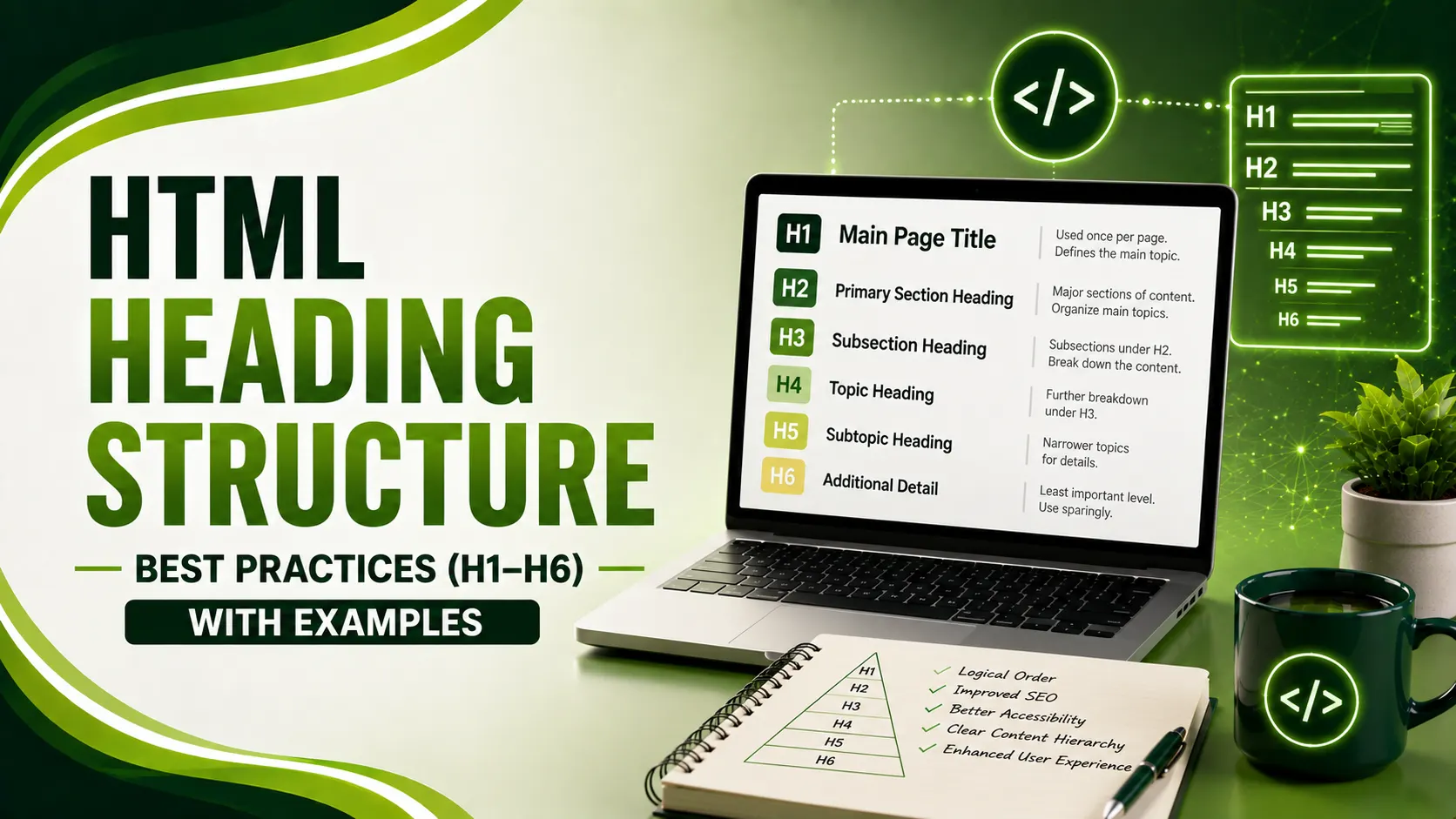
HTML heading structure best practices sound simple until a shared hero component silently duplicates your H1 on every page. Here's a real case study.
Table of Contents
ToggleHTML heading structure best practices come down to one core rule most sites still get wrong: one clear H1 per page, then H2 through H6 nested in order, with no levels skipped. Simple to state, surprisingly easy to break once a CMS, a design system, or a hero component gets involved.
01HTML Heading Structure Best Practices: The One-H1 Rule
Conductor's guide is direct about why this still matters even though HTML5 technically permits multiple H1s: search engines and accessibility tools never treated multiple H1s as best practice. When a page has more than one, the signal weakens, and if everything is labeled most important, nothing really is.
Screen reader users depend on this structure directly. They navigate by jumping between headings, and a broken hierarchy means jumping into confusion rather than the next logical section.
02A Real Case: One Component, Duplicate H1s Everywhere
DevTrios' audit writeup documents a concrete, anonymized example worth internalizing: a B2B SaaS site running a headless CMS with a Next.js frontend had an H1 hard-coded into a reusable hero component shared across every blog template. Every single post silently output two H1s, a generic marketing slogan from the hero, and the actual post title.
Nobody wrote a duplicate H1 on purpose. It came from a shared component nobody audited after launch, which is exactly the kind of structural bug that survives for years because it never throws an error, it just quietly weakens every page's topic signal.
<!-- Hero component, rendered on every page -->
<h1>Build Better Software</h1>

<!-- Blog post template, rendered inside the same page -->
<h1>How to Structure H1-H6 Headings for SEO</h1>
<h2>Why Heading Hierarchy Matters</h2>
<!-- Hero component, demoted to a non-competing role -->
<p class="hero-tagline">Build Better Software</p>

<!-- Blog post template retains the only H1 on the page -->
<h1>How to Structure H1-H6 Headings for SEO</h1>
<h2>Why Heading Hierarchy Matters</h2>
03The Skip-Level Rule, and the Nuance Most Guides Miss
The W3C's own accessibility tutorial states the core rule plainly: make sure an H2 is not followed directly by an H4, for example. Headings with an equal or higher rank start a new section, while a lower rank starts a subsection within it.
The nuance most SEO guides skip entirely: the W3C explicitly says it's fine to skip ranks when closing subsections. An H2 opening a new section can validly follow an H4 that was closing out the previous one, since that H4 was ending a subsection, not opening a new one that needs its own proper nesting.
Lawrence Hitches' 2026 audit findings identify a specific, widespread mistake most SEO content never addresses: many Shopify homepages and category pages skip the H1 entirely. Designers style a large, bold, centered paragraph or div to look like an H1 visually, but never actually tag it as one, and hero banners often bake the brand name into an image rather than live H1 text.
04H1 vs Title Tag: Related, Not Identical
Conductor's guide, referenced above, draws a distinction worth remembering: the title tag appears in SERP results and the browser tab, while the H1 appears on the actual page. They can match, but they don't have to, and each is written for a different reader in a different context.
Vocus Digital's guide gives a concrete example of that split: a title tag optimized for SERP click-through might read "How to Use Headings for SEO: H1–H6 Guide (2026)," while the on-page H1 reads "How to Use Headings for SEO — The Complete 2026 Guide," topically aligned but worded to serve the reader who's already landed, not the searcher deciding whether to click.
05Keyword Placement Without Stuffing
DevTrios' second guide is specific about where keyword effort should stop entirely: keyword stuffing in H4 through H6 provides little SEO value, since these lower-level tags carry minimal ranking weight. Focus on readability and structure at those depths, not density.
Vary the phrasing pattern across sibling headings. If every H2 on the page starts with "How to" and every H3 starts with "Why," the repetition itself starts to read as mechanical, even before a reader consciously notices the pattern. A little rhythm variation keeps a long article from feeling like a checklist.
06Recommended Depth by Content Type
Most content never needs to reach H5 or H6. Here's a practical guide by content type.
| Content Type | Typical Max Depth | Note |
|---|---|---|
| Standard blog post | H1, H2, H3 | Reaching H4+ often signals content should be split |
| Long-form guide or documentation | H1 through H4 | H4 is a reasonable cap for most genuinely deep content |
| Legal or highly technical reference | H1 through H5/H6 | Rare exception where deep nesting is genuinely warranted |
| Landing or product page | H1, H2 | Usually shallow, section-based rather than deeply nested |
07The WCAG Criteria Behind Heading Rules
Greadme's guide ties heading practices back to specific, testable standards worth knowing by name: WCAG 2.2 SC 1.3.1 requires visual hierarchy to be conveyed programmatically, through real heading tags, not styled divs. SC 2.4.6 requires headings to actually describe the section they introduce, not just look impressive.
Two automated audit failures are worth checking for specifically: heading-order fails when levels are skipped, like jumping from H1 straight to H3, and empty-heading fails on any heading tag with no actual text content inside it. This connects directly to how our table of contents generator guide queries headings, a broken hierarchy there produces a broken navigation outline too.
08Heading Structure Audit Checklist
A short list to run through on any template before considering it done.
Confirm exactly one H1 per rendered page, check shared components separately from the main template.
Never skip levels when opening a new section, H2 to H4 directly breaks the outline.
Use Chrome DevTools' Accessibility pane to view the actual heading outline as a real reader would.
Check sidebars and footers too, fixed-region headings need consistent ranks across templates.
Never style a div to look like a heading, use a real heading tag styled with CSS instead.
09How Clean Is Your Heading Structure?
Answer a few quick questions to check your current setup.
How Clean Is Your Heading Structure?
Select the option that matches your site
10Common Questions
Technically HTML5 allows it, but it's not recommended practice. Search engines and accessibility tools weaken the topic signal when multiple H1s compete, so one clear H1 per page remains the standard.
Yes, when closing a subsection. The W3C explicitly allows an H2 opening a new section to follow an H4 that was ending the previous subsection. What's not allowed is skipping levels when opening a new section, like H2 straight to H4.
No, though keeping them closely aligned usually helps. The title tag is written for SERP click-through, the H1 for the reader already on the page, and they can differ while still describing the same topic.
A common theme issue: designers style a large, bold heading-looking paragraph or div instead of using a real H1 tag, or bake the title into a hero banner image rather than live text.
Very little. Lower-level heading tags carry minimal SEO weight compared to H1 and H2. Focus on readability and clear structure at those depths rather than trying to force keyword density.
Related Articles
What We Learn Today
One H1 per page remains the established best practice
Shared components are the most common source of hidden duplicate H1s
Skipping ranks is fine when closing a subsection, not when opening one
H1 and title tag serve different readers and needn't match exactly
Keyword stuffing in H4-H6 provides minimal SEO value
WCAG 2.2 defines specific, testable heading criteria
Build a Complete Technical SEO Foundation
Clean heading structure pairs directly with table of contents generation and canonical strategy. Explore both guides next.
Related Posts
Previous Post
Next Post
Previous Post
Next Post






- Artificial Intelligence
- Content
- Core Web Vitals
- Development
- Digital Marketing
- Display Advertising
- Google Ads
- Google Search Console
- GTM
- HTML
- HTML CSS
- JavaScript
- Keyword Research
- Link Building
- LinkedIn Ads
- Local SEO
- Meta Ads
- Mobile SEO
- Off-Page SEO
- On-Page SEO
- Paid Media
- Paid Media Analytics
- PHP
- PPC Strategy
- Python
- SEO
- SEO Basics
- SEO Tools
- Social
- Technical SEO




