

- Home
- SEODiscover the latest updates from across the United States, including politics, culture, economy, and trending stories. Stay informed on the key events shaping the nation and the topics everyone’s talking about.
- Technical SEOLearn technical SEO concepts including crawling, indexing, XML sitemaps, robots.txt, canonical tags, site architecture, and website performance.
- Local SEOOptimize your business for local seo with Google Business Profile, local citations, reviews, maps, and location-based SEO.
- Mobile SEOImprove your website’s mobile seo performance with responsive design, mobile-first indexing, usability, and page speed optimization.
- On-Page SEOExplore on-page seo optimization techniques such as title tags, meta descriptions, headings, URLs, internal linking, and content optimization.
- Off-Page SEODiscover off-page SEO strategies such as backlinks, digital PR, brand mentions, outreach, and authority building.
- SEO ToolsExplore the best SEO tools for keyword research, technical audits, backlink analysis, rank tracking, and website optimization.
- Core Web VitalsLearn how to improve Core Web Vitals including LCP, INP, CLS, page speed, and overall user experience for better rankings.
- Keyword ResearchLearn how to find profitable keywords, analyze search intent, evaluate competition, and build effective keyword strategies.
- Link BuildingMaster ethical link building techniques, backlink analysis, outreach methods, guest posting, and authority growth strategies.
- Google Search ConsoleLearn how to use Google Search Console to monitor indexing, fix errors, analyze search performance, and improve SEO.
- SEO BasicsLearn the fundamentals of search engine optimization (SEO Basics), including how search engines work, SEO terminology, and beginner-friendly best practices.
- Paid Media
- Display AdvertisingLearn display advertising strategies, banner ads, audience targeting, remarketing, Google Display campaigns, and optimization techniques.
- Google AdsLearn Google Ads strategies, campaign setup, bidding, keywords, Performance Max, Search Ads, and optimization techniques.
- LinkedIn AdsLearn LinkedIn Ads strategies for B2B marketing, lead generation, audience targeting, campaign optimization, and paid social advertising.
- Meta AdsLearn Meta Ads strategies for Facebook and Instagram, including campaign setup, targeting, retargeting, and performance optimization.
- Paid Media AnalyticsLearn paid media analytics, including CPC, CTR, CPA, ROAS, conversion tracking, attribution, reporting, and campaign performance analysis.
- PPC StrategyLearn effective PPC strategies, campaign planning, bidding, keyword targeting, landing pages, conversion optimization, and more.
- ContentTransform your living spaces with inspiration, tips, and trends in interior design. From minimalist decor to bold statements, find ideas for every style and budget.
- Social
- Digital MarketingExplore stories and advice on living your best life. From personal growth to entertainment, dive into the latest in lifestyle trends and inspiration.
- Artificial IntelligenceStay informed about health and wellness with expert advice, fitness tips, and the latest medical breakthroughs. Your guide to a healthier and happier life.
- DevelopmentYou will find development related educational articles
- GTMLearn Google Tag Manager (GTM) with practical guides for tags, triggers, variables, tracking, conversions, and website analytics implementation.
- HTMLLearn HTML with simple tutorials, examples, tags, elements, attributes, and best practices for building modern web pages.
- HTML CSSLearn HTML CSS together with practical tutorials, examples, layouts, styling techniques, responsive design, and modern web development practices.
- HTML JSLearn HTML JS – JavaScript with practical tutorials and examples for adding interactivity, dynamic content, events, and functionality to web pages.
- JavaScriptExplore JavaScript tutorials, examples, concepts, and practical techniques for creating interactive and dynamic websites and web applications.
- PHPLearn PHP programming with practical tutorials, examples, functions, syntax, and web development techniques for beginners and developers.
- PythonLearn Python programming with practical tutorials, examples, syntax, functions, automation techniques, and useful programming concepts.
- Home
- SEODiscover the latest updates from across the United States, including politics, culture, economy, and trending stories. Stay informed on the key events shaping the nation and the topics everyone’s talking about.
- Technical SEOLearn technical SEO concepts including crawling, indexing, XML sitemaps, robots.txt, canonical tags, site architecture, and website performance.
- Local SEOOptimize your business for local seo with Google Business Profile, local citations, reviews, maps, and location-based SEO.
- Mobile SEOImprove your website’s mobile seo performance with responsive design, mobile-first indexing, usability, and page speed optimization.
- On-Page SEOExplore on-page seo optimization techniques such as title tags, meta descriptions, headings, URLs, internal linking, and content optimization.
- Off-Page SEODiscover off-page SEO strategies such as backlinks, digital PR, brand mentions, outreach, and authority building.
- SEO ToolsExplore the best SEO tools for keyword research, technical audits, backlink analysis, rank tracking, and website optimization.
- Core Web VitalsLearn how to improve Core Web Vitals including LCP, INP, CLS, page speed, and overall user experience for better rankings.
- Keyword ResearchLearn how to find profitable keywords, analyze search intent, evaluate competition, and build effective keyword strategies.
- Link BuildingMaster ethical link building techniques, backlink analysis, outreach methods, guest posting, and authority growth strategies.
- Google Search ConsoleLearn how to use Google Search Console to monitor indexing, fix errors, analyze search performance, and improve SEO.
- SEO BasicsLearn the fundamentals of search engine optimization (SEO Basics), including how search engines work, SEO terminology, and beginner-friendly best practices.
- Paid Media
- Display AdvertisingLearn display advertising strategies, banner ads, audience targeting, remarketing, Google Display campaigns, and optimization techniques.
- Google AdsLearn Google Ads strategies, campaign setup, bidding, keywords, Performance Max, Search Ads, and optimization techniques.
- LinkedIn AdsLearn LinkedIn Ads strategies for B2B marketing, lead generation, audience targeting, campaign optimization, and paid social advertising.
- Meta AdsLearn Meta Ads strategies for Facebook and Instagram, including campaign setup, targeting, retargeting, and performance optimization.
- Paid Media AnalyticsLearn paid media analytics, including CPC, CTR, CPA, ROAS, conversion tracking, attribution, reporting, and campaign performance analysis.
- PPC StrategyLearn effective PPC strategies, campaign planning, bidding, keyword targeting, landing pages, conversion optimization, and more.
- ContentTransform your living spaces with inspiration, tips, and trends in interior design. From minimalist decor to bold statements, find ideas for every style and budget.
- Social
- Digital MarketingExplore stories and advice on living your best life. From personal growth to entertainment, dive into the latest in lifestyle trends and inspiration.
- Artificial IntelligenceStay informed about health and wellness with expert advice, fitness tips, and the latest medical breakthroughs. Your guide to a healthier and happier life.
- DevelopmentYou will find development related educational articles
- GTMLearn Google Tag Manager (GTM) with practical guides for tags, triggers, variables, tracking, conversions, and website analytics implementation.
- HTMLLearn HTML with simple tutorials, examples, tags, elements, attributes, and best practices for building modern web pages.
- HTML CSSLearn HTML CSS together with practical tutorials, examples, layouts, styling techniques, responsive design, and modern web development practices.
- HTML JSLearn HTML JS – JavaScript with practical tutorials and examples for adding interactivity, dynamic content, events, and functionality to web pages.
- JavaScriptExplore JavaScript tutorials, examples, concepts, and practical techniques for creating interactive and dynamic websites and web applications.
- PHPLearn PHP programming with practical tutorials, examples, functions, syntax, and web development techniques for beginners and developers.
- PythonLearn Python programming with practical tutorials, examples, syntax, functions, automation techniques, and useful programming concepts.
Now Reading: How to Automatically Generate SEO-Friendly URLs in PHP
-
01
How to Automatically Generate SEO-Friendly URLs in PHP
- Home//
- SEO//Discover the latest updates from across the United States, including politics, culture, economy, and trending stories. Stay informed on the key events shaping the nation and the topics everyone’s talking about.
- Technical SEO//Learn technical SEO concepts including crawling, indexing, XML sitemaps, robots.txt, canonical tags, site architecture, and website performance.
- Local SEO//Optimize your business for local seo with Google Business Profile, local citations, reviews, maps, and location-based SEO.
- Mobile SEO//Improve your website’s mobile seo performance with responsive design, mobile-first indexing, usability, and page speed optimization.
- On-Page SEO//Explore on-page seo optimization techniques such as title tags, meta descriptions, headings, URLs, internal linking, and content optimization.
- Off-Page SEO//Discover off-page SEO strategies such as backlinks, digital PR, brand mentions, outreach, and authority building.
- SEO Tools//Explore the best SEO tools for keyword research, technical audits, backlink analysis, rank tracking, and website optimization.
- Core Web Vitals//Learn how to improve Core Web Vitals including LCP, INP, CLS, page speed, and overall user experience for better rankings.
- Keyword Research//Learn how to find profitable keywords, analyze search intent, evaluate competition, and build effective keyword strategies.
- Link Building//Master ethical link building techniques, backlink analysis, outreach methods, guest posting, and authority growth strategies.
- Google Search Console//Learn how to use Google Search Console to monitor indexing, fix errors, analyze search performance, and improve SEO.
- SEO Basics//Learn the fundamentals of search engine optimization (SEO Basics), including how search engines work, SEO terminology, and beginner-friendly best practices.
- Paid Media//
- Display Advertising//Learn display advertising strategies, banner ads, audience targeting, remarketing, Google Display campaigns, and optimization techniques.
- Google Ads//Learn Google Ads strategies, campaign setup, bidding, keywords, Performance Max, Search Ads, and optimization techniques.
- LinkedIn Ads//Learn LinkedIn Ads strategies for B2B marketing, lead generation, audience targeting, campaign optimization, and paid social advertising.
- Meta Ads//Learn Meta Ads strategies for Facebook and Instagram, including campaign setup, targeting, retargeting, and performance optimization.
- Paid Media Analytics//Learn paid media analytics, including CPC, CTR, CPA, ROAS, conversion tracking, attribution, reporting, and campaign performance analysis.
- PPC Strategy//Learn effective PPC strategies, campaign planning, bidding, keyword targeting, landing pages, conversion optimization, and more.
- Content//Transform your living spaces with inspiration, tips, and trends in interior design. From minimalist decor to bold statements, find ideas for every style and budget.
- Social//
- Digital Marketing//Explore stories and advice on living your best life. From personal growth to entertainment, dive into the latest in lifestyle trends and inspiration.
- Artificial Intelligence//Stay informed about health and wellness with expert advice, fitness tips, and the latest medical breakthroughs. Your guide to a healthier and happier life.
- Development//You will find development related educational articles
- GTM//Learn Google Tag Manager (GTM) with practical guides for tags, triggers, variables, tracking, conversions, and website analytics implementation.
- HTML//Learn HTML with simple tutorials, examples, tags, elements, attributes, and best practices for building modern web pages.
- HTML CSS//Learn HTML CSS together with practical tutorials, examples, layouts, styling techniques, responsive design, and modern web development practices.
- HTML JS//Learn HTML JS – JavaScript with practical tutorials and examples for adding interactivity, dynamic content, events, and functionality to web pages.
- JavaScript//Explore JavaScript tutorials, examples, concepts, and practical techniques for creating interactive and dynamic websites and web applications.
- PHP//Learn PHP programming with practical tutorials, examples, functions, syntax, and web development techniques for beginners and developers.
- Python//Learn Python programming with practical tutorials, examples, syntax, functions, automation techniques, and useful programming concepts.
- Home
- SEO
- On-Page SEO
- How to Automatically Generate SEO-Friendly URLs in PHP
How to Automatically Generate SEO-Friendly URLs in PHP

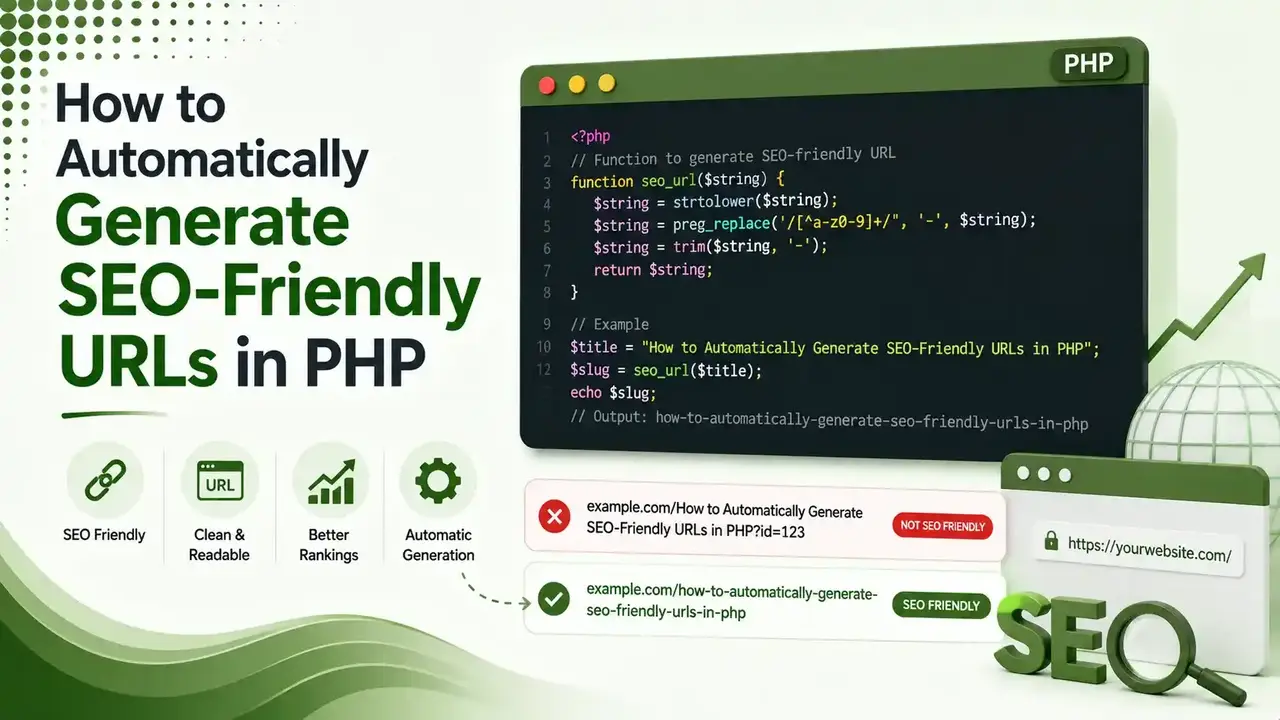
A URL like /post.php?id=4821 tells search engines nothing. Here's the complete PHP code to fix that automatically transliteration, uniqueness checks, server rewrite rules, and a live slug generator.
Table of Contents
ToggleA URL like /post.php?id=4821 tells a search engine and a user absolutely nothing. A URL like /blog/seo-friendly-urls-php tells them everything before the page even loads. Turning the first into the second is a single PHP function, and this guide gives you the complete, working code.
SEO-friendly URLs are automatically generated in PHP by converting a title or heading into a clean, lowercase, hyphen-separated slug, stripping special characters, transliterating accented letters, and checking the result against existing records to guarantee it stays unique.
We covered the writing side of this in our SEO-friendly blog posts guide. This article handles the technical half: the actual PHP that turns a title into a clean, working URL automatically.
words is the ideal slug length range for both readability and search performance
PHP function handles transliteration, cleanup, and formatting in a single pass
redirect status code required any time an already-indexed slug changes
What Turning a Title Into a Slug Actually Looks Like
Step 1: The Core Slugify Function
This single function handles transliteration, lowercasing, and cleanup in one pass, using PHP's built-in iconv function.
<?php
function slugify(string $text, string $separator = '-'): string {
    // Transliterate accented and Unicode characters to plain ASCII
    $text = iconv('UTF-8', 'ASCII//TRANSLIT//IGNORE', $text);

    // Lowercase everything
    $text = strtolower($text);

    // Replace anything that isn't a letter or number with the separator
    $text = preg_replace('/[^a-z0-9]+/', $separator, $text);

    // Trim separators from both ends
    $text = trim($text, $separator);

    // Collapse repeated separators into a single one
    $text = preg_replace('/' . preg_quote($separator, '/') . '+/', $separator, $text);

    return $text;
}

echo slugify('10 Content Writing Mistakes That Reduce Rankings!');
// Output: 10-content-writing-mistakes-that-reduce-rankings
A complete, working slugify function using PHP's built-in iconv transliteration
Step 2: Guaranteeing Uniqueness Against a Database
Two posts titled the same thing will otherwise generate identical slugs. This version checks the database and appends a number if needed.
<?php
function generateUniqueSlug(PDO $pdo, string $title, ?int $excludeId = null): string {
    $baseSlug = slugify($title);
    $slug = $baseSlug;
    $counter = 2;

    while (slugExists($pdo, $slug, $excludeId)) {
        $slug = $baseSlug . '-' . $counter;
        $counter++;
    }
    return $slug;
}

function slugExists(PDO $pdo, string $slug, ?int $excludeId = null): bool {
    $sql = "SELECT COUNT(*) FROM posts WHERE slug = :slug";
    $params = ['slug' => $slug];

    if ($excludeId !== null) {
        $sql .= " AND id != :id";
        $params['id'] = $excludeId;
    }

    $stmt = $pdo->prepare($sql);
    $stmt->execute($params);
    return (int) $stmt->fetchColumn() > 0;
}
Appends -2, -3, and so on until an unused slug is found; excludeId prevents false positives when editing an existing post
Step 3: Putting It Together on Save
<?php
$title = $_POST['title'];
$slug = generateUniqueSlug($pdo, $title);

$stmt = $pdo->prepare("INSERT INTO posts (title, slug, created_at) VALUES (:title, :slug, NOW())");
$stmt->execute(['title' => $title, 'slug' => $slug]);
A complete insert flow: title comes in, a guaranteed-unique SEO-friendly URL goes into the database
Step 4: Making the URL Actually Work
Generating the slug is only half the job. The server needs to route that clean URL to the right script.
RewriteEngine On
RewriteCond %{REQUEST_FILENAME} !-f
RewriteCond %{REQUEST_FILENAME} !-d
RewriteRule ^blog/([a-z0-9-]+)/?$ blog-post.php?slug=$1 [L,QSA]
location /blog/ {
    rewrite ^/blog/([a-z0-9-]+)/?$ /blog-post.php?slug=$1 last;
}
Live Slug Generator
Type a title below to see the exact SEO-friendly URL the PHP function above would generate.
Live Slug Generator
Mirrors the slugify() function's logic in real time
Why SEO-Friendly URLs Matter Beyond Rankings
According to Achromatic's guide to SEO-friendly slugs, a clean URL improves click-through rate directly, since users can see what a page is about before ever clicking the search result.
SEO-friendly URLs also make internal linking easier to manage. A URL like /blog/seo-friendly-urls-php is self-documenting in code, on a sitemap, or in analytics reports, unlike an opaque numeric ID that requires a database lookup to understand.
Transliteration Options Beyond the Basic Function
According to Slug Generator's guide to creating SEO-friendly URL slugs in PHP, PHP's intl extension offers ICU-based transliteration for cases where iconv's simpler approach does not cover a specific language well enough.
According to Our Code World's guide to creating URL slugs properly in PHP, a custom character map is another option for teams needing precise control over how specific accented or Cyrillic characters convert, beyond what a generic transliteration function provides by default.
Testing Your SEO-Friendly URL Setup End to End
According to PHP's official preg_replace documentation, testing the slugify function against edge cases, titles with numbers, punctuation, and mixed languages, catches formatting issues before they reach production.
Once the PHP side generates a correct SEO-friendly URL, confirm the rewrite rule actually resolves it by visiting the new URL directly in a browser, not just linking to it internally.
According to Edureka's community discussion on generating SEO-friendly URL slugs, a working rewrite rule returns the correct page with a 200 status; a broken one returns a 404 even though the slug itself was generated correctly.
Common Mistakes to Avoid
| Mistake | Why It Matters |
|---|---|
| Using auto-increment IDs as the slug | /post/4821 means nothing to users or search engines |
| Changing a slug without a 301 redirect | Breaks every existing backlink and indexed search result |
| Leaving slugs 8-10+ words long | 3-5 words performs best for both readability and search |
| Skipping transliteration entirely | Accented characters get silently stripped, mangling the slug |
| All-numeric slugs | Some frameworks route pure numbers to ID-based logic unexpectedly |
Handling Slug Changes Safely
According to DevToolHub's 2026 URL slug best practices guide, once a URL is indexed, has backlinks, or has been shared, changing the slug breaks every one of those existing references unless a redirect is put in place.
According to Rich Dev Tools' guide to URL slug rules and SEO impact, a simple redirects table mapping old slugs to new ones, checked before a 404 response, handles this cleanly without manual .htaccess edits for every single change.
FAQs on Generating SEO-Friendly URLs in PHP
Related Articles
> what_we_learn_today.log
iconv transliteration handles accented characters without any external library
A database uniqueness check prevents duplicate slugs from colliding
Generating the slug is only half the job; server rewrite rules make it live
3-5 words is the sweet spot for slug length
Never change an indexed slug without a 301 redirect in place
Avoid auto-increment IDs and all-numeric slugs entirely
Related Posts


Previous Post
Next Post
Previous Post
Next Post





- Artificial Intelligence
- Content
- Core Web Vitals
- Development
- Digital Marketing
- Display Advertising
- Google Ads
- Google Search Console
- GTM
- HTML
- HTML CSS
- JavaScript
- Keyword Research
- Link Building
- LinkedIn Ads
- Local SEO
- Meta Ads
- Mobile SEO
- Off-Page SEO
- On-Page SEO
- Paid Media
- Paid Media Analytics
- PHP
- PPC Strategy
- Python
- SEO
- SEO Basics
- SEO Tools
- Social
- Technical SEO




