

- Home
- SEODiscover the latest updates from across the United States, including politics, culture, economy, and trending stories. Stay informed on the key events shaping the nation and the topics everyone’s talking about.
- Technical SEOLearn technical SEO concepts including crawling, indexing, XML sitemaps, robots.txt, canonical tags, site architecture, and website performance.
- Local SEOOptimize your business for local seo with Google Business Profile, local citations, reviews, maps, and location-based SEO.
- Mobile SEOImprove your website’s mobile seo performance with responsive design, mobile-first indexing, usability, and page speed optimization.
- On-Page SEOExplore on-page seo optimization techniques such as title tags, meta descriptions, headings, URLs, internal linking, and content optimization.
- Off-Page SEODiscover off-page SEO strategies such as backlinks, digital PR, brand mentions, outreach, and authority building.
- SEO ToolsExplore the best SEO tools for keyword research, technical audits, backlink analysis, rank tracking, and website optimization.
- Core Web VitalsLearn how to improve Core Web Vitals including LCP, INP, CLS, page speed, and overall user experience for better rankings.
- Keyword ResearchLearn how to find profitable keywords, analyze search intent, evaluate competition, and build effective keyword strategies.
- Link BuildingMaster ethical link building techniques, backlink analysis, outreach methods, guest posting, and authority growth strategies.
- Google Search ConsoleLearn how to use Google Search Console to monitor indexing, fix errors, analyze search performance, and improve SEO.
- SEO BasicsLearn the fundamentals of search engine optimization (SEO Basics), including how search engines work, SEO terminology, and beginner-friendly best practices.
- Paid Media
- Display AdvertisingLearn display advertising strategies, banner ads, audience targeting, remarketing, Google Display campaigns, and optimization techniques.
- Google AdsLearn Google Ads strategies, campaign setup, bidding, keywords, Performance Max, Search Ads, and optimization techniques.
- LinkedIn AdsLearn LinkedIn Ads strategies for B2B marketing, lead generation, audience targeting, campaign optimization, and paid social advertising.
- Meta AdsLearn Meta Ads strategies for Facebook and Instagram, including campaign setup, targeting, retargeting, and performance optimization.
- Paid Media AnalyticsLearn paid media analytics, including CPC, CTR, CPA, ROAS, conversion tracking, attribution, reporting, and campaign performance analysis.
- PPC StrategyLearn effective PPC strategies, campaign planning, bidding, keyword targeting, landing pages, conversion optimization, and more.
- ContentTransform your living spaces with inspiration, tips, and trends in interior design. From minimalist decor to bold statements, find ideas for every style and budget.
- Social
- Digital MarketingExplore stories and advice on living your best life. From personal growth to entertainment, dive into the latest in lifestyle trends and inspiration.
- Artificial IntelligenceStay informed about health and wellness with expert advice, fitness tips, and the latest medical breakthroughs. Your guide to a healthier and happier life.
- DevelopmentYou will find development related educational articles
- GTMLearn Google Tag Manager (GTM) with practical guides for tags, triggers, variables, tracking, conversions, and website analytics implementation.
- HTMLLearn HTML with simple tutorials, examples, tags, elements, attributes, and best practices for building modern web pages.
- HTML CSSLearn HTML CSS together with practical tutorials, examples, layouts, styling techniques, responsive design, and modern web development practices.
- HTML JSLearn HTML JS – JavaScript with practical tutorials and examples for adding interactivity, dynamic content, events, and functionality to web pages.
- JavaScriptExplore JavaScript tutorials, examples, concepts, and practical techniques for creating interactive and dynamic websites and web applications.
- PHPLearn PHP programming with practical tutorials, examples, functions, syntax, and web development techniques for beginners and developers.
- PythonLearn Python programming with practical tutorials, examples, syntax, functions, automation techniques, and useful programming concepts.
- Home
- SEODiscover the latest updates from across the United States, including politics, culture, economy, and trending stories. Stay informed on the key events shaping the nation and the topics everyone’s talking about.
- Technical SEOLearn technical SEO concepts including crawling, indexing, XML sitemaps, robots.txt, canonical tags, site architecture, and website performance.
- Local SEOOptimize your business for local seo with Google Business Profile, local citations, reviews, maps, and location-based SEO.
- Mobile SEOImprove your website’s mobile seo performance with responsive design, mobile-first indexing, usability, and page speed optimization.
- On-Page SEOExplore on-page seo optimization techniques such as title tags, meta descriptions, headings, URLs, internal linking, and content optimization.
- Off-Page SEODiscover off-page SEO strategies such as backlinks, digital PR, brand mentions, outreach, and authority building.
- SEO ToolsExplore the best SEO tools for keyword research, technical audits, backlink analysis, rank tracking, and website optimization.
- Core Web VitalsLearn how to improve Core Web Vitals including LCP, INP, CLS, page speed, and overall user experience for better rankings.
- Keyword ResearchLearn how to find profitable keywords, analyze search intent, evaluate competition, and build effective keyword strategies.
- Link BuildingMaster ethical link building techniques, backlink analysis, outreach methods, guest posting, and authority growth strategies.
- Google Search ConsoleLearn how to use Google Search Console to monitor indexing, fix errors, analyze search performance, and improve SEO.
- SEO BasicsLearn the fundamentals of search engine optimization (SEO Basics), including how search engines work, SEO terminology, and beginner-friendly best practices.
- Paid Media
- Display AdvertisingLearn display advertising strategies, banner ads, audience targeting, remarketing, Google Display campaigns, and optimization techniques.
- Google AdsLearn Google Ads strategies, campaign setup, bidding, keywords, Performance Max, Search Ads, and optimization techniques.
- LinkedIn AdsLearn LinkedIn Ads strategies for B2B marketing, lead generation, audience targeting, campaign optimization, and paid social advertising.
- Meta AdsLearn Meta Ads strategies for Facebook and Instagram, including campaign setup, targeting, retargeting, and performance optimization.
- Paid Media AnalyticsLearn paid media analytics, including CPC, CTR, CPA, ROAS, conversion tracking, attribution, reporting, and campaign performance analysis.
- PPC StrategyLearn effective PPC strategies, campaign planning, bidding, keyword targeting, landing pages, conversion optimization, and more.
- ContentTransform your living spaces with inspiration, tips, and trends in interior design. From minimalist decor to bold statements, find ideas for every style and budget.
- Social
- Digital MarketingExplore stories and advice on living your best life. From personal growth to entertainment, dive into the latest in lifestyle trends and inspiration.
- Artificial IntelligenceStay informed about health and wellness with expert advice, fitness tips, and the latest medical breakthroughs. Your guide to a healthier and happier life.
- DevelopmentYou will find development related educational articles
- GTMLearn Google Tag Manager (GTM) with practical guides for tags, triggers, variables, tracking, conversions, and website analytics implementation.
- HTMLLearn HTML with simple tutorials, examples, tags, elements, attributes, and best practices for building modern web pages.
- HTML CSSLearn HTML CSS together with practical tutorials, examples, layouts, styling techniques, responsive design, and modern web development practices.
- HTML JSLearn HTML JS – JavaScript with practical tutorials and examples for adding interactivity, dynamic content, events, and functionality to web pages.
- JavaScriptExplore JavaScript tutorials, examples, concepts, and practical techniques for creating interactive and dynamic websites and web applications.
- PHPLearn PHP programming with practical tutorials, examples, functions, syntax, and web development techniques for beginners and developers.
- PythonLearn Python programming with practical tutorials, examples, syntax, functions, automation techniques, and useful programming concepts.
Now Reading: Canonical Tag Explained: Fix Duplicate Content and Improve SEO
-
01
Canonical Tag Explained: Fix Duplicate Content and Improve SEO
- Home//
- SEO//Discover the latest updates from across the United States, including politics, culture, economy, and trending stories. Stay informed on the key events shaping the nation and the topics everyone’s talking about.
- Technical SEO//Learn technical SEO concepts including crawling, indexing, XML sitemaps, robots.txt, canonical tags, site architecture, and website performance.
- Local SEO//Optimize your business for local seo with Google Business Profile, local citations, reviews, maps, and location-based SEO.
- Mobile SEO//Improve your website’s mobile seo performance with responsive design, mobile-first indexing, usability, and page speed optimization.
- On-Page SEO//Explore on-page seo optimization techniques such as title tags, meta descriptions, headings, URLs, internal linking, and content optimization.
- Off-Page SEO//Discover off-page SEO strategies such as backlinks, digital PR, brand mentions, outreach, and authority building.
- SEO Tools//Explore the best SEO tools for keyword research, technical audits, backlink analysis, rank tracking, and website optimization.
- Core Web Vitals//Learn how to improve Core Web Vitals including LCP, INP, CLS, page speed, and overall user experience for better rankings.
- Keyword Research//Learn how to find profitable keywords, analyze search intent, evaluate competition, and build effective keyword strategies.
- Link Building//Master ethical link building techniques, backlink analysis, outreach methods, guest posting, and authority growth strategies.
- Google Search Console//Learn how to use Google Search Console to monitor indexing, fix errors, analyze search performance, and improve SEO.
- SEO Basics//Learn the fundamentals of search engine optimization (SEO Basics), including how search engines work, SEO terminology, and beginner-friendly best practices.
- Paid Media//
- Display Advertising//Learn display advertising strategies, banner ads, audience targeting, remarketing, Google Display campaigns, and optimization techniques.
- Google Ads//Learn Google Ads strategies, campaign setup, bidding, keywords, Performance Max, Search Ads, and optimization techniques.
- LinkedIn Ads//Learn LinkedIn Ads strategies for B2B marketing, lead generation, audience targeting, campaign optimization, and paid social advertising.
- Meta Ads//Learn Meta Ads strategies for Facebook and Instagram, including campaign setup, targeting, retargeting, and performance optimization.
- Paid Media Analytics//Learn paid media analytics, including CPC, CTR, CPA, ROAS, conversion tracking, attribution, reporting, and campaign performance analysis.
- PPC Strategy//Learn effective PPC strategies, campaign planning, bidding, keyword targeting, landing pages, conversion optimization, and more.
- Content//Transform your living spaces with inspiration, tips, and trends in interior design. From minimalist decor to bold statements, find ideas for every style and budget.
- Social//
- Digital Marketing//Explore stories and advice on living your best life. From personal growth to entertainment, dive into the latest in lifestyle trends and inspiration.
- Artificial Intelligence//Stay informed about health and wellness with expert advice, fitness tips, and the latest medical breakthroughs. Your guide to a healthier and happier life.
- Development//You will find development related educational articles
- GTM//Learn Google Tag Manager (GTM) with practical guides for tags, triggers, variables, tracking, conversions, and website analytics implementation.
- HTML//Learn HTML with simple tutorials, examples, tags, elements, attributes, and best practices for building modern web pages.
- HTML CSS//Learn HTML CSS together with practical tutorials, examples, layouts, styling techniques, responsive design, and modern web development practices.
- HTML JS//Learn HTML JS – JavaScript with practical tutorials and examples for adding interactivity, dynamic content, events, and functionality to web pages.
- JavaScript//Explore JavaScript tutorials, examples, concepts, and practical techniques for creating interactive and dynamic websites and web applications.
- PHP//Learn PHP programming with practical tutorials, examples, functions, syntax, and web development techniques for beginners and developers.
- Python//Learn Python programming with practical tutorials, examples, syntax, functions, automation techniques, and useful programming concepts.
- Home
- SEO
- Technical SEO
- Canonical Tag Explained: Fix Duplicate Content and Improve SEO
Canonical Tag Explained: Fix Duplicate Content and Improve SEO

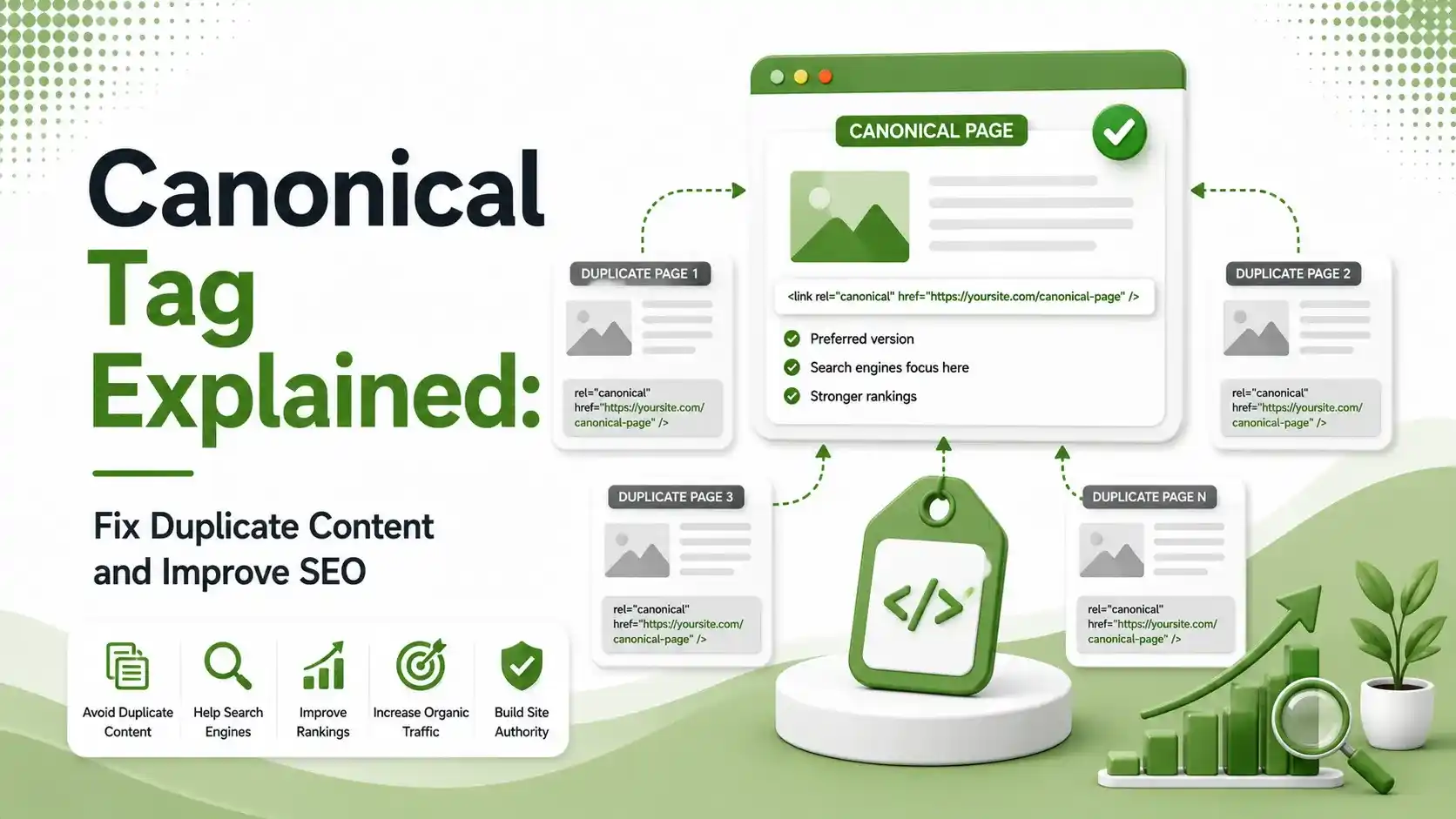
Learn how canonical tags prevent duplicate content issues, consolidate ranking signals, and help search engines index the correct version of your pages.
Table of Contents
ToggleYour product page, its filtered version, its tracking-parameter version, and its mobile version might all look identical to Google, four separate URLs quietly splitting the ranking credit that should belong to one page. That is duplicate content, and a canonical tag is the fix. Here is what canonicalization actually does and how to stop it from costing you rankings.
Duplicate content is not usually copied text from someone else's site. Most of it is self-inflicted, generated by your own CMS through filters, tracking parameters, printer-friendly versions, and URL variations like http versus https or www versus non-www.
We covered a related technical topic in our guide to schema markup for SEO and AI search. Canonicalization sits right alongside it as one of the quieter technical fixes that compounds into real ranking gains.
preferred URL is all Google needs per set of duplicate or near-duplicate pages
direct duplicate content penalty exists, but ranking dilution happens regardless
common URL variants most sites unintentionally create per page (http/https, www, params, filters)
What Canonicalization Actually Does
Canonicalization is the process of telling search engines which version of a page is the master copy when multiple URLs contain the same or very similar content. The signal itself is a simple HTML tag, but the effect is significant.
Instead of splitting ranking signals like backlinks and engagement data across three or four near-identical URLs, canonicalization consolidates all of that value into one authoritative page.
What a Canonical Tag Looks Like in Code
The tag itself sits in the page head and takes only one line. Here is a self-referencing canonical, the most common and safest setup for any indexable page.
<!-- Placed inside the <head> of the page -->
<link rel="canonical" href="https://www.brandella.in/shoes/" />
A self-referencing canonical tag, confirming this URL is the preferred version of itself
Five Situations That Commonly Need a Canonical Tag
Filter and Facet URLs
According to 12AM Agency's 2026 canonical tag guide, the standard approach is canonicalizing filtered category URLs, like a color or size filter, back to the base unfiltered category page.
Tracking Parameters
URLs with UTM tags or affiliate tracking codes technically create a new address for the same content, and should almost always canonicalize back to the clean, parameter-free URL.
HTTP/HTTPS and WWW Variants
According to Webflow's help documentation on canonical tags, search engines can treat http and https, or www and non-www versions of a page, as entirely separate duplicate pages without a clear signal.
Syndicated or Cross-Posted Content
When the same article is published on your site and republished elsewhere, a canonical tag on the syndicated copy points back to your original, preserving your claim as the source.
Mobile or AMP Page Variants
Separate mobile-specific URLs, where they still exist, need a canonical relationship back to the primary desktop version so ranking signals stay consolidated.
Canonical Tags in the Age of AI Search
Duplicate content used to be primarily a traditional SEO problem. That has changed.
According to Search Engine Land's 2026 canonicalization guide, AI Overviews, ChatGPT, and Perplexity all rely on clear canonical signals to identify which version of a page to trust, ingest, and cite as the authoritative source.
Messy or missing canonical signals do not just dilute rankings anymore. They can cause generative engines to summarize and attribute a topic to the wrong URL entirely, or skip citing your content because the "true" version was never clearly declared.
Common Canonicalization Mistakes to Avoid
Not every canonicalization setup helps. Tap through the two most damaging mistakes site owners make.
Pointing a canonical tag to a URL that also carries a noindex directive sends Google contradictory instructions. Fix this by either removing the noindex or updating the canonical target, depending on which page you actually want indexed.
According to Quattr's canonicalization guide, every indexable page should carry a self-referencing canonical tag, even when no duplicates currently exist. Without one, Google may later prefer an external duplicate over your original if one appears.
Canonicalization Methods Compared
| Method | Use Case | Strength of Signal |
|---|---|---|
| rel="canonical" tag | Similar content, multiple URLs, page must stay live | Strong hint, not a directive |
| 301 redirect | Permanent URL change, old URL should disappear | Strongest, fully consolidates the page |
| Parameter handling in Search Console | Large-scale tracking or session parameters | Moderate, supplementary signal |
| Noindex tag | Page should not appear in search at all | Strong, but different from canonicalization |
How to Audit Your Site's Canonical Tags
Start with Google Search Console's Pages report, which flags "Duplicate, Google chose different canonical than user" as a distinct issue. This report tells you exactly where your declared canonical does not match what Google decided to index instead.
Next, run a full site crawl using a crawler tool and export every page's canonical URL alongside its actual URL.
According to W3Era's 2026 canonical tags guide, the safest baseline is one absolute canonical URL in the head of every important page, combined with regular crawler checks to catch errors.
Finally, treat this as an ongoing task rather than a one-time fix.
According to HunkyDory Solutions' 2026 canonicalization guide, dynamic CMS platforms can generate new duplicate URLs automatically.
A quarterly recheck catches issues before they compound. This connects to the same discipline we described in our piece on why page volume stopped working for SEO, since both come down to keeping your site's structure clean as it scales.
How Canonicalization Protects Crawl Budget
Every duplicate URL Google crawls is a wasted crawl that could have gone toward a page you actually want indexed. On large sites, this adds up fast.
According to Surfer SEO's guide to canonical tag rules, getting canonical tags right protects crawl budget, consolidates link equity, and keeps rankings clean, while getting them wrong risks Google indexing the wrong pages or wasting resources on duplicates you never intended to rank.
This matters more as sites scale. A small site with a handful of pages rarely runs into crawl budget problems.
A larger ecommerce catalog with thousands of filter combinations can generate crawl waste that actively slows down how quickly new or updated pages get discovered and indexed.
Canonicalization Mistakes That Actively Hurt Rankings
Beyond conflicting signals and missing self-references, a few other mistakes show up repeatedly in site audits.
According to Optizite's 2026 guide to canonical tags, pointing a canonical tag to the wrong URL entirely, sometimes due to a copy-paste error in a template, causes search engines to simply ignore the incorrect signal.
Another common issue involves ecommerce platforms. According to Quattr's canonicalization guide referenced earlier, product variation pages, like different sizes or colors of the same item, often need careful canonical planning so that meaningful variants stay indexable while pure duplicates consolidate correctly.
Putting a Simple Canonicalization Routine in Place
Most sites do not need a complex canonicalization strategy, just a consistent one. A short recurring routine catches the majority of issues before they affect rankings.
Once a quarter, export a full list of indexed URLs from Search Console and compare it against your actual sitemap. Any unexpected URL showing up as indexed is worth investigating, since it often points to a missing or incorrect canonical tag somewhere in your template.
Pair that check with a look at your top-performing pages specifically. These are the pages where ranking dilution from duplicate URLs does the most damage, so confirming clean, self-referencing canonical tags on your highest-value content should always take priority over auditing your entire site at once.
FAQs on Canonicalization
Related Articles
What We Learn Today
01 — Canonical tags tell search engines which version of a duplicate page is the master copy.
02 — There is no direct duplicate content penalty, but ranking dilution is real.
03 — Filters, tracking parameters, and URL variants are the most common causes.
04 — AI search engines now rely on canonical signals to decide what to cite.
05 — Every indexable page should carry a self-referencing canonical tag.
06 — Canonicalization is an ongoing task, not a one-time setup.
Related Posts



Previous Post
Next Post
Previous Post
Next Post





- Artificial Intelligence
- Content
- Core Web Vitals
- Development
- Digital Marketing
- Google Ads
- Google Search Console
- GTM
- HTML
- HTML CSS
- JavaScript
- Keyword Research
- Link Building
- Local SEO
- Meta Ads
- Mobile SEO
- Off-Page SEO
- On-Page SEO
- Paid Media
- Paid Media Analytics
- PHP
- PPC Strategy
- Python
- SEO
- SEO Basics
- SEO Tools
- Social
- Technical SEO




