

- Home
- SEODiscover the latest updates from across the United States, including politics, culture, economy, and trending stories. Stay informed on the key events shaping the nation and the topics everyone’s talking about.
- Technical SEOLearn technical SEO concepts including crawling, indexing, XML sitemaps, robots.txt, canonical tags, site architecture, and website performance.
- Local SEOOptimize your business for local seo with Google Business Profile, local citations, reviews, maps, and location-based SEO.
- Mobile SEOImprove your website’s mobile seo performance with responsive design, mobile-first indexing, usability, and page speed optimization.
- On-Page SEOExplore on-page seo optimization techniques such as title tags, meta descriptions, headings, URLs, internal linking, and content optimization.
- Off-Page SEODiscover off-page SEO strategies such as backlinks, digital PR, brand mentions, outreach, and authority building.
- SEO ToolsExplore the best SEO tools for keyword research, technical audits, backlink analysis, rank tracking, and website optimization.
- Core Web VitalsLearn how to improve Core Web Vitals including LCP, INP, CLS, page speed, and overall user experience for better rankings.
- Keyword ResearchLearn how to find profitable keywords, analyze search intent, evaluate competition, and build effective keyword strategies.
- Link BuildingMaster ethical link building techniques, backlink analysis, outreach methods, guest posting, and authority growth strategies.
- Google Search ConsoleLearn how to use Google Search Console to monitor indexing, fix errors, analyze search performance, and improve SEO.
- SEO BasicsLearn the fundamentals of search engine optimization (SEO Basics), including how search engines work, SEO terminology, and beginner-friendly best practices.
- Paid Media
- Display AdvertisingLearn display advertising strategies, banner ads, audience targeting, remarketing, Google Display campaigns, and optimization techniques.
- Google AdsLearn Google Ads strategies, campaign setup, bidding, keywords, Performance Max, Search Ads, and optimization techniques.
- LinkedIn AdsLearn LinkedIn Ads strategies for B2B marketing, lead generation, audience targeting, campaign optimization, and paid social advertising.
- Meta AdsLearn Meta Ads strategies for Facebook and Instagram, including campaign setup, targeting, retargeting, and performance optimization.
- Paid Media AnalyticsLearn paid media analytics, including CPC, CTR, CPA, ROAS, conversion tracking, attribution, reporting, and campaign performance analysis.
- PPC StrategyLearn effective PPC strategies, campaign planning, bidding, keyword targeting, landing pages, conversion optimization, and more.
- ContentTransform your living spaces with inspiration, tips, and trends in interior design. From minimalist decor to bold statements, find ideas for every style and budget.
- Social
- Digital MarketingExplore stories and advice on living your best life. From personal growth to entertainment, dive into the latest in lifestyle trends and inspiration.
- Artificial IntelligenceStay informed about health and wellness with expert advice, fitness tips, and the latest medical breakthroughs. Your guide to a healthier and happier life.
- DevelopmentYou will find development related educational articles
- GTMLearn Google Tag Manager (GTM) with practical guides for tags, triggers, variables, tracking, conversions, and website analytics implementation.
- HTMLLearn HTML with simple tutorials, examples, tags, elements, attributes, and best practices for building modern web pages.
- HTML CSSLearn HTML CSS together with practical tutorials, examples, layouts, styling techniques, responsive design, and modern web development practices.
- HTML JSLearn HTML JS – JavaScript with practical tutorials and examples for adding interactivity, dynamic content, events, and functionality to web pages.
- JavaScriptExplore JavaScript tutorials, examples, concepts, and practical techniques for creating interactive and dynamic websites and web applications.
- PHPLearn PHP programming with practical tutorials, examples, functions, syntax, and web development techniques for beginners and developers.
- PythonLearn Python programming with practical tutorials, examples, syntax, functions, automation techniques, and useful programming concepts.
- Home
- SEODiscover the latest updates from across the United States, including politics, culture, economy, and trending stories. Stay informed on the key events shaping the nation and the topics everyone’s talking about.
- Technical SEOLearn technical SEO concepts including crawling, indexing, XML sitemaps, robots.txt, canonical tags, site architecture, and website performance.
- Local SEOOptimize your business for local seo with Google Business Profile, local citations, reviews, maps, and location-based SEO.
- Mobile SEOImprove your website’s mobile seo performance with responsive design, mobile-first indexing, usability, and page speed optimization.
- On-Page SEOExplore on-page seo optimization techniques such as title tags, meta descriptions, headings, URLs, internal linking, and content optimization.
- Off-Page SEODiscover off-page SEO strategies such as backlinks, digital PR, brand mentions, outreach, and authority building.
- SEO ToolsExplore the best SEO tools for keyword research, technical audits, backlink analysis, rank tracking, and website optimization.
- Core Web VitalsLearn how to improve Core Web Vitals including LCP, INP, CLS, page speed, and overall user experience for better rankings.
- Keyword ResearchLearn how to find profitable keywords, analyze search intent, evaluate competition, and build effective keyword strategies.
- Link BuildingMaster ethical link building techniques, backlink analysis, outreach methods, guest posting, and authority growth strategies.
- Google Search ConsoleLearn how to use Google Search Console to monitor indexing, fix errors, analyze search performance, and improve SEO.
- SEO BasicsLearn the fundamentals of search engine optimization (SEO Basics), including how search engines work, SEO terminology, and beginner-friendly best practices.
- Paid Media
- Display AdvertisingLearn display advertising strategies, banner ads, audience targeting, remarketing, Google Display campaigns, and optimization techniques.
- Google AdsLearn Google Ads strategies, campaign setup, bidding, keywords, Performance Max, Search Ads, and optimization techniques.
- LinkedIn AdsLearn LinkedIn Ads strategies for B2B marketing, lead generation, audience targeting, campaign optimization, and paid social advertising.
- Meta AdsLearn Meta Ads strategies for Facebook and Instagram, including campaign setup, targeting, retargeting, and performance optimization.
- Paid Media AnalyticsLearn paid media analytics, including CPC, CTR, CPA, ROAS, conversion tracking, attribution, reporting, and campaign performance analysis.
- PPC StrategyLearn effective PPC strategies, campaign planning, bidding, keyword targeting, landing pages, conversion optimization, and more.
- ContentTransform your living spaces with inspiration, tips, and trends in interior design. From minimalist decor to bold statements, find ideas for every style and budget.
- Social
- Digital MarketingExplore stories and advice on living your best life. From personal growth to entertainment, dive into the latest in lifestyle trends and inspiration.
- Artificial IntelligenceStay informed about health and wellness with expert advice, fitness tips, and the latest medical breakthroughs. Your guide to a healthier and happier life.
- DevelopmentYou will find development related educational articles
- GTMLearn Google Tag Manager (GTM) with practical guides for tags, triggers, variables, tracking, conversions, and website analytics implementation.
- HTMLLearn HTML with simple tutorials, examples, tags, elements, attributes, and best practices for building modern web pages.
- HTML CSSLearn HTML CSS together with practical tutorials, examples, layouts, styling techniques, responsive design, and modern web development practices.
- HTML JSLearn HTML JS – JavaScript with practical tutorials and examples for adding interactivity, dynamic content, events, and functionality to web pages.
- JavaScriptExplore JavaScript tutorials, examples, concepts, and practical techniques for creating interactive and dynamic websites and web applications.
- PHPLearn PHP programming with practical tutorials, examples, functions, syntax, and web development techniques for beginners and developers.
- PythonLearn Python programming with practical tutorials, examples, syntax, functions, automation techniques, and useful programming concepts.
Now Reading: How to Add Schema Markup to Any Website (JSON-LD Examples)
-
01
How to Add Schema Markup to Any Website (JSON-LD Examples)
- Home//
- SEO//Discover the latest updates from across the United States, including politics, culture, economy, and trending stories. Stay informed on the key events shaping the nation and the topics everyone’s talking about.
- Technical SEO//Learn technical SEO concepts including crawling, indexing, XML sitemaps, robots.txt, canonical tags, site architecture, and website performance.
- Local SEO//Optimize your business for local seo with Google Business Profile, local citations, reviews, maps, and location-based SEO.
- Mobile SEO//Improve your website’s mobile seo performance with responsive design, mobile-first indexing, usability, and page speed optimization.
- On-Page SEO//Explore on-page seo optimization techniques such as title tags, meta descriptions, headings, URLs, internal linking, and content optimization.
- Off-Page SEO//Discover off-page SEO strategies such as backlinks, digital PR, brand mentions, outreach, and authority building.
- SEO Tools//Explore the best SEO tools for keyword research, technical audits, backlink analysis, rank tracking, and website optimization.
- Core Web Vitals//Learn how to improve Core Web Vitals including LCP, INP, CLS, page speed, and overall user experience for better rankings.
- Keyword Research//Learn how to find profitable keywords, analyze search intent, evaluate competition, and build effective keyword strategies.
- Link Building//Master ethical link building techniques, backlink analysis, outreach methods, guest posting, and authority growth strategies.
- Google Search Console//Learn how to use Google Search Console to monitor indexing, fix errors, analyze search performance, and improve SEO.
- SEO Basics//Learn the fundamentals of search engine optimization (SEO Basics), including how search engines work, SEO terminology, and beginner-friendly best practices.
- Paid Media//
- Display Advertising//Learn display advertising strategies, banner ads, audience targeting, remarketing, Google Display campaigns, and optimization techniques.
- Google Ads//Learn Google Ads strategies, campaign setup, bidding, keywords, Performance Max, Search Ads, and optimization techniques.
- LinkedIn Ads//Learn LinkedIn Ads strategies for B2B marketing, lead generation, audience targeting, campaign optimization, and paid social advertising.
- Meta Ads//Learn Meta Ads strategies for Facebook and Instagram, including campaign setup, targeting, retargeting, and performance optimization.
- Paid Media Analytics//Learn paid media analytics, including CPC, CTR, CPA, ROAS, conversion tracking, attribution, reporting, and campaign performance analysis.
- PPC Strategy//Learn effective PPC strategies, campaign planning, bidding, keyword targeting, landing pages, conversion optimization, and more.
- Content//Transform your living spaces with inspiration, tips, and trends in interior design. From minimalist decor to bold statements, find ideas for every style and budget.
- Social//
- Digital Marketing//Explore stories and advice on living your best life. From personal growth to entertainment, dive into the latest in lifestyle trends and inspiration.
- Artificial Intelligence//Stay informed about health and wellness with expert advice, fitness tips, and the latest medical breakthroughs. Your guide to a healthier and happier life.
- Development//You will find development related educational articles
- GTM//Learn Google Tag Manager (GTM) with practical guides for tags, triggers, variables, tracking, conversions, and website analytics implementation.
- HTML//Learn HTML with simple tutorials, examples, tags, elements, attributes, and best practices for building modern web pages.
- HTML CSS//Learn HTML CSS together with practical tutorials, examples, layouts, styling techniques, responsive design, and modern web development practices.
- HTML JS//Learn HTML JS – JavaScript with practical tutorials and examples for adding interactivity, dynamic content, events, and functionality to web pages.
- JavaScript//Explore JavaScript tutorials, examples, concepts, and practical techniques for creating interactive and dynamic websites and web applications.
- PHP//Learn PHP programming with practical tutorials, examples, functions, syntax, and web development techniques for beginners and developers.
- Python//Learn Python programming with practical tutorials, examples, syntax, functions, automation techniques, and useful programming concepts.
- Home
- SEO
- On-Page SEO
- How to Add Schema Markup to Any Website (JSON-LD Examples)
How to Add Schema Markup to Any Website (JSON-LD Examples)

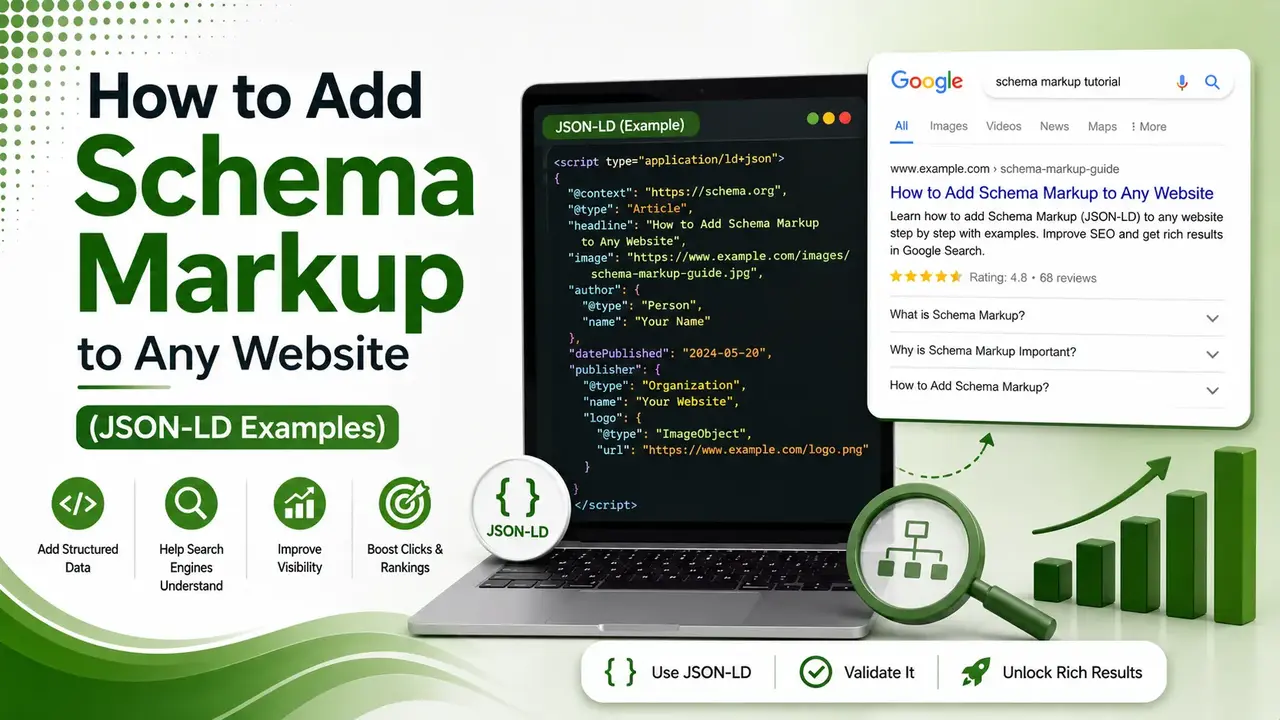
You don't need a developer to add JSON-LD schema just one script tag and the right template. Seven complete, copy-paste code blocks, platform-specific placement instructions, and a live snippet builder.
Table of Contents
ToggleYou do not need a developer to add schema markup to a website. You need one script tag, the right JSON-LD template, and about ten minutes per page. This guide gives you copy-paste code for the seven schema types that cover almost every website, plus exactly where to paste them, whatever platform you run.
JSON-LD is a JavaScript object wrapped in a single script tag that tells search engines and AI systems exactly what a page contains, separate from your visible HTML entirely.
Google explicitly recommends this format over the older Microdata and RDFa alternatives, since it can be added, edited, or removed without touching your page's actual layout.
We covered why this matters in our complete schema markup guide. This article is the hands-on companion: real code, real placement instructions, nothing theoretical.
script tag is all JSON-LD requires, placed anywhere in the page's HTML
schema types covered here handle the vast majority of website content
visible changes to your page's design or layout, since JSON-LD is invisible to users
How to Add JSON-LD to a Static HTML Website
Paste the script tag anywhere between your page's <head> tags, or just before the closing </body> tag if editing the head is inconvenient.
<script type="application/ld+json">
{
  "@context": "https://schema.org",
  "@type": "Organization",
  "name": "Brandella Journal",
  "url": "https://www.brandella.in",
  "logo": "https://www.brandella.in/logo.png",
  "sameAs": [
    "https://www.linkedin.com/company/brandella",
    "https://twitter.com/brandella"
  ]
}
</script>
Organization schema, added once, site-wide, ideally on every page's head
Article Schema for Blog Posts and News Content
According to SEOScore's 2026 schema markup guide, Article is one of the 10 most-used JSON-LD types, and it is what qualifies a blog post for enhanced treatment in search results.
<script type="application/ld+json">
{
  "@context": "https://schema.org",
  "@type": "Article",
  "headline": "How to Add Schema Markup to Any Website",
  "author": {
    "@type": "Person",
    "name": "Santaji"
  },
  "datePublished": "2026-07-31",
  "dateModified": "2026-07-31",
  "image": "https://www.brandella.in/images/schema-guide.jpg",
  "publisher": {
    "@type": "Organization",
    "name": "Brandella Journal"
  }
}
</script>
Article schema, placed on individual blog post pages only
FAQ Schema: An Important 2026 Caveat
According to Foglift's 2026 JSON-LD guide, Google discontinued the FAQ rich result display in May 2026. The schema itself remains valid and is still parsed by crawlers, including AI systems, but it no longer earns the expandable accordion appearance in Google's traditional search results.
<script type="application/ld+json">
{
  "@context": "https://schema.org",
  "@type": "FAQPage",
  "mainEntity": [{
    "@type": "Question",
    "name": "What is JSON-LD?",
    "acceptedAnswer": {
      "@type": "Answer",
      "text": "A JSON script format for structured data, recommended by Google."
    }
  }]
}
</script>
FAQPage schema, only for questions genuinely visible on the page itself
Product Schema for Ecommerce Pages
<script type="application/ld+json">
{
  "@context": "https://schema.org",
  "@type": "Product",
  "name": "Wireless Keyboard",
  "image": "https://example.com/keyboard.jpg",
  "description": "A compact wireless keyboard with backlit keys.",
  "offers": {
    "@type": "Offer",
    "priceCurrency": "USD",
    "price": "49.99",
    "availability": "https://schema.org/InStock"
  }
}
</script>
Product schema, one block per product page, with prices kept accurate and current
LocalBusiness Schema for Storefronts and Service Areas
<script type="application/ld+json">
{
  "@context": "https://schema.org",
  "@type": "LocalBusiness",
  "name": "Pune Coffee House",
  "address": {
    "@type": "PostalAddress",
    "streetAddress": "12 MG Road",
    "addressLocality": "Pune",
    "addressRegion": "MH",
    "postalCode": "411001"
  },
  "telephone": "+91-20-0000-0000",
  "openingHours": "Mo-Sa 09:00-20:00"
}
</script>
LocalBusiness schema, placed on the homepage or a dedicated contact/location page
BreadcrumbList Schema for Site Navigation
<script type="application/ld+json">
{
  "@context": "https://schema.org",
  "@type": "BreadcrumbList",
  "itemListElement": [
    { "@type": "ListItem", "position": 1, "name": "Home", "item": "https://www.brandella.in/" },
    { "@type": "ListItem", "position": 2, "name": "SEO", "item": "https://www.brandella.in/category/seo/" }
  ]
}
</script>
BreadcrumbList schema, matching the visible navigation trail shown on the page
HowTo Schema for Tutorial Content
<script type="application/ld+json">
{
  "@context": "https://schema.org",
  "@type": "HowTo",
  "name": "How to Add JSON-LD to a Website",
  "step": [
    { "@type": "HowToStep", "text": "Choose the schema type matching your content." },
    { "@type": "HowToStep", "text": "Paste the JSON-LD script into your page's head." },
    { "@type": "HowToStep", "text": "Validate using Google's Rich Results Test." }
  ]
}
</script>
HowTo schema, used for genuine step-by-step tutorial content
Where to Paste This Code by Platform
Placement differs slightly depending on what your site runs on. Tap through the platform that matches your setup.
Paste the full script block directly into the HTML file, between the head tags. No plugin or additional tool is required for a static site.
According to SchemaValidator's step-by-step tutorial, WordPress users can paste JSON-LD through an SEO plugin's custom schema field, or directly into a theme's header.php file just before the closing head tag.
In Shopify, JSON-LD typically goes into the theme.liquid file, inside the head section, or through a dedicated schema app if editing theme code directly is not preferred.
How to Validate Your Schema Before Publishing
Check the Page Source First
According to SchemaValidator's tutorial referenced above, right-click the page, choose View Page Source, and search for "application/ld+json". If it appears there, the script is rendering server-side correctly.
Run Google's Rich Results Test
Paste your page URL at search.google.com/test/rich-results. A correctly detected schema type confirms the markup is syntactically valid and eligible for enhanced treatment.
Cross-Check With Schema.org's Validator
According to Schema Pilot's complete JSON-LD guide, the official Schema.org Validator checks structural correctness independently of Google's specific rich-result requirements, catching errors the Rich Results Test alone might miss.
JSON-LD Snippet Builder
Fill in the fields below to generate a basic Organization schema block ready to copy into your site.
JSON-LD Snippet Builder
Generates a copy-paste Organization schema block from your details
Combining Multiple JSON-LD Blocks on One Page
According to ClickForest's JSON-LD implementation guide, most websites duplicate Organization schema unnecessarily across every page. A single site-wide script defining WebSite, Organization, and Person entities once keeps page-level JSON-LD concise and easier to maintain.
A typical blog post, for example, only needs its own Article or BlogPosting block plus an optional BreadcrumbList, while the Organization details live in one shared script referenced across the entire site rather than repeated on every single page.
Why JSON-LD Matters Beyond Traditional Rich Results
According to SEO Strategy's complete JSON-LD implementation guide, when ChatGPT browses a website, it parses the JSON-LD directly. When Perplexity retrieves a page as a citation source, it extracts the same structured data.
This means well-implemented JSON-LD is no longer just about earning a star rating or an accordion in Google's results.
According to Netstager's 2026 guide to JSON-LD for modern SEO, it is increasingly the foundational layer AI systems rely on to understand exactly what an Organization, Product, or Service actually is, before ever deciding whether to cite it.
Common JSON-LD Mistakes That Break Validation
| Mistake | Why It Breaks Things |
|---|---|
| Trailing commas | Invalid JSON syntax, fails validation entirely |
| Smart quotes instead of straight quotes | Common when pasting from Word or Google Docs |
| Marking up content not visible on the page | Violates Google's structured data policies |
| Duplicate schema blocks for the same entity | Creates conflicting or redundant signals |
| Mismatched prices or dates vs. visible content | Triggers manual actions or validation warnings |
Keeping JSON-LD Accurate as Your Site Changes
According to Incremys' guide to Schema.org for SEO, structured data works best as a living part of a page's content, updated whenever prices, dates, or author details actually change, rather than treated as a one-time setup task.
According to eSEOspace's comprehensive guide to Google-supported schema types, re-validating key page templates after any redesign or platform migration catches broken JSON-LD before it quietly stops earning rich results at scale.
FAQs on Adding Schema Markup
Related Articles
> what_we_learn_today.log
JSON-LD is a single script tag, invisible to visitors, easy to maintain
Seven schema types cover Organization, Article, FAQ, Product, Local, Breadcrumb, HowTo
FAQ rich results were deprecated in May 2026; the schema itself still parses fine
Placement varies slightly by platform: static HTML, WordPress, Shopify
Always validate with Rich Results Test and Schema.org Validator before publishing
Schema markup aids understanding and eligibility, not a direct ranking factor
Related Posts


Previous Post
Next Post
Previous Post
Next Post





- Artificial Intelligence
- Content
- Core Web Vitals
- Development
- Digital Marketing
- Google Ads
- Google Search Console
- GTM
- HTML
- HTML CSS
- JavaScript
- Keyword Research
- Link Building
- Local SEO
- Meta Ads
- Mobile SEO
- Off-Page SEO
- On-Page SEO
- Paid Media
- Paid Media Analytics
- PHP
- PPC Strategy
- Python
- SEO
- SEO Basics
- SEO Tools
- Social
- Technical SEO




