Now Reading: HTML Semantic Elements Explained: 7 Steps to Fix Why Div Soup Hurts SEO
-
01
HTML Semantic Elements Explained: 7 Steps to Fix Why Div Soup Hurts SEO
HTML Semantic Elements Explained: 7 Steps to Fix Why Div Soup Hurts SEO

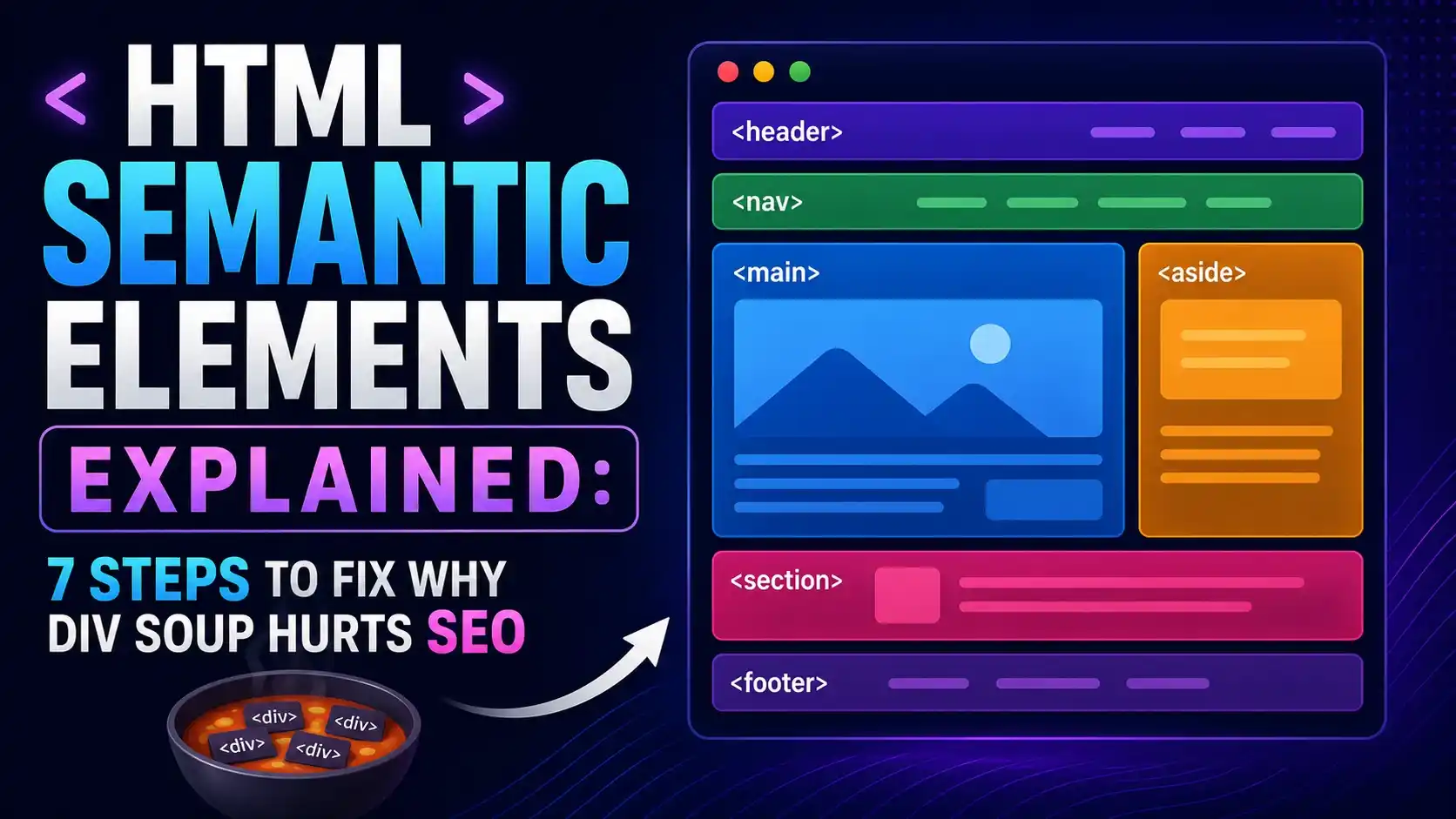
A practical guide to HTML semantic elements, why div soup hurts SEO and AI search comprehension, and a real accessibility tree proof that identical content produces zero landmark roles as div soup versus six as proper semantic markup.
Right, let's clear something up before anything else. If your page is built almost entirely out of div tags with class names doing all the work, you are not alone, but you are quietly making life harder for search engines, screen readers, and now AI answer engines too.
Open the DOM tree of almost any older website and you will find the same pattern: div, div, div, div, forever, each one distinguished only by a class name a machine cannot read the way a human reads it. HTML semantic elements exist to fix exactly this, and the gap between a div soup page and a properly marked up one is bigger than most teams realize.
What Are HTML Semantic Elements?
HTML semantic elements are tags that describe the actual meaning of the content they wrap, not just how it should look. A <div> tells the browser nothing except "here is a box." A <nav> tells every browser, screen reader, search engine, and AI crawler reading the page "this is the site's navigation," with zero extra effort from you.
<header>Site Title</header>
<nav>
  <a href="/">Home</a>
</nav>
<main>
  <article>
    <h1>Article Title</h1>
  </article>
</main>
The most common HTML semantic elements are header, nav, main, article, section, aside, and footer, plus smaller ones like figure, figcaption, and time. Each one maps to a real, named landmark or content role that assistive technology and machines can act on directly.
None of this is new technology. Every browser released in the last decade understands these tags. The gap is almost never a browser support problem, it is a habit problem, where the same handful of generic wrappers get reached for out of routine long after a more accurate tag would have taken exactly as much typing.
A useful test: if you can describe what a block of markup IS, not just where it sits on the page, there is probably a semantic tag for it already. "This is the navigation" becomes nav. "This is the main content" becomes main.
What Div Soup Actually Means
Div soup is what happens when every structural role on a page, header, navigation, main content, sidebar, footer, gets built from a generic container with a class name attached, instead of the HTML semantic elements built to express that exact role.
<div class="header">Site Title</div>
<div class="nav">
  <div class="navlink">Home</div>
</div>
<!-- visually identical, structurally meaningless -->
It usually is not intentional carelessness. A component library ships everything as a generic box, a design handoff only specifies visual styling, or a team simply never revisits markup once the CSS looks right. The visual result can be pixel perfect while the underlying structure tells a machine nothing at all.
That gap between how a page looks and what it actually communicates structurally is precisely why div soup hurts SEO. A search engine can still read the text inside a div. It just cannot tell, from the tag alone, whether that text is the main story, a sidebar promotion, or the site footer.
Why Div Soup Hurts SEO and AI Search
Search engines and AI answer engines both build an understanding of a page from its structure, not only its words. HTML semantic elements are free structural signals: no schema markup required, no extra crawl budget spent, just a tag that already says what the content is.
A div soup page forces a crawler to infer structure entirely from class names, visual position, and text patterns, which is unreliable across the wildly different class naming conventions every site uses. A properly marked up page states its own structure directly in the markup itself.
According to Google's own SEO starter guide, a well organized page structure helps Google understand what content matters most, and HTML semantic elements are the most direct way to express that organization without adding a single extra kilobyte of structured data.
An AI answer engine summarizing a page for a chat response faces the exact same task a search crawler does, deciding which part of the page is the actual answer worth quoting and which part is navigation, promotion, or boilerplate. A page that already states its own structure in the markup gives that summarization step less room to guess wrong.
According to the WebAIM Screen Reader User Survey, 31.7% of respondents say they always or often navigate by landmarks when a page provides them, meaning a div soup page is actively harder to use for roughly a third of screen reader visitors, not just theoretically less semantic.
The Accessibility Connection, Verified in a Real Browser
Rather than take that claim on faith, we built the exact same content two ways, once as pure div soup and once with HTML semantic elements, and read each page's real accessibility tree straight out of Chromium.

The semantic versus div soup classification rule, checked in plain JavaScript against five real container ratio combinations before touching a real browser at all.

Same visible content, same visual result, two markup versions. The div soup page produced zero landmark roles in Chromium's real accessibility tree. The semantic version produced six, with no ARIA attributes written by hand at all.
That empty array on the div soup page is the entire argument in one line of real output. Every one of those six roles on the semantic version, banner, navigation, main, article, heading, and contentinfo, came from the tag names alone. Nothing was hand labeled with an ARIA attribute.
const snapshot = await page.accessibility.snapshot({ interestingOnly: false });
// div soup: [] roles found. Semantic markup: 6 real landmark roles found.The Core HTML Semantic Elements Reference
MDN's own glossary entry on semantics is worth bookmarking, but the table below covers the elements that matter most for a typical page layout.
| Element | Represents | Accessibility Role |
|---|---|---|
header | Introductory content or site branding | banner |
nav | Primary or secondary navigation links | navigation |
main | The page's one true main content area | main |
article | Self contained, independently distributable content | article |
aside | Content tangentially related to the main content | complementary |
footer | Closing content, copyright, or site metadata | contentinfo |
Per the WHATWG living standard's sectioning elements chapter, section is meant for a thematic grouping of content that would appear in a document outline, while article is specifically for content that could stand alone if pulled out and syndicated elsewhere. That distinction alone resolves most of the confusion teams run into.
The smaller elements matter too. figure and figcaption pair an image, chart, or code sample with its caption as one connected unit, rather than two unrelated blocks that only look related visually. time lets a publish date be read by machines in a standard format, even while displaying a friendly string like "yesterday" to a visitor.
A page should have exactly one visible main element. Multiple main regions confuse both assistive technology and any crawler trying to identify the single most important block of content on the page.
Refactoring Div Soup Into HTML Semantic Elements
The refactor is almost always mechanical once you know the mapping. A wrapper carrying class="header" becomes a header tag. A wrapper carrying class="footer" becomes a footer tag. The visual styling attached to that class name does not have to change at all.
<!-- before -->
<div class="article">
  <div class="heading">Title</div>
</div>

<!-- after, same CSS classes kept for styling -->
<article class="article">
  <h2 class="heading">Title</h2>
</article>
Notice the class names survive the refactor untouched. Every existing style rule keeps working, since CSS selectors targeting .article or .heading do not care what tag they are attached to. Only the tag itself changes, and that single change is what a crawler and a screen reader both read.
web.dev's own HTML course walks through this exact refactor pattern element by element, which is a genuinely useful second pass once you have converted the obvious cases yourself.
Common Pitfalls With HTML Semantic Elements
The most common mistake is nesting article inside article when the inner content is not genuinely independent, like a comment thread nested inside a blog post. A comment can be its own article, since it could stand alone, but a supporting image caption cannot.
The second is reaching for section as a generic wrapper. The W3C's own page structure tutorial is explicit that a section without a heading is usually a sign a plain div would have been the more honest choice, since a section is meant to represent one titled part of a document outline.
The third is assuming semantic HTML replaces accessibility testing entirely. Chrome's own Lighthouse documentation still flags a missing or duplicated main landmark as a real accessibility failure, semantic tags included, so the markup is a strong foundation, not a finish line.
A fourth, quieter mistake is treating the refactor as a one time project instead of an ongoing habit. A new component added six months later, built by someone unfamiliar with the original decisions, can just as easily reintroduce a div where a tag with real meaning belonged from the start.
- Use exactly one main element per page. Multiple main regions confuse both crawlers and assistive technology.
- Give every section a heading. A section without one is usually a plain div wearing the wrong tag.
- Reserve article for genuinely standalone content. A blog post qualifies. A caption inside it does not.
- Keep a div for anything with no real meaning. A pure styling wrapper is exactly what div was built for.
Pairing HTML semantic elements with a clear heading structure gives both search engines and AI answer engines two independent, reinforcing signals about the same content hierarchy, rather than relying on either one alone.
Once your structure is solid, layering schema markup on top adds a third, even more explicit signal. Semantic HTML and structured data are not competing approaches. They answer the same underlying question, what is this content, at two different levels of precision.
Smashing Magazine's long standing guide to sectioning elements remains one of the clearest walkthroughs of exactly where the line sits between a section, an article, and a plain div.
Frequently Asked Questions About HTML Semantic Elements
Not as a direct ranking factor on its own, but it helps search engines and AI answer engines correctly identify your main content, navigation, and supporting sections, which supports every other on page SEO signal working correctly.
Yes. A div is the correct choice for a wrapper that exists purely for styling or layout and carries no real structural meaning of its own. The problem is only using a div where a more specific tag actually fits.
Mostly, yes, for standard landmarks. A native nav element already exposes a navigation role automatically. ARIA is still needed for interactive widgets, like a custom dropdown, that have no native HTML equivalent.
An article is meant to stand alone if extracted, like a blog post or a comment. A section is a thematic grouping within a larger document, expected to have its own heading, and not meant to be pulled out independently.
Exactly one visible main element per page. A second main region, even hidden ones some frameworks add by accident, confuses both accessibility tooling and search engine parsing of the page's true content area.
Learn Today
Semantic Element
A tag that describes the meaning of its content, like nav or article, instead of just providing a generic box.
Div Soup
A page built almost entirely from generic div wrappers with class names instead of meaningful HTML tags.
Accessibility Tree
The structured representation of a page a browser exposes to screen readers and other assistive technology.
Landmark Role
A named region like banner or navigation that lets assistive technology and crawlers jump straight to that part of a page.
Document Outline
The implied hierarchy of a page's headings and sections, used to understand how content nests and relates.
Structured Data
Explicit machine readable markup, like schema.org, layered on top of semantic HTML for even more precise meaning.
Ready to Clean Up Your Own Markup?
Start with header, nav, main, and footer. Those four alone fix most of a typical div soup page.