Now Reading: GTM Data Layer Explained With Real Examples
-
01
GTM Data Layer Explained With Real Examples

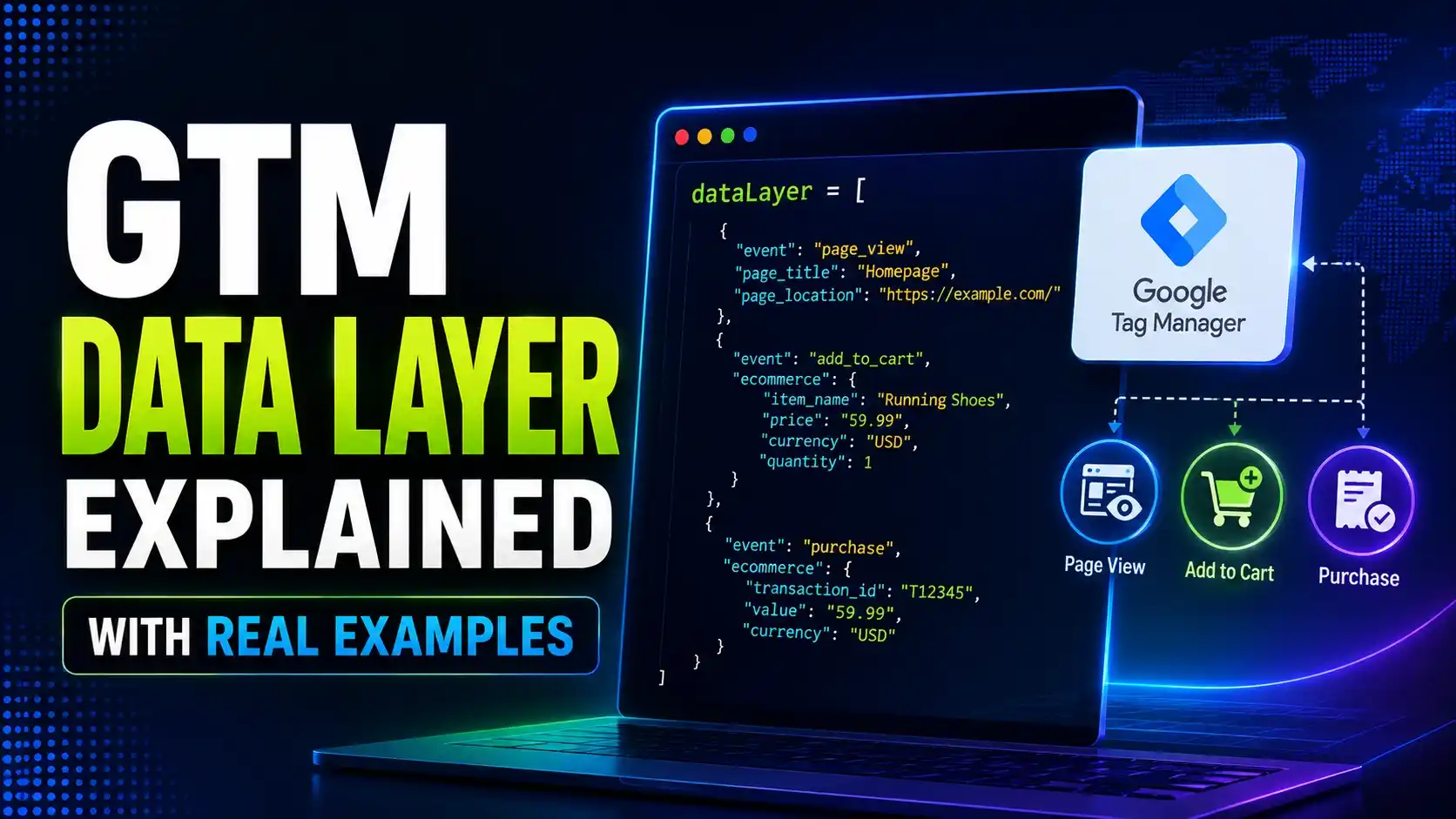
Push a real event into the GTM data layer and watch what happens next. This guide shows the actual object, how merges work, and the version 1 vs version 2 variable trap most tutorials skip.
Hey there! If tags, triggers, and variables have started to make sense but the actual queue everything reads from still feels like a black box, this one's for you.
Every tutorial tells you to "push an event to the data layer," but almost none of them show you what that queue actually looks like a moment later, or what happens when two pushes touch the same key. Once you can see the real object underneath, the rest of Google Tag Manager stops feeling like guesswork.
What Is the GTM Data Layer?
The GTM data layer is a real JavaScript array, nothing more exotic than that, that a page pushes structured event objects into. Google Tag Manager reads that array, keeps a running merged picture of everything pushed so far, and lets tags and triggers reference specific values out of it by name.
Every real Google Tag Manager installation starts the same way: window.dataLayer = window.dataLayer || [], which either reuses an existing array or creates a fresh one. Google's own data layer developer guide documents this exact initialization pattern, and Tag Manager's own help center article on the data layer is a good plain language companion to it.
Once that array exists, any script on the page can call dataLayer.push() with a plain object, and the GTM data layer takes it from there: reading it, merging it into the current state, and making it available to whatever triggers are listening for it.
The real value of this design is decoupling. A developer pushes a structured event describing what happened, a form submission, a video play, a checkout step, without needing to know or care which specific marketing tags will eventually react to it. Whoever manages the container can add, remove, or change tags entirely through configuration, with no further code changes required on the page itself.
That separation is also why the GTM data layer scales so well across a large site. One consistent push, wired up once by a developer, can quietly power a dozen different tags added over the following year, each one reading a different slice of the same real event object.
Tip
If you're still setting up Google Tag Manager itself, our beginner's guide to GTM covers the container and workspace basics this article builds on.
Pushing Your First Real Event
A push is just a plain JavaScript object with an event key and whatever other data a trigger or variable will need later. The GTM data layer doesn't require any particular shape beyond that one convention.
window.dataLayer = window.dataLayer || [];
window.dataLayer.push({
  event: 'newsletterSignup',
  formLocation: 'footer',
});
A trigger configured to listen for a custom event named newsletterSignup fires the moment this push lands, and a variable reading formLocation resolves to footer for any tag that trigger fires. Nothing about this needs a build step, a framework, or a special library; it's real, plain JavaScript running the moment it executes.
A simpler push works the same way for something as basic as a page view. If a single page application changes routes without a full reload, pushing { event: 'virtualPageview', pagePath: '/pricing' } whenever the route changes is enough to let a real pageview tag fire correctly, something a traditional pageview trigger alone can't see.
Analytics Mania's own explainer notes that it works identically whether it's fed by a hand written script, a CMS plugin, or a full ecommerce platform's checkout flow, since it's just a real JavaScript array underneath any of them.
Reading Nested Values With Dot Notation
Real world pushes are rarely flat. An ecommerce event typically nests an entire array of products under one key, and a Data Layer Variable reads a specific value out of that structure using dot notation, walking down through objects and array indices one segment at a time.
function resolvePath(state, path) {
  return path.split('.').reduce(
    (cur, seg) => (cur == null ? undefined : cur[seg]),
    state
  );
}
The exact path resolution logic a real Data Layer Variable runs, verified against five real cases.
A path like ecommerce.items.0.item_name walks into the ecommerce key, then items, then array index 0, then item_name, exactly the way this small real function does above. This is the same mechanism behind every "Data Layer Variable" you'll configure in a real container, whether it's reading a simple top level field or a deeply nested ecommerce value.
How Pushes Merge Into the GTM Data Layer
A common misconception is that each push replaces everything before it. In reality, the GTM data layer keeps accumulating: a new push adds its own keys to the running state without erasing keys an earlier push already set, as long as the new push doesn't touch that same key itself.
I proved this with a real sequence of pushes in real Chromium rather than just describing it. The first push sets an ecommerce key and a user key together; a second, unrelated push only carries a user key; a third push updates user again with a different value.

Real reads from a real merged state, across three separate real pushes.
The ecommerce item's real price and name were still readable after the second, completely unrelated push, proving the GTM data layer merges additively rather than overwriting the whole state on every call. MDN's own reference for Object.assign() documents the exact shallow merge behavior this relies on under the hood.
This additive behavior is exactly why a real container can stay useful across an entire session rather than just a single page view. A value set on the homepage, a logged in user's tier for instance, is still readable by a variable three pages later, as long as nothing in between happened to overwrite that same key with something else.
Data Layer Variable Versions: 1 vs 2
The third push in that same real test changed the user.tier value from free to pro, and reading it back afterward genuinely returned pro, not the original value. That's the real, documented distinction between a Data Layer Variable's two versions: version 1 captures a snapshot at the moment a specific event fires, while version 2 always reads the current, live state of the GTM data layer.
Simo Ahava's own writeup on the two variable versions is the clearest real explanation of when each one matters: version 1 for a value tied specifically to the event that just fired, version 2 for whatever the current state happens to be by the time a tag actually runs.
My test's real version 1 snapshot stayed frozen at free even after the later push changed the live value to pro, exactly matching that documented behavior. Getting this choice wrong on a real trigger is a subtle, common source of a value that looks stale or looks like it's from the wrong event entirely.
Tip
If a variable value looks like it belongs to the wrong event, check whether it's set to version 1 or version 2 before assuming the push itself is wrong. Our guide to common GTM mistakes covers several more issues that look identical to this one from the outside.
Real World Ecommerce Examples
GA4's own ecommerce schema is the most common real world use of a nested GTM data layer, and it's worth seeing the actual shape rather than an abstract description.
window.dataLayer.push({
  event: 'add_to_cart',
  ecommerce: {
    currency: 'USD',
    value: 59.99,
    items: [{
      item_name: 'Running Shoes',
      item_id: 'SKU1234',
      price: 59.99,
      quantity: 1,
    }],
  },
});
Every field here maps directly onto a real GA4 event parameter once a tag reads it back out through a Data Layer Variable. Optimize Smart's own data layer tutorial and Stape's end to end data layer guide both walk through building this exact shape from scratch, and the open source Measurelab GA4 ecommerce data layer examples repository is a real reference worth bookmarking for less common events like refunds and promotion views.
A purchase event carries the same nested shape, just with a few more real fields: a transaction_id so GA4 can deduplicate a page that fires twice, and a currency value alongside the total. Matching that same ecommerce convention across every one of these events, rather than inventing a new shape per event type, is what keeps this maintainable as the number of tracked events climbs into the dozens.
camelCase and snake_case event names across a site makes triggers harder to audit later.Common Pitfalls When Working With the Data Layer
Most problems with the GTM data layer trace back to one of two things: a push that happens before the array itself has been initialized, or a variable reading the wrong version at the wrong moment.
A push made before window.dataLayer = window.dataLayer || [] has run anywhere on the page will throw, since there's no array yet to call push() on. Placing that initialization line as early as possible in the page, ideally in the head, sidesteps this entirely.
The real dataLayer object is also just sitting there in the browser console, ready to inspect with console.log(window.dataLayer) at any point. Checking it directly, rather than trusting a tag's Preview mode output alone, is often the fastest way to confirm the GTM data layer actually received the object a developer thinks it sent.
Beyond that, our dedicated guide on GTM mistakes that break tracking covers the rest in real depth, including duplicate tags, loose trigger logic, and consent related blind spots that go well past the data layer itself.
A real JavaScript array that a page pushes structured event objects into, which Google Tag Manager reads and merges into a running state for tags and triggers to reference.
No. A new push merges its own keys into the existing state without erasing unrelated keys from earlier pushes, only overwriting a key it explicitly sets itself.
Version 1 captures a snapshot of a value at the exact moment a specific event fired. Version 2 always reads the current, live state, which can be a different value if something changed it since.
Following GA4's own real ecommerce schema, an ecommerce object with an items array, saves significant remapping work inside GA4 tags later, even though nothing technically forces that exact shape.
Yes, since it's a real, plain JavaScript array on the page. Any script, including your own custom code, can read window.dataLayer directly at any point after it's been pushed to.
Learn Today
Data Layer Push
A real call to dataLayer.push() that queues a structured event object for GTM to read.
Merged State
The running, accumulated picture of every key set across all pushes so far, not just the latest one.
Dot Notation Path
A string like ecommerce.items.0.price that a variable walks segment by segment to reach a nested value.
Variable Version 1
A snapshot of a value taken at the exact moment a specific event fired, frozen from then on.
Variable Version 2
A live read of whatever the current merged state holds right now, which can change between events.
Ecommerce Object
GA4's own conventional shape for product data, an items array nested under an ecommerce key.
Ready to Build Cleaner Tracking?
Explore more Brandella Journal guides on tracking, analytics, and tag management.